Possible to Sort / Filter table? | Community
Skip to main content
Level 7
October 19, 2022
Solved

Possible to Sort / Filter table?

  • October 19, 2022
  • 1 reply
  • 1371 views

Hi there,


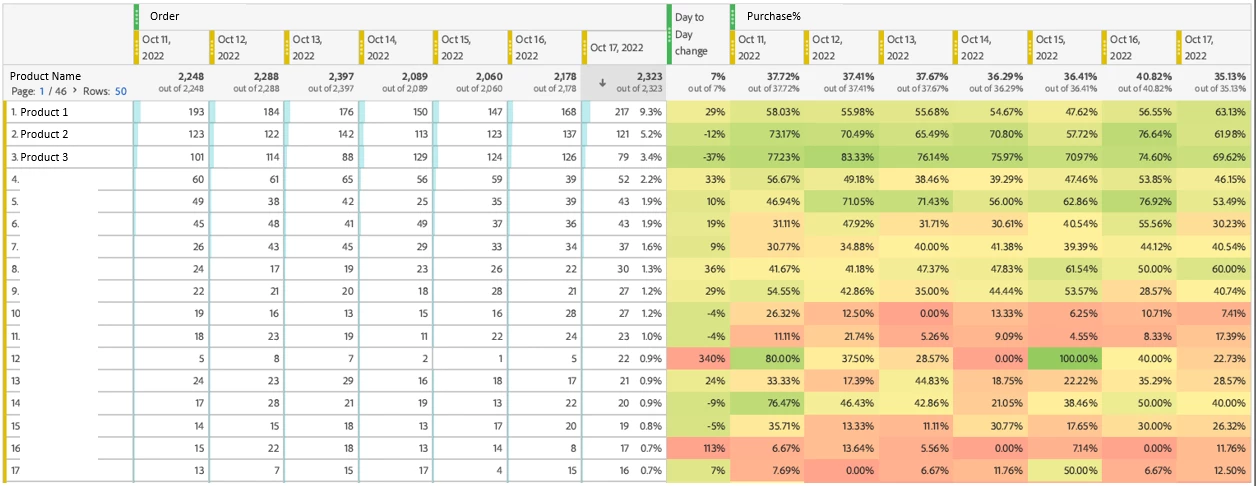
We created a table as following example, sorts Product Name by Order in the last day.

Just wanted to ask:

Is there a way to create (or filter) a table with number of Order greater than X that have Purchase% lower than Y (of the latest day)?

E.g. a table shows all Product Name those Order more than 20 AND Purchase% lower than 40% in 17-OCT (last day, latest day). - Keep all the past 7 days data.


Thanks in advance.

H

 

This post is no longer active and is closed to new replies. Need help? Start a new post to ask your question.
Best answer by yuhuisg

If you have permission to use ReportBuilder (and are using a Windows computer with Excel), then you can build and schedule your reports in Excel using ReportBuilder to get the data for you. Then you don't need to go down the DB/BI tool path.

1 reply

yuhuisg
Community Advisor
Community Advisor
October 19, 2022

It's not easily done in Analysis Workspace. Unfortunately, in there, tables can only be filtered by dimensional values.

Segments won't work in your case because segments are applied on the individual hits of data. In your case, though, you want a total number of Orders or an aggregate percentage of Purchase% over a range of hits.

Your best bet is to build this in Excel.

H_LAuthor
Level 7
October 21, 2022

Thanks for reply, then we need to find a way to build the dynamic table, since the ideal table is: scheduled and delivered on daily basis, which means, everyday, build a table (report) with the last 7 day's data, sort by Order and include those Order > 20 and/or Purchase% < 40% in the last date.

Maybe we need to schedule the raw data, and ask DBA's support to proceed in another BI tool.


Have a good day.

yuhuisg
Community Advisor
yuhuisgCommunity AdvisorAccepted solution
Community Advisor
October 21, 2022

If you have permission to use ReportBuilder (and are using a Windows computer with Excel), then you can build and schedule your reports in Excel using ReportBuilder to get the data for you. Then you don't need to go down the DB/BI tool path.