Level 2
Nov 14, 2018 8:59 AM UTC
Declined

Possibility to manually reorder rows in a Workspace Freeform Table

When one has, for example, a number of metrics in the left side column under each other, it would be useful to be able to drag them up and down in order to change the order of them. There is a sort arrow but that only gives an alphabetic sort A-Z or Z-A on the names. See screenshot:
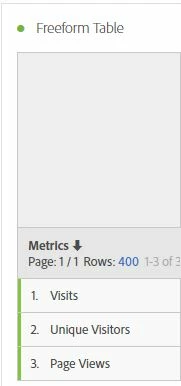
So the idea would be to take, in this case, 'Unique Visitors', and drag it above 'Visits' for example. Off course the whole row to the right of the metric would move with it. This possibility to manually order the leftmost column would give the table more flexibility. Clicking the 'Sort' arrow could reset the ordering to one of the 2 predefined possibilities (A-Z or Z-A).

6 replies

Gigazelle
Adobe Employee
Adobe Employee
Feb 6, 2019 7:33 PM UTC

Marking as a duplicate of Possibility to manually reorder rows in a Workspace Freeform Table - please show your support there!

Translate
Andrew_Wathen_
Community Advisor
Community Advisor
Feb 6, 2019 7:39 PM UTC

Gigazelle I think you meant to link to here...

Analysis Workspace - Dimension ordering in freeform table

Translate
Gigazelle
Adobe Employee
Adobe Employee
Feb 6, 2019 7:43 PM UTC

You are absolutely right - thank you for the correction! Copy/pasting is hard sometimes.

Translate
Level 2
Feb 7, 2019 7:23 AM UTC

OK - thank you for notifying me

Should I delete my post or is it ok that it stays archived? No problem with deleting it.

Translate
Gigazelle
Adobe Employee
Adobe Employee
Feb 7, 2019 11:28 PM UTC

You are welcome to leave it up - it might help others who search for ideas and come across this one.

Translate
New Member
May 15, 2020 7:41 PM UTC

Was option 2 solved?--Ignore. wrong thread. won't let me delete

Translate