Paid Search Detection | Adobe Experience League Community
Skip to main content
Level 1
November 21, 2025
Solved

Paid Search Detection

  • November 21, 2025
  • 1 reply
  • 110 views

How to set Paid Search Detection in Adobe Analytics?

This post is no longer active and is closed to new replies. Need help? Start a new post to ask your question.
Best answer by Jennifer_Dungan

Hi @shibinsvk,


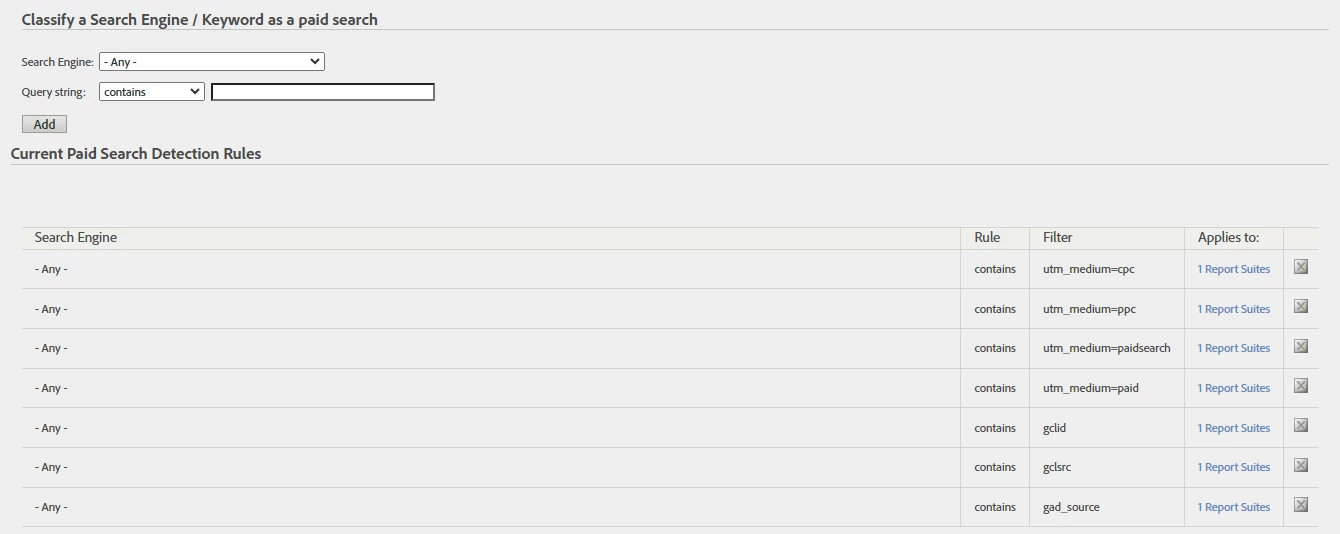
The configuration for paid search detection can be found in the settings for each Report Suite; so:


Admin > Report Suites > (select suite) > Edit Settings > General > Paid Search Detection


I am not sure how familiar you are with the tool (or for others finding this thread), these settings are also used for the Marketing Channel "Paid" and "Natural" search rules (instead of you needing to keep both this and Marketing Channels up to date with the same query string identifiers.


Here you can set rules for all "search engines", or set rules for specific Search Engines.


1 reply

Jennifer_Dungan
Adobe Champion and Community Advisor
Jennifer_DunganAdobe Champion and Community AdvisorAccepted solution
Adobe Champion and Community Advisor
November 21, 2025

Hi @shibinsvk,


The configuration for paid search detection can be found in the settings for each Report Suite; so:


Admin > Report Suites > (select suite) > Edit Settings > General > Paid Search Detection


I am not sure how familiar you are with the tool (or for others finding this thread), these settings are also used for the Marketing Channel "Paid" and "Natural" search rules (instead of you needing to keep both this and Marketing Channels up to date with the same query string identifiers.


Here you can set rules for all "search engines", or set rules for specific Search Engines.
