Page Views from App screenView do not break down by eVar | Community
Skip to main content
Level 2
February 10, 2026
Question

Page Views from App screenView do not break down by eVar

  • February 10, 2026
  • 1 reply
  • 28 views

Hello,

I’m troubleshooting an Adobe Analytics implementation for a mobile app using AEP Edge Network.
 

Context:

  • App sends screenView

  • xdm.eventType = web.webpagedetails.pageViews

  • Page name is mapped to _experience.analytics.session.web.webpagedetails.name

  • pageViews.value = 1

  • eVar14 is populated in the same Analytics hit and represents the platform Web Platform

  • Hit is successfully processed (droppedHit = false)

In Workspace:

  • Page Views are correctly reported

  • eVar14 has values

  • Web data behaves normally

Issue:

When I apply eVar14 as filter, this is the result:
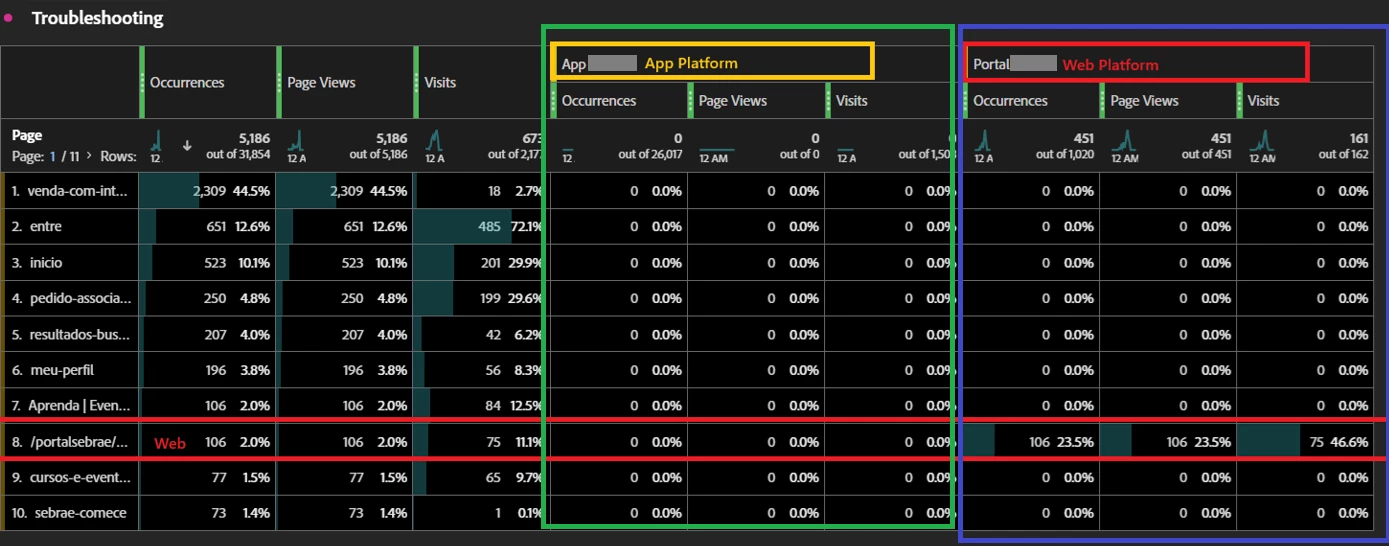


This does not seem to be a mapping or timing issue, since both values exist in the same hit payload.

Here is part of the mapping:
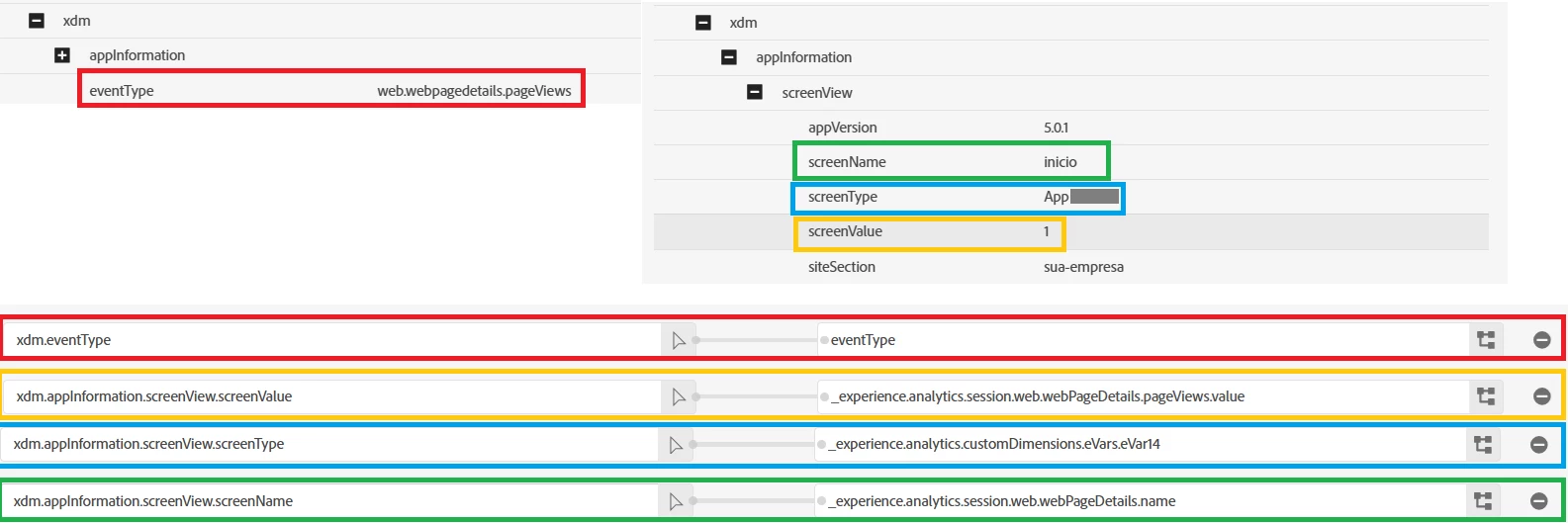
 

My question:

Could this behavior indicate that something is incorrect or missing in the Analytics mapping, even though both the Page View and the eVar are present in the same Analytics hit? I’m trying to understand why this breakdown does not work.
 

Thanks in advance for any clarification or guidance.

    1 reply

    Jennifer_Dungan
    Community Advisor and Adobe Champion
    Community Advisor and Adobe Champion
    February 10, 2026

    Hmmmm… that is odd… I ended up using the Adobe Data model for our apps, and only use a few of the basic XDM objects…. so I didn’t have to create any mapping.


    Do you have AEP Assurance installed on your app (I think one of your screenshots is showing that)? Did you check the “Post Processed” data?


    I see you looking at the raw XDM, but did that data actually get properly mapped into your analytics data?

    Level 2
    February 10, 2026

    Hi Jennifer,

    After changing the Datastream mappings, the pageName started appearing correctly in the post-processed Analytics data.


    What I’m struggling to understand is the following behavior:

    The Page dimension does exist and contains values in the dashboard, and when no Page filter is applied, the navigation events (Page Views / Visits) are counted as expected.

    However, as soon as I apply a filter using the Page dimension, those same navigation events are no longer counted.


    And regarding the changes in the mappings, shouldn’t the behavior be exactly the same?

    In other words, why isn’t the pageName consistently being populated in the post-processed Analytics data when _experience.analytics.session.web.webPageDetails.name is used? 

    Based on the mapping, I would expect the behavior to be the same.

    Jennifer_Dungan
    Community Advisor and Adobe Champion
    Community Advisor and Adobe Champion
    February 10, 2026

    I’m also confused… I haven’t used any of those mappings…  


    I used this for our apps: https://experienceleague.adobe.com/en/docs/analytics/implementation/aep-edge/data-var-mapping

    and I continued to use all our original context variables rules… 


    Mostly cause I didn’t want to make our developers do a full re-write of our analytics….


    That is very strange… without access to your data, I can’t confirm if you have multiple “Page” values (the default and a custom dimension… that might be the issue… that maybe you were showing one, and segmenting on the other?)


    The fact that in your newest screenshot, it goes from no “pageName” value to having a “pageName” would indicate that you weren’t collecting the standard “Page” dimension before.. I cannot tell if the “Page” in your Worksheet is the standard or a custom dimension with the same name….. many companies will have their own custom “Page” dimension, so that they can track it on all pages AND on all Actions… but making sure that the dimension is identifiable as being the custom one is important to avoid confusion.