Page URL in Analytics | Community
Skip to main content
October 26, 2023
Solved

Page URL in Analytics

  • October 26, 2023
  • 2 replies
  • 1171 views

Hi,


I want to send a different pageURL than the current one:


Instead of https://example.com/path/x/y, I want to send analytics https://example.com/path, I tried to use the vars pageURL and pagePath, but when I debug with the Chrome Extension Adobe Experience Platform Debugger, I still see the full URL and not the edited one.


What should I do in order to not  log the full URL?

This post is no longer active and is closed to new replies. Need help? Start a new post to ask your question.
Best answer by Jennifer_Dungan

There are 2 "pageURLs" that show in the debugger.. I believe the one a the top is really just a visual mapping to what page is being tested, but that isn't the info being sent to analytics....


The "g" value, or the "PageURL" as tracked in Adobe is the second one, the one that shows about mid-way down the debugger in alphabetical order
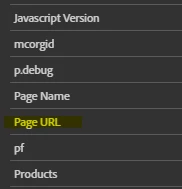


The one at the top is paired with "Page Title" which also isn't something that is sent to Adobe by default, but the later one is paired with "Page Name" which is the "pageName" value that does go to Adobe.


Check both fields and see if the second one is getting your modified value...


Though, I would suggest that you not modify the Page URL (unless you are just doing it to sanitize PII - like an email passed through a querystring), you can always use an eVar for a "processed path" URL variation...  PageURL is really your only truly identifiable value of where the user was on the site, and is only available in Data Warehouse and Raw Data Exports.... 

2 replies

Jennifer_Dungan
Community Advisor and Adobe Champion
Jennifer_DunganCommunity Advisor and Adobe ChampionAccepted solution
Community Advisor and Adobe Champion
October 26, 2023

There are 2 "pageURLs" that show in the debugger.. I believe the one a the top is really just a visual mapping to what page is being tested, but that isn't the info being sent to analytics....


The "g" value, or the "PageURL" as tracked in Adobe is the second one, the one that shows about mid-way down the debugger in alphabetical order


The one at the top is paired with "Page Title" which also isn't something that is sent to Adobe by default, but the later one is paired with "Page Name" which is the "pageName" value that does go to Adobe.


Check both fields and see if the second one is getting your modified value...


Though, I would suggest that you not modify the Page URL (unless you are just doing it to sanitize PII - like an email passed through a querystring), you can always use an eVar for a "processed path" URL variation...  PageURL is really your only truly identifiable value of where the user was on the site, and is only available in Data Warehouse and Raw Data Exports.... 

January 5, 2024

hi @ukch 

suggest to use a new data element to get desire value of the page URL.
here is the simple code which could of use for your requirement, try this.
var host = document.location.hostname
console.log("host= "+ host);
var path = document.location.pathname
console.log("path ="+path);
var result = "https://" + host + path.substring(0,path.indexOf("/",1)+1)
console.log("result ="+result)

the result value of the data element you can assign to the evar.

hope this helps.

Thanks,