Level 2
August 31, 2026
Question

Page Previous to a specific page

  • August 31, 2026
  • 6 replies
  • 35 views

Hello,

I’d like to ask how to build a segment to identify which pages visitors are most likely to visit immediately before  a certain page.

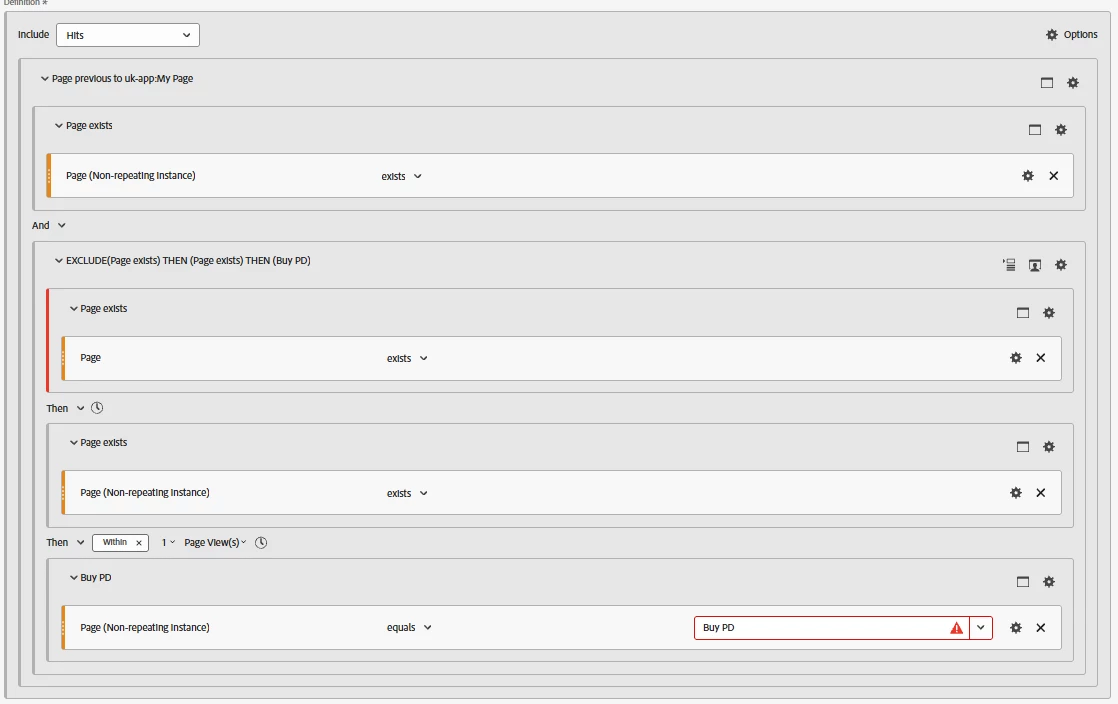
I attempted to build a segment to identify which pages visitors are most likely to visit immediately before a certain page. Using the Quick Segment feature, I was able to create the following segment.

With this segmentation, I believe I can identify the page immediately preceding a certain page (e.g., Buy PD). However, it seems to be a little too restrictive.

From what I understand, it only takes into consideration visits where there is no page view before the page immediately preceding a certain page (e.g., Buy PD). As a result, visits where a visitor  explored multiple pages before landing on Buy PD may not be included.

I’d be grateful if anyone can help me with this. 



    6 replies

    MandyGeorge
    Adobe Champion and Community Advisor
    Adobe Champion and Community Advisor
    August 31, 2026

    Personally, I would do this a different way, instead of using segments. There are two methods I’ve used to do this before.

    First, is to drag the page you’re interested in look at into your table, and then break it down by “previous page.” This assume that you’re capturing the previous page. If you are, this is probably the easiest way to do this.

    Another way, which also works even if you aren’t capturing previous page, is to use the flow visualization. Drag the page you’re interested in, and then it will show you what pages came before and after it. It’ll give you more than just the page before, so it might be more information than you need, but it will also help you get a picture of the paths that your customers take.

    Jennifer_Dungan
    Adobe Champion and Community Advisor
    Adobe Champion and Community Advisor
    August 31, 2026

    Hi, this looks like a segment written by the “Next or Previous Page” panel, which is probably your best starting point.


    This shouldn’t stop visits that have Page A > Page B > Page “Buy PD”


    The exclusion is there to make sure that “Page A” isn’t returned as the “Previous Page” to Page “Buy PD”. You aren’t trying to pull ALL pages that happened before, but restrict what is returned to just the pages that happen right before the specified Page.


    The logic excludes the HIT, not the VISIT… 


    I know this logic looks strange, but it’s complex logic…. 


    I hope this helps give you more confidence in the segment, but if you have additional questions, please let me know.

    Jennifer_Dungan
    Adobe Champion and Community Advisor
    Adobe Champion and Community Advisor
    August 31, 2026

    If you want to use a visualization, as suggested by ​@MandyGeorge, you can also use the Journey Canvas.


    If you pull your page into that visualization, you can right click and choose “Show top nodes before this node” (and then either “Immediately” or “Eventually” before


    It will then give you the option to see that in Journey Canvas or in a Freeform Table.

    Rajeshwari
    Community Advisor
    Community Advisor
    August 31, 2026

    You can create a HIT-level segment where the next page equals your target page (e.g., Buy PD). Apply this segment to the Pages report, and it will show you all pages that visitors viewed immediately before landing on Buy PD. This way, you capture all possible preceding pages, not just one specific path..

    Try and I hope this will help.