Output one line for multiple cells | Adobe Higher Education
Skip to main content
April 11, 2022
Répondu

Output one line for multiple cells

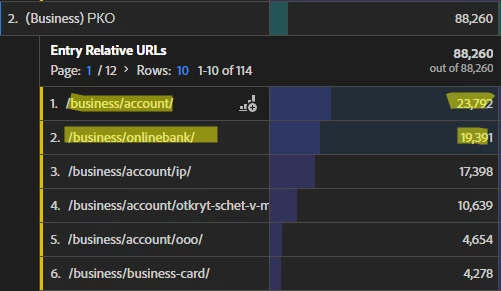
Is it possible to plot one line, which is the sum of the values of the selected cells? Now when I select cells, I get two different lines.


Ce sujet a été fermé aux réponses.
Meilleure réponse par derek-tangren

It is possible, but there would be a bit of customization that would need to be done in order to do what you are looking for. A couple of options come to mind:

  • Similar to another question you asked, this could be a situation where you could use Classifications to combine the /business/account/ and /business/onlinebank/ into a single value which could then be trended.
  • Another option would be to create a calculated metric which would combine the values from /business/account and /business/onlinebank with the selected metric. The potential challenge with this is that it would be for one specific metric and so if you would like to look at this combination across multiple metrics, it would be more invovled. Additionally, it looks like in this case you are using the Entry Relative URLs variable as a breakdown of another variable, which could create some complexity in devising what your calculated metric should be. You can check out several videos detailing the different aspects of using calculated metrics on Experience League: Calculated Metrics - Segmented Metrics

1 commentaire

derek-tangren
Adobe Employee
Adobe Employee
April 11, 2022

It is possible, but there would be a bit of customization that would need to be done in order to do what you are looking for. A couple of options come to mind:

  • Similar to another question you asked, this could be a situation where you could use Classifications to combine the /business/account/ and /business/onlinebank/ into a single value which could then be trended.
  • Another option would be to create a calculated metric which would combine the values from /business/account and /business/onlinebank with the selected metric. The potential challenge with this is that it would be for one specific metric and so if you would like to look at this combination across multiple metrics, it would be more invovled. Additionally, it looks like in this case you are using the Entry Relative URLs variable as a breakdown of another variable, which could create some complexity in devising what your calculated metric should be. You can check out several videos detailing the different aspects of using calculated metrics on Experience League: Calculated Metrics - Segmented Metrics