Order Id captured in the reports whereas other metrics like Units, revenue, shipping etc details are 0 | Community
Skip to main content
Level 2
March 14, 2023
Solved

Order Id captured in the reports whereas other metrics like Units, revenue, shipping etc details are 0

  • March 14, 2023
  • 1 reply
  • 1343 views

Hello all,
I am using Adobe analytics Platform Web SDK, Schema, Processing rules, Adobe Launch for the adobe commerce website.
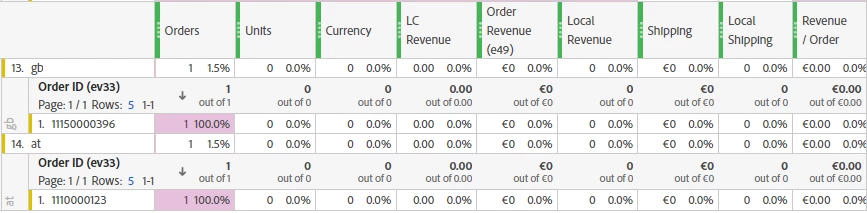
For some orders, the order id is captured but no corresponding data is available for the order, like Product is showing as undefined, Orders = 1, but Units = 0, Revenue/Order = 0.00, Shipping = 0 etc.

This is happening for I can say if we have 100 orders per day, for 20% order the data is showing as 0.

This is not country specific issue also, happening for different countries different time.

If anyone can help me figure out what can be the reason for this, that would be really helpful.

Thanks in advance.

This post is no longer active and is closed to new replies. Need help? Start a new post to ask your question.
Best answer by Jennifer_Dungan

This is odd.. it's failing only about 20% of the time... and there is no pattern to which products or orders are failing?


Have you been able to replicate this behaviour in your Dev environment? It would be interesting to know if there is an error on the page that is preventing the data from populating... if you can replicate it, then digging into the behaviour would be the best way to attempt to resolve the issue...

1 reply

Jennifer_Dungan
Community Advisor and Adobe Champion
Jennifer_DunganCommunity Advisor and Adobe ChampionAccepted solution
Community Advisor and Adobe Champion
March 14, 2023

This is odd.. it's failing only about 20% of the time... and there is no pattern to which products or orders are failing?


Have you been able to replicate this behaviour in your Dev environment? It would be interesting to know if there is an error on the page that is preventing the data from populating... if you can replicate it, then digging into the behaviour would be the best way to attempt to resolve the issue...

Level 2
March 15, 2023

Hi Jennifer,
Thanks for the reply.

We haven't noticed any pattern yet for the failing, its random. 
In the development environment we haven't noticed any kind of issues like this. 

Jennifer_Dungan
Community Advisor and Adobe Champion
March 15, 2023

Honestly... those are the worst to track down!


There could be so many potential causes... and it will also depend on how you are getting the values.. the issue could be from your developers where their data layer is failing to populate with correct values... to your code failing to extract them... it could be related to a latency issue, where the code technically works fine... but something is delay and the code runs at the wrong time (before or after the data is available).....


Does your development team have any sort of tools that can create an automated script that can run many users through a purchase flow (in dev.. or your prod environment, but overriding locally the tracking files so your data goes to dev)... basically, try to catch the issue by using higher volume of purchases....


If it's in your dev environment, maybe your devs can throw in extra logging, and you can try adding some extra check/logs to try and get more visibility into the issue?


Good luck!