
Next and previous Page in Workspace (Pathing IQ)
Hello friends!
I submitted this post before, but it got deleted during the Experience League migration. So here it is again!
Right now, there is no easy way to generate a next- or previous page report in Analysis Workspace. It is something that has been requested countless times. We can do a bit with Segments from the Flow Visualization, but that is a very involved process. But since we are able to change Metric calculations with Attribution IQ, why not do something similar with Dimensions as well? I would call this: Pathing IQ!
Ideally, we would have the option to change the Pathing logic for any Dimension by clicking the little gear icon, like with metrics:
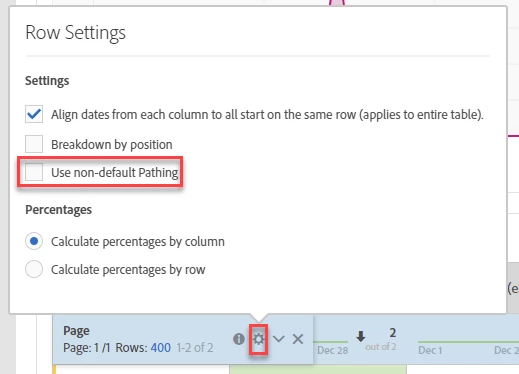
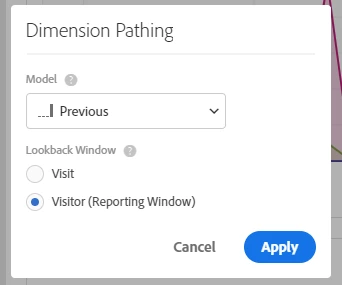
Once opened, we could change the pathing logic like with Metrics. Things we could select there could be items like "Current", "Previous", or "Next". Ideally, we would also have "Entry" and "Exit" in there to clean up the Dimensions list. All would be available for Visit and Visitor levels. It could look like this:
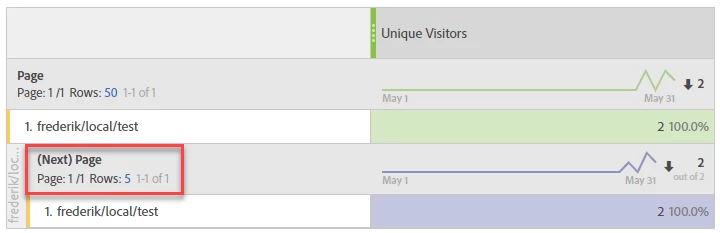
Now we could break down one Dimension by another using that changed Pathing logic:
So far for my thoughts. What do you think?
Best,
Frederik