New Report Builder Issue - Commands in hub disappear | Community
Skip to main content
StefanSiefert
November 5, 2025
Solved

New Report Builder Issue - Commands in hub disappear

  • November 5, 2025
  • 1 reply
  • 330 views
 
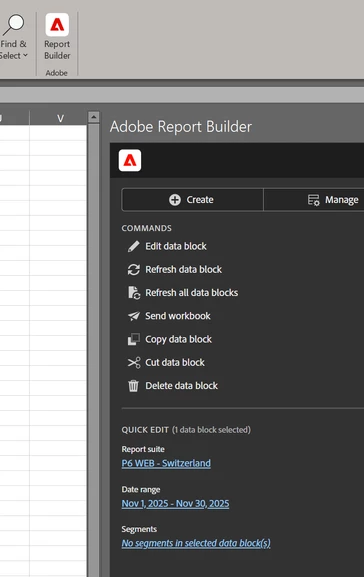
⚠️The issue: When I start the new RB in Excel, all commands like "Copy data block" are available - until I use them once or manage my requests. After that only two commands remain, the others like copy/paste/delete, etc. are gone.

That happens in all Excel-sheets with different request-setups. I have installed the newest version of RP and i'm using Office 2021. (Of course, I've tried to select cells with requests & refresh hub.)


The Screenshots show the before / after situation when the Hub's commands disappear after the first action: 


-> Do you have any idea why the commands don't appear/reload?


Many thanks for any hints & tips! 😊
 

Best answer by Jennifer_Dungan

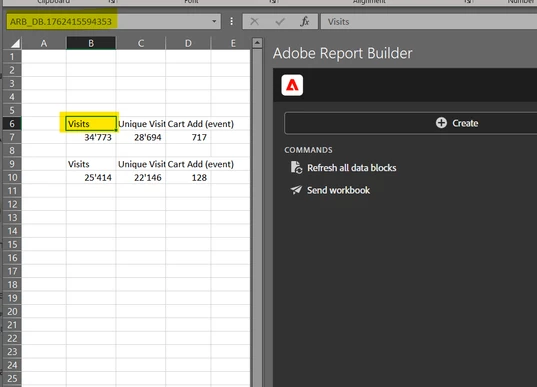
Yes, it has the ARB_DB_ in it.

I can refresh and edit the requests, but there are still no further commands.

It seems, that the extended commands disapper after the first refresh of the datablocks.


OK, that is crazy...


What version of the plugin are you running? (Though I suspect it auto-updates...).


This may be a question for Client Care to try and replicate, but it really does sound like a bug.

1 reply

Jennifer_Dungan
Community Advisor and Adobe Champion
November 5, 2025

In order to see all the commands, you have to actually select the "cell" for one of your data blocks.


Example: When I select a random cell (or one of the "inner" cells of a request):


Example: When I select the reference cell for one of my requests:


If you don't have a request selected, you can't Edit, Refresh the specific block, Copy, Cut or Delete it... 


In most programs, you don't select "Copy" before you choose what you are trying to copy... it's the same here. You have to select the block you want to perform the action on.


When you have a valid request cell selected, you should see the available options. When you don't have a valid selection, you will only see the "sheet level" commands.


I hope this helps.

MandyGeorge
Community Advisor and Adobe Champion
November 5, 2025

I agree with Jen about needing to click into the block in order for the commands to appear. Think of these blocks like pivot tables. If you've clicked outside of the table, then there's no commands available because what you've selected doesn't have any options. Once you click on the cell where you put the data block, everything should be available.