Level 2
February 26, 2024
Solved

Network request shows 'cancelled' on click call

  • February 26, 2024
  • 5 replies
  • 3995 views

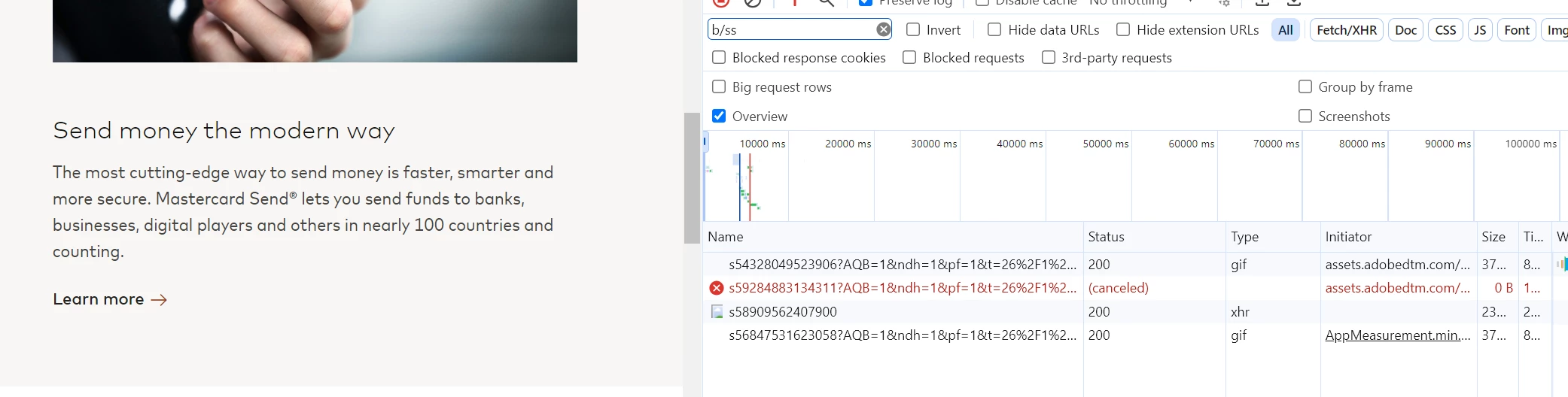
I keep getting this error "This request was NOT successful because your browser stopped this request (net::ERR_ABORTED)" on a link click.

The network call shows 'cancelled'. 

Same happens for any floodlight pixel implemented on these links. 

Does anyone know a solution to this? We have a campaign going live soon and need this urgently fixed.

Best answer by Jennifer_Dungan

Sometimes these still go through, but this is always a frustrating and unnerving issue.


So technically, the way that Adobe and other pixel trackers work is that they make a request to the server for a 1x1 pixel (with parameters being passed via GET or POST). The request gets to the server (this is what actually matters, because its the requests that are actually processed to get the information). The server also responds with the pixel, this is really just a formality to "complete" the full internet transaction, but the pixel itself doesn't actually matter.


Now, if the pixel gets cancelled before it reaches the server, you have a problem... if the pixel is cancelled on the actual image return, this is fine, because as I said above, the actual pixel doesn't mean anything.


Now, you can apply a small delay on the click, this should allow the full transaction to complete... but this could pose new issues.. Starting the middle of March, Google will start using a new Core Web Vital (CWV) measurement called "Interaction to Next Paint" (INP) and this is a measurement of how much time between the latency of a user's click, tap or keyboard interaction and the next page starting to load... so those delays added to your clicks could actually hurt your CWVs.


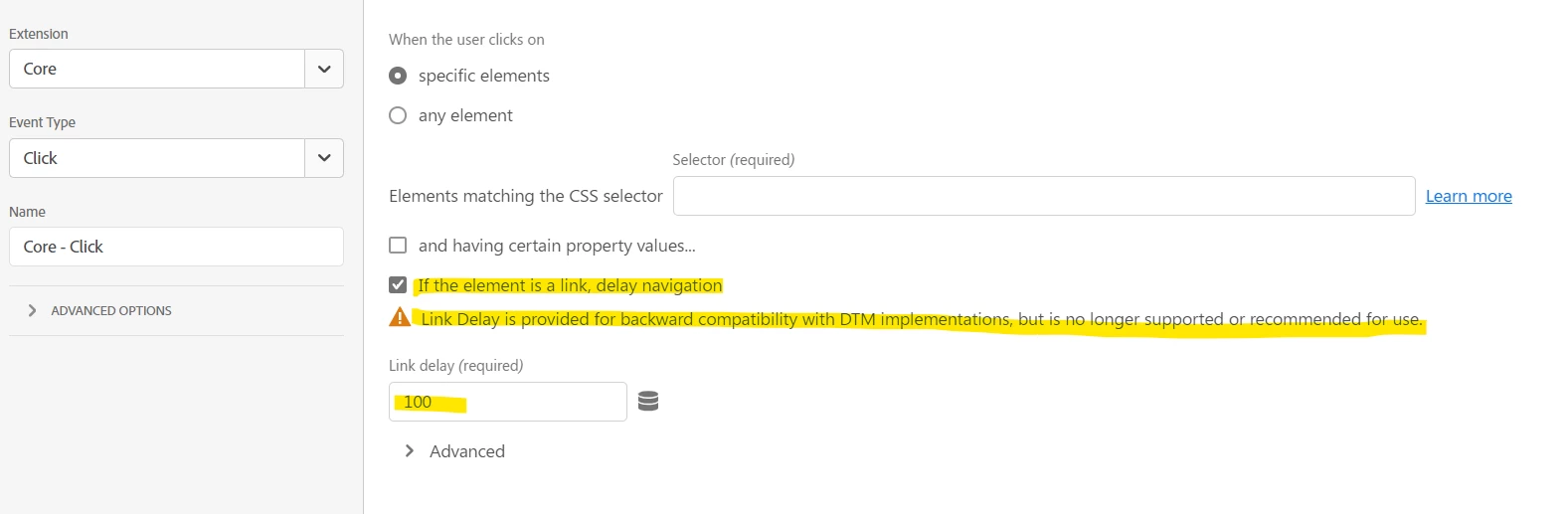
You can see here how to add a delay to a link, but also that Adobe no longer recommends its use:


I would try and confirm if the error you are seeing is false positive... a lot of the testing tools rely on seeing the 200 response code for the pixel before they will show that tracking occurred, but as I said, the request only has to make it to the server, not back in order to actually work.

5 replies

Jennifer_Dungan
Adobe Champion and Community Advisor
Jennifer_DunganAdobe Champion and Community AdvisorAccepted solution
Adobe Champion and Community Advisor
February 27, 2024

Sometimes these still go through, but this is always a frustrating and unnerving issue.


So technically, the way that Adobe and other pixel trackers work is that they make a request to the server for a 1x1 pixel (with parameters being passed via GET or POST). The request gets to the server (this is what actually matters, because its the requests that are actually processed to get the information). The server also responds with the pixel, this is really just a formality to "complete" the full internet transaction, but the pixel itself doesn't actually matter.


Now, if the pixel gets cancelled before it reaches the server, you have a problem... if the pixel is cancelled on the actual image return, this is fine, because as I said above, the actual pixel doesn't mean anything.


Now, you can apply a small delay on the click, this should allow the full transaction to complete... but this could pose new issues.. Starting the middle of March, Google will start using a new Core Web Vital (CWV) measurement called "Interaction to Next Paint" (INP) and this is a measurement of how much time between the latency of a user's click, tap or keyboard interaction and the next page starting to load... so those delays added to your clicks could actually hurt your CWVs.


You can see here how to add a delay to a link, but also that Adobe no longer recommends its use:


I would try and confirm if the error you are seeing is false positive... a lot of the testing tools rely on seeing the 200 response code for the pixel before they will show that tracking occurred, but as I said, the request only has to make it to the server, not back in order to actually work.

Level 3
August 25, 2026

Hi ​@Jennifer_Dungan ,

We are also facing the exact same issue of link calls getting aborted from browser. We even connected with Client care team of Adobe to verify if the cancelled calls are reaching the server or not but they confirmed that the calls are not visible in raw data. When checked in network tab we are seeing an ‘Unknown’ status of those calls due to which calls are not even appearing in HAR logs. We are using Tealium iQ as TMS and the issue is very intermittent and that too not on a particular link. The issue is happening very randomly across the websites. Can you suggest what should we do to resolve this issue ? Any solution will be a great help  !

Jennifer_Dungan
Adobe Champion and Community Advisor
August 25, 2026

Hi ​@AmanGupta21,


Yes, it really depends on which point the call is “aborted”… if it’s aborted before the call even gets sent, then Adobe won’t see it… if it gets to Adobe, but aborts on the signal to say it was received, it can still sometimes be tracked.


Now, I don’t use Tealium, so I may not be the best person to answer… but, are you using Tealium to set the AppMeasurement or WebSDK code directly and triggering calls to Adobe that way? Or are you pulling all the data back to the server, then funneling it to Adobe that way?


If you are still using “direct to Adobe”, you could try enabling the “useBeacon” feature, which is supposed to prevent calls from being lost as the page unloads?? I’ve not tried this myself, since we have so few “click” trackers between pages… 

https://experienceleague.adobe.com/en/docs/analytics/implementation/vars/config-vars/usebeacon


You can try this in your QA/Dev and see if it makes a difference?

Level 3
August 26, 2026

Hi ​@Jennifer_Dungan , 

Thanks for providing the quick solution ! We are using Tealium to send data directly to adobe using legacy appMeasurement. We will try that approach of setting useBeacon in lower environments.