Need help with /reports API in CJA | Community
Skip to main content
Level 2
November 15, 2024
Solved

Need help with /reports API in CJA

  • November 15, 2024
  • 1 reply
  • 870 views

I am new to Adobe CJA  API and my team wants to fetch the top viewed page with the exact number of views using reports API: https://developer.adobe.com/cja-apis/docs/api/#tag/Reporting-API. My team has already created a Adobe CJA Workspace project for the same. I was able to make connection and get the data from https://cja.adobe.io/reports/topItems for the pageviews but it only provides the page URL without the number of views. I tried /reports API but somehow https://cja.adobe.io/reports doesn't work for me and give me below error:

{
"errorCode": "invalid_json_input",
"errorDescription": "Invalid JSON. At least one field format is not recognized or cannot be parsed. - Error caused by exceptionMessage=HTTP 400 Bad Request - Locale { not suported",
"errorId": "77216d89-c8d8-4649-a077-1de9a978040f"
}


Can someone help me here with the value that needs to be given inside the body parameters for fetching the pageviews metric with the views number or explain me how to debug the error? Currently I am giving the exact body parameters provided in the request sample https://developer.adobe.com/cja-apis/docs/api/#tag/Reporting-API
This post is no longer active and is closed to new replies. Need help? Start a new post to ask your question.
Best answer by Jennifer_Dungan

This error sounds like you might have set up your API call with an incorrect value in one of the fields...


Both AA and CJA workspace are built using the API... and a little known feature is that you can see the actual API calls that are being made for your Workspace reports, by comparing the API call for the workspace (which has a lot more info including table details), you might be able to figure out what part of your API call has issues.


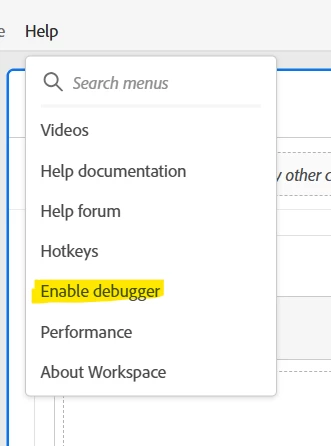
First, you need to enable the debugger:


(This will refresh the page)


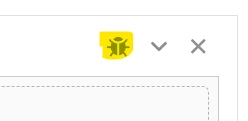
You will now see a new icon on your tables:


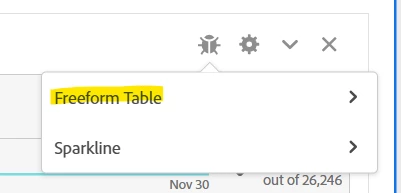
Clicking on this will bring up 2 options, one for the table data, and one for the sparkline... you want the table


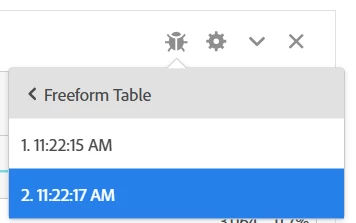
For every run that has happened since the report was loaded, you will have a timestamp... now some complex tables actually have multiple API calls, but in a simple Page Name and Page View table, only one is needed (I have two here, one for the initial run when I added page views, and the second when I changed the dimension to Page Name)


Choose the timestamp you want to look at, and it will open a new screen with the APIs in XML, Curl and JSON formatting.


Since you are using JSON, that would be the best place to compare against.


If you also want to share your current JSON here (removing specifics for privacy reasons), we can also take a look and see if we can identify the problem.

1 reply

Jennifer_Dungan
Community Advisor and Adobe Champion
Jennifer_DunganCommunity Advisor and Adobe ChampionAccepted solution
Community Advisor and Adobe Champion
November 15, 2024

This error sounds like you might have set up your API call with an incorrect value in one of the fields...


Both AA and CJA workspace are built using the API... and a little known feature is that you can see the actual API calls that are being made for your Workspace reports, by comparing the API call for the workspace (which has a lot more info including table details), you might be able to figure out what part of your API call has issues.


First, you need to enable the debugger:


(This will refresh the page)


You will now see a new icon on your tables:


Clicking on this will bring up 2 options, one for the table data, and one for the sparkline... you want the table


For every run that has happened since the report was loaded, you will have a timestamp... now some complex tables actually have multiple API calls, but in a simple Page Name and Page View table, only one is needed (I have two here, one for the initial run when I added page views, and the second when I changed the dimension to Page Name)


Choose the timestamp you want to look at, and it will open a new screen with the APIs in XML, Curl and JSON formatting.


Since you are using JSON, that would be the best place to compare against.


If you also want to share your current JSON here (removing specifics for privacy reasons), we can also take a look and see if we can identify the problem.

SwetaRaniAuthor
Level 2
January 8, 2025

Thank you so much Jennifer for your help. This worked very nicely and I was able to see the data.

Jennifer_Dungan
Community Advisor and Adobe Champion
January 8, 2025

Glad I was able to help