
Multiple Instances - Real Time Reporting | Community
Skip to main content
Roshanchauhan
Level 3
July 2, 2018
Solved

Multiple Instances - Real Time Reporting

  • July 2, 2018
  • 5 replies
  • 4395 views

Hi,

In real time reporting I have tested the internal search and found multiple Instances on single search, can anyone help me in this. I have written all the cases in SC tool editor section and fired s.tl() function.
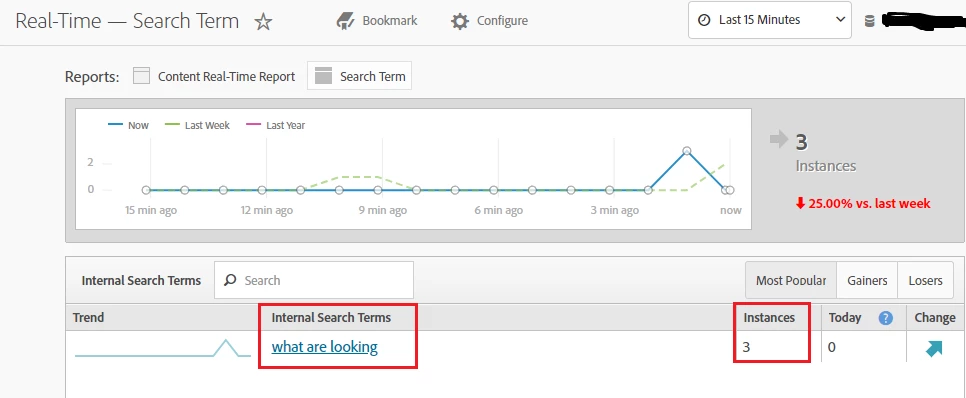
Thanks in advance!

Roshan

This post is no longer active and is closed to new replies. Need help? Start a new post to ask your question.
Best answer by Waqas_Rafiq

Instead of using real time reporting to verify your implementation, you should always do the following instead:

1. Open your browser console (Press F12)

2. Go to "Network" tab

3. Filter on "b/ss"

4. Make sure "preserve log" is ticked

5. Load the url you want to debug.

As Alexis mentioned. It's most likely your implementation that is wrong and not the real time report as it's just parsing through the data that is hitting the Adobe Analytics servers.

Good luck with the debugging.

5 replies

Alexis_Cazes_
Level 10
July 3, 2018

we will need more details url were to test it, how to test it etc...

Check how many requests are being sent when you do the internal search as well

Roshanchauhan
Level 3
July 3, 2018

@Alexis - I have stopped the multiple instances through s.clearVars(); but now i am facing issue in Page view. I have checked in real time and found double  page views in this. Could you please help in this to stop the double page views and I am sorry i cant share the website URL for debugging due to some privacy.

Thanks!
Roshan

Alexis_Cazes_
Level 10
July 4, 2018

It is unlikely that the real-time report is wrong.

The issue is in your code implementation, is you have 2 page views then it means you are calling s.t() twice. which should be the case.

Without access to the code there is nothing we can do.

Waqas_Rafiq
Waqas_RafiqAccepted solution
Level 4
July 4, 2018

Instead of using real time reporting to verify your implementation, you should always do the following instead:

1. Open your browser console (Press F12)

2. Go to "Network" tab

3. Filter on "b/ss"

4. Make sure "preserve log" is ticked

5. Load the url you want to debug.

As Alexis mentioned. It's most likely your implementation that is wrong and not the real time report as it's just parsing through the data that is hitting the Adobe Analytics servers.

Good luck with the debugging.

Roshanchauhan
Level 3
July 4, 2018

Fixed this issue!