Mobile - multiple report suits | Community
Skip to main content
Level 5
June 24, 2022
Solved

Mobile - multiple report suits

  • June 24, 2022
  • 1 reply
  • 2210 views

Is there a way to have more than one report suit linked to an app?

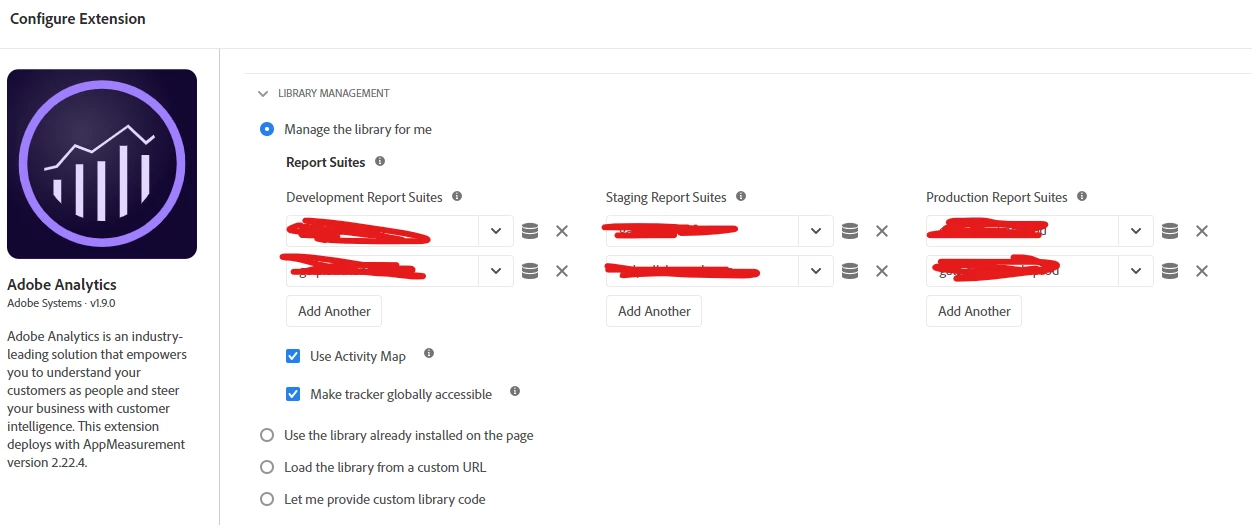
We have multiple websites and each of them has its own report suit in the extension but also a universal one that is present in all of them so we can have a master report and know the user flow between all our products (shown below).


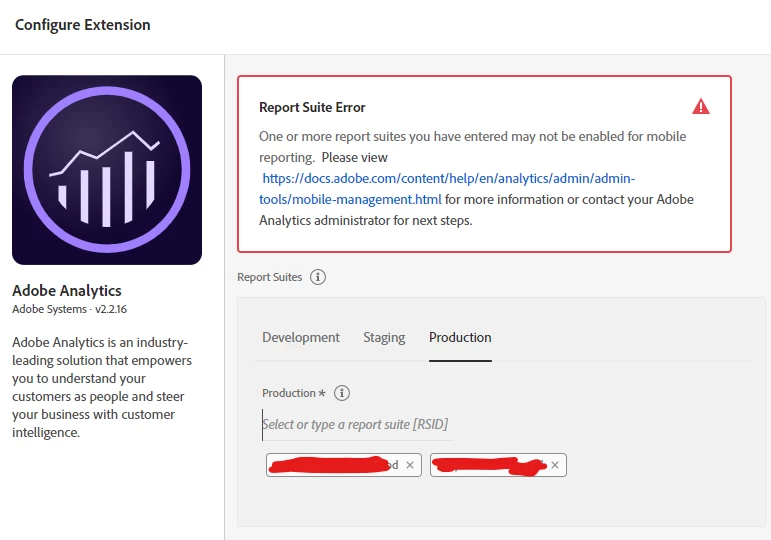
However, I also need to see the flow including an app (the app has links leading to some of the websites). I thought about also adding the general report suit to the app one like we do with the web ones but there is no option for that in the mobile services and in launch it is not allowed as the general one is not an app RS.


How can I track the users that are visiting our other websites from the app? Can I do like we have been doing in the desktop products or would the option be to use specific UTMs for the the app and track those on analytics?
thank you in advance

This post is no longer active and is closed to new replies. Need help? Start a new post to ask your question.
Best answer by Jennifer_Dungan

Hi @fern1,


I definitely have had multiple "dev" suites attached to my mobile apps at one point (when we were starting our apps, I wanted a "clean" suite in which to play around with processing rules and testing data in isolation of out global suite set up.


I think the reason it's not allowing you to add your website suite is just a matter of configuring your suite to accept mobile app data. There should be instructions for how to turn that on from the link that was provided in your screenshot.


This leads me to an aside (I will get to your last question next), but not to throw a wrench into your plans and setups... but have you considered just using one global suite, and creating virtual suites?


This is how I have our systems set up... I have 31 "brands" (31 core websites, each brand has multiple "extended content" sites, and 3 of these brands has a mobile app).... all feeding into one global suite. I have a virtual report suite for each brand's "core website", I have virtual suites for "all extended content", I have virtual suites to group some of the extended content together for that particular business unit who want to see that content aggregated, I have a virtual suite for mobile apps, etc....


This way I can see all the data together, or break it out to the individual piece that I need... and I am no longer incurring the cost of multiple server calls for tracking going to multiple suites.


This significantly reduces tracking complexity and costs.. and at the end of the day, the decision is yours to make.. but it is something I recommend considering.


Now, back to your last question about tracking people who go from the app to the website.


You can use visitorAppendToURL (https://experienceleague.adobe.com/docs/mobile-services/ios/sdk-reference-ios/hybrid-app.html?lang=en there is a similar code for Android as well) to append the user's ECID to the web call, that you can then use to properly map the app user's ID to the website. If you want to add additional "campaigning" you can.. but I would probably avoid UTMs as that is reserved for "external" campaigns... I would be more likely to go with an ITM (internal tracking campaign) and creating specific tracking around that... but asking your devs to append this to every url may get troublesome....


I am not sure the nature of your app... when you click on a web link... is the website opening within the native app as a webview? Or taking people right out of the app and into their default browser?


If the first, then you can actually do something else entirely! I had our developers follow a similar implementation that many social media apps are using, and I had them modify the app's User Agent string by appending a recognizable item to the end.... 


So let's use the Facebook app for instance...

When a user opens a webpage within their webview, the user agent string users the user agent of the default browser on the device:


Mozilla/5.0 (iPhone; CPU iPhone OS 13_3_1 like Mac OS X) AppleWebKit/605.1.15 (KHTML, like Gecko) Mobile/15E148


Within the app, they append some extra data to the end like so:


Mozilla/5.0 (iPhone; CPU iPhone OS 13_3_1 like Mac OS X) AppleWebKit/605.1.15 (KHTML, like Gecko) Mobile/15E148 [FBAN/FBIOS]


We used a similar behaviour, appending a custom value to the end of the user agent... then I just use a processing rule to check if the user agent content [***] (whatever my devs appended) and map that into a tracking parameter as being a webview from our own app (I also mapped in known Social Media apps in the same way so that I could attribute a lot of our "direct traffic" back to known social media apps.
1 reply

jeff_bloomer
Community Advisor and Adobe Champion
June 24, 2022

@fern1, Tagging in a friend here (@jennifer_dungan), but I am remembering from my old days of implementation guidance that it was possible to tie more than one report suite into an app, specifically because of production and development environments.  That being said, it's been more than a few years since I've been in that role, and since I don't have the practical experience to apply here, I believe it would be best to bring in someone who has the coding background to advise or at least move you in the right direction.

fern1Author
Level 5
June 24, 2022

Thank you Jeff! Hopefully, Jennifer or someone else can help me out with that!

Jennifer_Dungan
Community Advisor and Adobe Champion
Jennifer_DunganCommunity Advisor and Adobe ChampionAccepted solution
Community Advisor and Adobe Champion
June 24, 2022

Hi @fern1,


I definitely have had multiple "dev" suites attached to my mobile apps at one point (when we were starting our apps, I wanted a "clean" suite in which to play around with processing rules and testing data in isolation of out global suite set up.


I think the reason it's not allowing you to add your website suite is just a matter of configuring your suite to accept mobile app data. There should be instructions for how to turn that on from the link that was provided in your screenshot.


This leads me to an aside (I will get to your last question next), but not to throw a wrench into your plans and setups... but have you considered just using one global suite, and creating virtual suites?


This is how I have our systems set up... I have 31 "brands" (31 core websites, each brand has multiple "extended content" sites, and 3 of these brands has a mobile app).... all feeding into one global suite. I have a virtual report suite for each brand's "core website", I have virtual suites for "all extended content", I have virtual suites to group some of the extended content together for that particular business unit who want to see that content aggregated, I have a virtual suite for mobile apps, etc....


This way I can see all the data together, or break it out to the individual piece that I need... and I am no longer incurring the cost of multiple server calls for tracking going to multiple suites.


This significantly reduces tracking complexity and costs.. and at the end of the day, the decision is yours to make.. but it is something I recommend considering.


Now, back to your last question about tracking people who go from the app to the website.


You can use visitorAppendToURL (https://experienceleague.adobe.com/docs/mobile-services/ios/sdk-reference-ios/hybrid-app.html?lang=en there is a similar code for Android as well) to append the user's ECID to the web call, that you can then use to properly map the app user's ID to the website. If you want to add additional "campaigning" you can.. but I would probably avoid UTMs as that is reserved for "external" campaigns... I would be more likely to go with an ITM (internal tracking campaign) and creating specific tracking around that... but asking your devs to append this to every url may get troublesome....


I am not sure the nature of your app... when you click on a web link... is the website opening within the native app as a webview? Or taking people right out of the app and into their default browser?


If the first, then you can actually do something else entirely! I had our developers follow a similar implementation that many social media apps are using, and I had them modify the app's User Agent string by appending a recognizable item to the end.... 


So let's use the Facebook app for instance...

When a user opens a webpage within their webview, the user agent string users the user agent of the default browser on the device:


Mozilla/5.0 (iPhone; CPU iPhone OS 13_3_1 like Mac OS X) AppleWebKit/605.1.15 (KHTML, like Gecko) Mobile/15E148


Within the app, they append some extra data to the end like so:


Mozilla/5.0 (iPhone; CPU iPhone OS 13_3_1 like Mac OS X) AppleWebKit/605.1.15 (KHTML, like Gecko) Mobile/15E148 [FBAN/FBIOS]


We used a similar behaviour, appending a custom value to the end of the user agent... then I just use a processing rule to check if the user agent content [***] (whatever my devs appended) and map that into a tracking parameter as being a webview from our own app (I also mapped in known Social Media apps in the same way so that I could attribute a lot of our "direct traffic" back to known social media apps.
