Mobile App - Context Data not appearing in Processing Rules | Community
Skip to main content
July 8, 2021
Solved

Mobile App - Context Data not appearing in Processing Rules

  • July 8, 2021
  • 2 replies
  • 1510 views

Mobile App, implemented with Mobile App SDK via Adobe Launch. 


I am able to see the beacons through Charles Proxy, and can see life cycle data as well as the pageName in workspace. 


However, NO context data is not available in the Processing Rules, not even the out of the box context data included in Mobile SDK. 


When should context data be available in the process rules?  How long, if any, is the delay in seeing context data once the data is sent.


Are there any other settings that would prevent context data from being sent, if the other information in the beacon is available in reporting?  
This post is no longer active and is closed to new replies. Need help? Start a new post to ask your question.
Best answer by vidurb80577666

@vtran14,

I suppose you are waiting for context data to show up in processing rule so that you can create the rules based on those context data. There is no ETA for that. The Context Variables list contains all variables that were sent to the report suite in the previous 30 days.


If you still using mobilemarketing.adobe.com, you can login there and map the context variables being used with variables like evar/prop/events etc.

https://experienceleague.adobe.com/docs/mobile-services/using/manage-app-settings-ug/c-mob-manage-app.html?lang=en


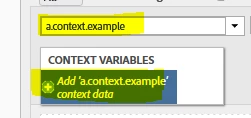
Or you can add the context variables by yourself in the processing rule by just typing them in if it is urgent.

https://experienceleague.adobe.com/docs/analytics/admin/admin-tools/processing-rules/processing-rules-examples/processing-rules-copy-context-data.html?lang=en


2 replies

Level 7
July 8, 2021

@vtran14 Is App Reporting enabled for that report suite ? If not, then please enable the App Reporting from Admin -> Report Suite -> Select your report suite -> Edit Settings -> App Management -> App Reporting.

vidurb80577666Adobe EmployeeAccepted solution
Adobe Employee
July 8, 2021

@vtran14,

I suppose you are waiting for context data to show up in processing rule so that you can create the rules based on those context data. There is no ETA for that. The Context Variables list contains all variables that were sent to the report suite in the previous 30 days.


If you still using mobilemarketing.adobe.com, you can login there and map the context variables being used with variables like evar/prop/events etc.

https://experienceleague.adobe.com/docs/mobile-services/using/manage-app-settings-ug/c-mob-manage-app.html?lang=en


Or you can add the context variables by yourself in the processing rule by just typing them in if it is urgent.

https://experienceleague.adobe.com/docs/analytics/admin/admin-tools/processing-rules/processing-rules-examples/processing-rules-copy-context-data.html?lang=en