
Missing Search Term Activity | Community
Skip to main content
JayGr
Level 3
June 26, 2025
Solved

Missing Search Term Activity

  • June 26, 2025
  • 3 replies
  • 479 views

Hi,


We are having an issue with AA returning different numbers for a few of our metrics when you create a segment which says does a search term exist ($7.0M) and when you create a report with search terms ($6.2M).

Any explanation for why we would be getting different numbers?


If the search term exists, then why doesn't the search term show up in reporting?
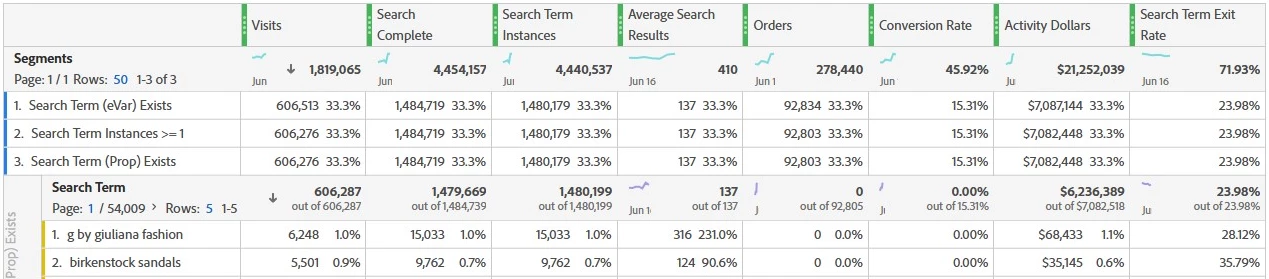


Definitions:
Segment is exactly as written in description
The calculation for Activity Dollars is revenue with an attribution of participation in the visit (just accounting for sales within the same session as this activity).

This post is no longer active and is closed to new replies. Need help? Start a new post to ask your question.
Best answer by Vinay_Chauhan

Hi @jaygr 

This could happen in cases like -


  • Search terms being truncated or exceeding character limits, so the raw value qualifies the segment but isn't grouped under the reported dimension.

  • Case sensitivity or inconsistent formatting values might be stored slightly differently in raw data vs. what's rolled up in the report.

  • Bot or internal traffic being included in one view and excluded in another (depending on segment scope and filters).

  • Timing or attribution mismatch especially if participation attribution is applied and the segment spans visit-level data that crosses date boundaries or session breaks.

It’s also worth checking if any data governance rules or processing filters are excluding certain values from classification or reporting. Comparing the raw data feed for a few sessions where the segment includes activity, but the term doesn’t appear in the breakdown, could help clarify where the drop-off is happening.


Hope that gives you a few directions to troubleshoot. Let me know if you’ve ruled those out already.
Hope that helps!

3 replies

Jennifer_Dungan
Community Advisor and Adobe Champion
June 27, 2025

That's a strange one... I can't replicate in my own data... 


The only thing I can think of is that the attribution is causing some oddities in your scenario?


I know that's not a great answer... but maybe the search happened before midnight when your date range started.. or something else?


Since I can't replicate, and I can't see your data, it's hard to pinpoint what might be happening....

KumarRishii
Level 5
June 27, 2025

Hi @jaygr 
To investigate discrepancy, compare segment results with search term breakdowns, validate attribution logic, and check for missing or truncated terms in the reporting dimension.

Vinay_Chauhan
Community Advisor and Adobe Champion
Vinay_ChauhanCommunity Advisor and Adobe ChampionAccepted solution
Community Advisor and Adobe Champion
June 27, 2025

Hi @jaygr 

This could happen in cases like -


  • Search terms being truncated or exceeding character limits, so the raw value qualifies the segment but isn't grouped under the reported dimension.

  • Case sensitivity or inconsistent formatting values might be stored slightly differently in raw data vs. what's rolled up in the report.

  • Bot or internal traffic being included in one view and excluded in another (depending on segment scope and filters).

  • Timing or attribution mismatch especially if participation attribution is applied and the segment spans visit-level data that crosses date boundaries or session breaks.

It’s also worth checking if any data governance rules or processing filters are excluding certain values from classification or reporting. Comparing the raw data feed for a few sessions where the segment includes activity, but the term doesn’t appear in the breakdown, could help clarify where the drop-off is happening.


Hope that gives you a few directions to troubleshoot. Let me know if you’ve ruled those out already.
Hope that helps!

JayGr
JayGrAuthor
Level 3
June 27, 2025

Thanks. I'll take a look at these scenarios.