February 16, 2023
Solved

Metrics by Unique Visitors

Hi! I'm trying to calculate some metrics such as conversion, orders, average order value and revenue, but all by unique visitors. Can some please explain how can I do that? Thanks!

This post is no longer active and is closed to new replies. Need help? Start a new post to ask your question.
Jennifer_Dungan
Jennifer_DunganAccepted solution
Adobe Champion and Community Advisor
February 21, 2023

Hi,


So for non-calculated metrics (like orders), you can create the segment as I mentioned above...


But for calculated metrics, like Conversion Rate, so I am going to assume the metric is "Orders / UV"....


You can pull in a column for Orders, and another column for Unique Visitors.. select the two columns and right click to bring up the context menu... select "Create Metric from Selection" > "Divide"
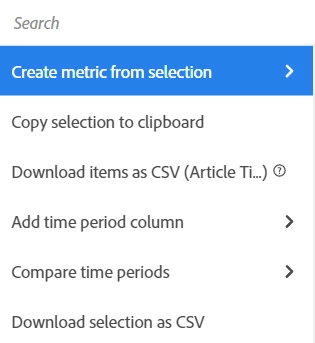
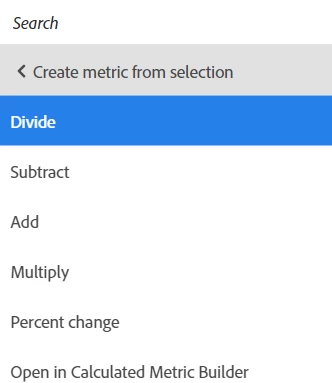


You may want to edit the resulting calculated metric (give it a better name than what is auto generated, make it display as decimal or % and the number of decimal points, etc, and make sure the division is in the correct order...


If you need a more complex conversion.. like "Orders per UV (that actually makes an order)", then you can create a segment for "Visitors with Orders"  (and make sure that you look for orders made within an appropriate time frame by adding a date range into your segment - you don't want any visitors who have ever made an order in the entire history of your site)... then you can stack that segment with your metrics, and create a calculated metric that includes the segment.... 

8 replies

Jennifer_Dungan
Adobe Champion and Community Advisor
February 16, 2023

I generally use a segment such as:


Hit level:

      Order exists


Then I stack that segment with Unique Visitor, then no matter what breakdown I am using (Page, Month, etc), I know that the scope the "order" isn't greedily grabbing more than I expect, and the UV metric will de-duplicate multiple orders by User.

Translate
mns740Author
February 16, 2023

Thanks for your response! Is that something that'd work only for orders? I tried creating a segment for conversion rate the same way but cannot pull in conversion rate in custom segment. 

Translate
Jennifer_Dungan
Adobe Champion and Community Advisor
February 16, 2023

Ohh.. probably cause conversion rate is a calculated metric... you should be able to create your own conversion by UV....

Translate
Level 2
February 21, 2023

Hi 

Did you find out how to do this one ? I am also working on the same issue . Can you please explain me

Thank you

Translate
Jennifer_Dungan
Adobe Champion and Community Advisor
Jennifer_DunganAdobe Champion and Community AdvisorAccepted solution
Adobe Champion and Community Advisor
February 21, 2023

Hi,


So for non-calculated metrics (like orders), you can create the segment as I mentioned above...


But for calculated metrics, like Conversion Rate, so I am going to assume the metric is "Orders / UV"....


You can pull in a column for Orders, and another column for Unique Visitors.. select the two columns and right click to bring up the context menu... select "Create Metric from Selection" > "Divide"


You may want to edit the resulting calculated metric (give it a better name than what is auto generated, make it display as decimal or % and the number of decimal points, etc, and make sure the division is in the correct order...


If you need a more complex conversion.. like "Orders per UV (that actually makes an order)", then you can create a segment for "Visitors with Orders"  (and make sure that you look for orders made within an appropriate time frame by adding a date range into your segment - you don't want any visitors who have ever made an order in the entire history of your site)... then you can stack that segment with your metrics, and create a calculated metric that includes the segment.... 

Translate
Level 2
February 21, 2023

I hope this helps .. will try and check.. Thankyou 

Translate