
Metric Filters | Community
Skip to main content
David_Jerome
Level 6
December 14, 2018
Investigating

Metric Filters

  • December 14, 2018
  • 40 replies
  • 19966 views

Hi there,

An idea that would be really useful for us is metric filters/criteria in workspace.

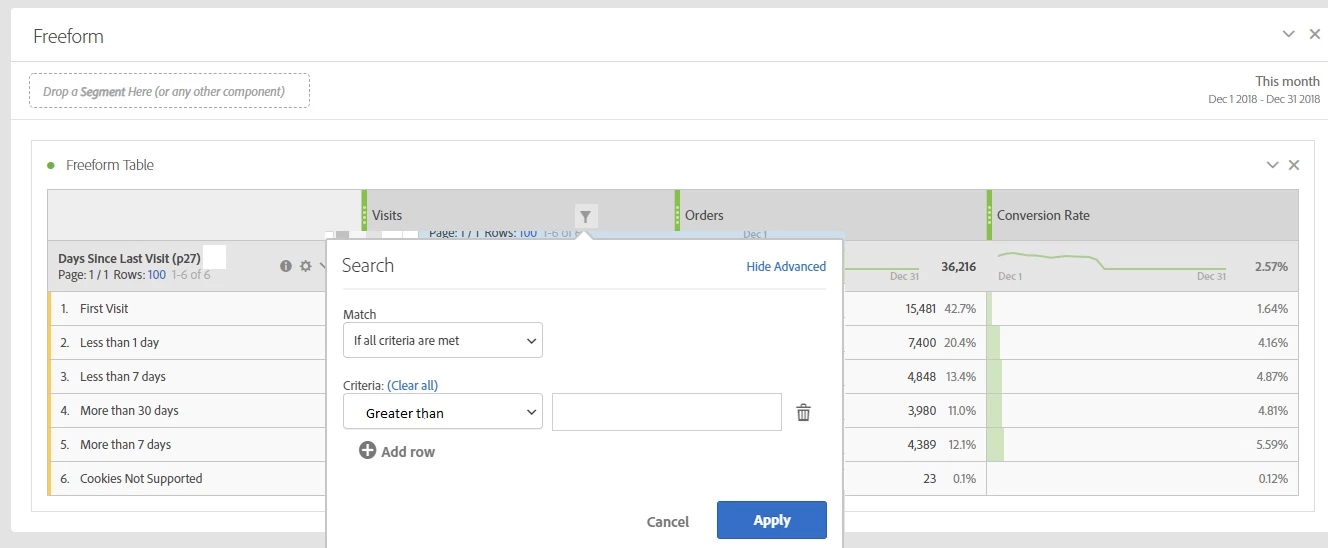
At the moment if you drop an Evar on a free form table you can filter based on values.

What I would love to see is the ability to do this on metrics (greater than / less than) as currently we have to do these reports in report builder / excel.

An (very crude) example of what I am after is below.

Thanks

Dave
40 replies

Urs_Boller
Community Advisor
Community Advisor
December 14, 2018

as a workaround you can use a calc. metric like

IF

  GREATER THAN

    - visits

    - (static number) 100

THEN visits

ELSE (static number) 0

add more conditions as needed (using AND), and receive a table where it only shows the visit number for the condition. all other rows will receive a zero.

I know this is not as good as your idea, but might help meanwhile ... and I voted to get the feature!

Level 2
December 18, 2018

Great idea!

Adobe Employee
July 26, 2019
July 8, 2020

Hi, 

So is it possible in report builder to not show metrics with a value of 0? I haven't been able to figure out how to do that or found detailed documentation on it. 


Thanks! 

Level 2
October 15, 2020

catalinas137940 that's the same issue i'm running into. I'm wanting to show the bottom 10 performing campaigns that have over 200 visits to them. What ursboller mentioned allows me to at least zero out the ones under 200 but I still can't have a visualization for the team of what I'm trying to show since I can't create a segment on that calculated metric.


I'm trying to show the top 10 campaigns and bottom 10 performing campaigns with over 200 visits in a workspace dashboard without having to export the data out and building a dashboard elsewhere. Either a filter would allow me to do that or the ability to do a segment on a calculated metric but neither are available.


trevor-paulsen
Adobe Employee
Adobe Employee
February 10, 2021
No text available
reportb46259316
February 11, 2021

Status: 'Investigating'

Finally 🙂

Level 2
March 26, 2021

This feature would be super helpful!!

irinar44228106
April 2, 2021

This would be amazing!

New Member
May 27, 2021

This would be an amazing utility!!