Maximum options in a workspace dropdown | Community
Skip to main content
September 2, 2020
Solved

Maximum options in a workspace dropdown

  • September 2, 2020
  • 2 replies
  • 1838 views

I have recently noticed that the dropdown in a workspace only seems to be capable of handling 200 items.


If I wish to create a dropdown filter for countries I am therefore unable to do this as there are more than 200 defined.


Is there any way around this, or am I looking at making a feature request?
This post is no longer active and is closed to new replies. Need help? Start a new post to ask your question.
Best answer by saumyag24417044

Hi,

There does appear to be a limit on the number of values that can be selected in Drop-down Filters in Panels. Given this limit, you can apply multiple such drop down filters in the panel for the same dimension item but different values. Lets say drop down 1 has 1st 200 dimension values, drop down 2 has next 200 dimension values n so on.

You can select the desired value from one of the drop down filters and keep other drop downs to "No filter".

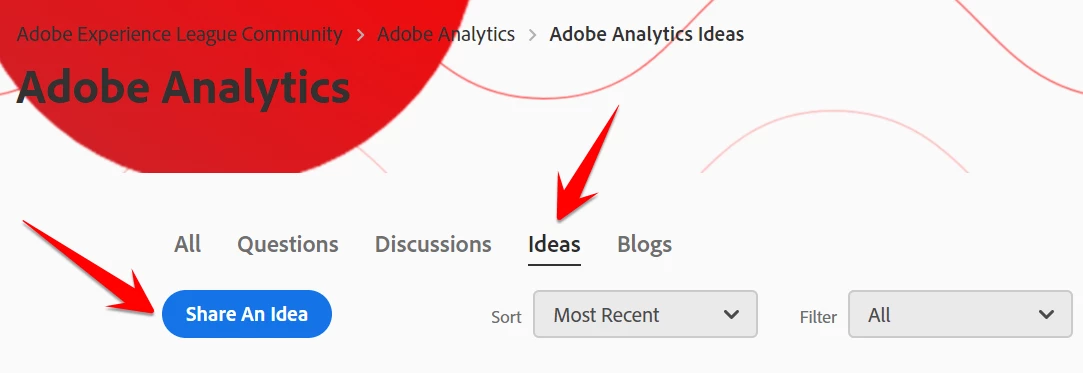
Additionally, to submit a feature enhancement request post under "Ideas" section as follows:

Experience League > Adobe Analytics > Ideas > Share an Idea (screenshot below)


Hope this helps!


Thanks,

Saumya


2 replies

saumyag24417044Accepted solution
Level 4
September 2, 2020

Hi,

There does appear to be a limit on the number of values that can be selected in Drop-down Filters in Panels. Given this limit, you can apply multiple such drop down filters in the panel for the same dimension item but different values. Lets say drop down 1 has 1st 200 dimension values, drop down 2 has next 200 dimension values n so on.

You can select the desired value from one of the drop down filters and keep other drop downs to "No filter".

Additionally, to submit a feature enhancement request post under "Ideas" section as follows:

Experience League > Adobe Analytics > Ideas > Share an Idea (screenshot below)


Hope this helps!


Thanks,

Saumya


Brian_Kent_Watson
Adobe Employee
Adobe Employee
September 8, 2020

Saumya's suggestion will work if you want to go that route.


From a product perspective, we are unlikely to add support for more than 200 items in a dropdown filter as scrolling through 200+ items in a drop list is not a great experience for most users.

September 9, 2020
I understand what you say from a UX perspective. On the other hand, being able to setup a filter by country is a very useful way to segment data when creating an analytics dashboard