Maximum number allowed scheduled reports alert - not true | Community
Skip to main content
Level 2
July 12, 2017
Solved

Maximum number allowed scheduled reports alert - not true

  • July 12, 2017
  • 5 replies
  • 5545 views

Hello,

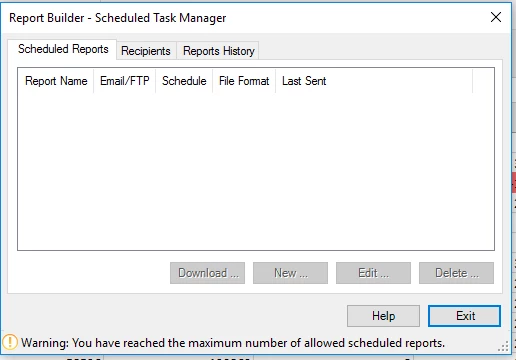
In report builder I get the message "You reached the maximum number of allowed scheduled reports". However, when I log in into the same account and go into Analytics->Components->Reports scheduled - I have no reports scheduled. I am unable to schedule any reports due to this bug. Can anyone help me sort this out?

Thank you,
This post is no longer active and is closed to new replies. Need help? Start a new post to ask your question.
Best answer by Hyder_Ziaee

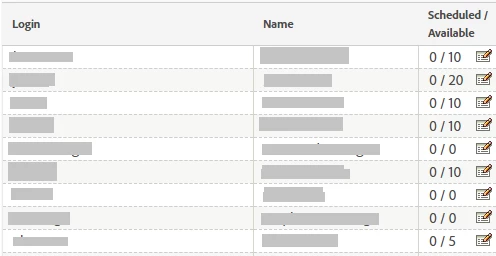
Check if you have not been assigned 0 schedules available for your account in Admin > Company Settings > Report Builder Reports.

Like in this example the 5, 7, and 8 person cannot setup schedules.

5 replies

WhoaShekhar
Level 10
July 12, 2017

Hello There,

Thanks for posting your query.

Reports scheduled via report builder will appear in the Schedule section under your Addin section for Report Builder in Excel itself. They won't be available when you login to see them in Analytics via a browser.

Do you see anything in the Report History section under Scheduled Task Manager?

You can have a maximum of 10 scheduled workbooks per Report Builder license. However, you can increase this number by subtracting from other licenses. To do so, go to Admin > Company Settings > Report Builder Reports.

See this Doc for more on this: Schedule Report Requests

Hope this helps!

ancagoagaAuthor
Level 2
July 12, 2017

Hello,

Thank you for replying.

Unfortunately, as you can see in the first screen shot, there is nothing in the Scheduled reports tab in the report builder (in Excel). Just that message at the bottom, with the maximum limit. Concerning the Report istory tab there are indeed listed the reports that have been already sent, earlier this year (the last one is from more than a month ago). But it's just a list, I can not interact with the items.

Hyder_Ziaee
Adobe Employee
Hyder_ZiaeeAdobe EmployeeAccepted solution
Adobe Employee
July 14, 2017

Check if you have not been assigned 0 schedules available for your account in Admin > Company Settings > Report Builder Reports.

Like in this example the 5, 7, and 8 person cannot setup schedules.

ancagoagaAuthor
Level 2
July 17, 2017

thank you! didn't know about this setup

New Member
August 5, 2019

Hi @@shekhardhiman,

I'm trying to edit the task allocation, but even when I try to set "0" to a certain user (to, them, reallocate those 10 free slots) I got the Error: You have entered a value that exceeds the total available scheduled tasks. error.

Please find below screenshots about what I'm trying to do and the error I obtain.

Could you please exactly explain how to reallocate the tasks?

Many thanks,

Daniele