Marking Traffic as internal Traffic | Community
Skip to main content
Level 2
March 23, 2026
Solved

Marking Traffic as internal Traffic

  • March 23, 2026
  • 2 replies
  • 42 views

Hello,


We need to filter out traffic on our site as internal if Employees are visiting site.

What will be the best way out in CJA.


In Analytics, we had ability to filter out based on IP address using processing rules.


    Best answer by Nick_Walter

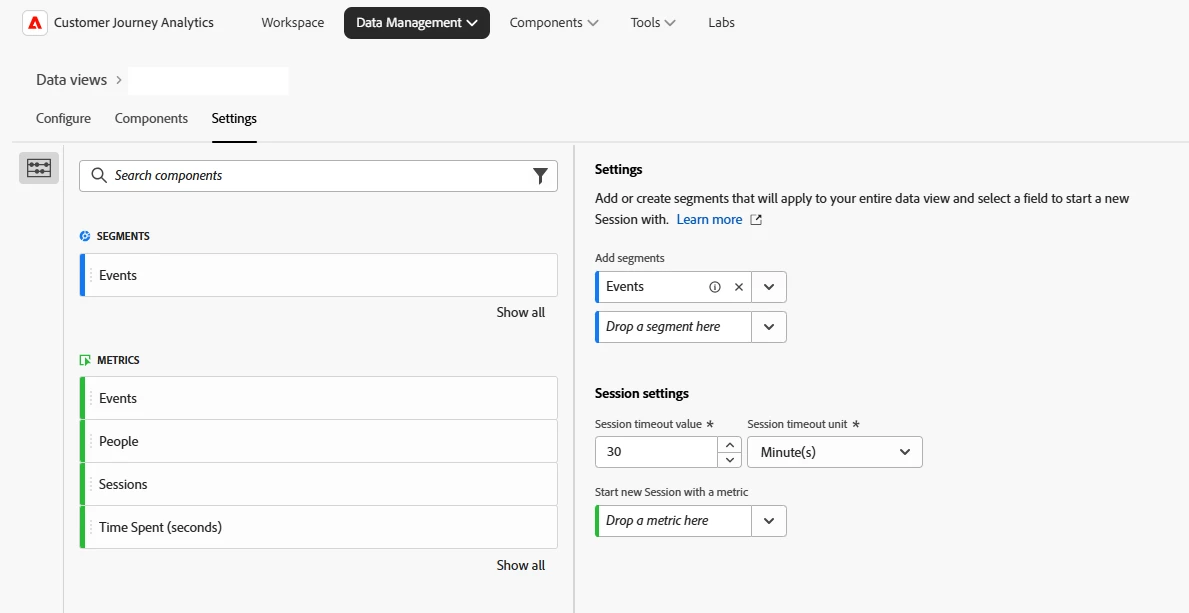
    The easiest way to do this in CJA is to make a segment excluding the traffic. You should be able to still use IP address so long as it is a field in your CJA dataset. 
    Once you have the segment set up you can go into the the Data Management tab at the top of the page and then into settings. Add your new segment in this tab to filter the whole data view for all users.


    2 replies

    Jennifer_Dungan
    Community Advisor and Adobe Champion
    Community Advisor and Adobe Champion
    March 23, 2026

    Hi ​@Nitin3432434,


    First off, I don’t have CJA, so this is all theory….


    I believe that Internal IPs need to be configured into your Data View.. I believe there is an XDM Field for IP Address.


    However, I would also expect that there must be an IP Obfuscation setting… so if that is obfuscated, you wouldn’t be able to see that info to create a Data View on… 


    Do you know if you are obfuscating this info? If not, then you should be okay… but if you are… you might need your own web developers to integrate and evaluate IP data and pass back a flag for “internal traffic”… I suggest this over trying to call a third-party IP lookup service, as it should be a lot more efficient to get it via your own servers rather than trying to call a third-party service and waiting for a reply. You cannot read the IP address with JavaScript natively…. so it’s not like you can just build a quick rule into Launch… 


    Good Luck

    Nick_Walter
    Community Advisor and Adobe Champion
    Nick_WalterCommunity Advisor and Adobe ChampionAccepted solution
    Community Advisor and Adobe Champion
    March 23, 2026

    The easiest way to do this in CJA is to make a segment excluding the traffic. You should be able to still use IP address so long as it is a field in your CJA dataset. 
    Once you have the segment set up you can go into the the Data Management tab at the top of the page and then into settings. Add your new segment in this tab to filter the whole data view for all users.