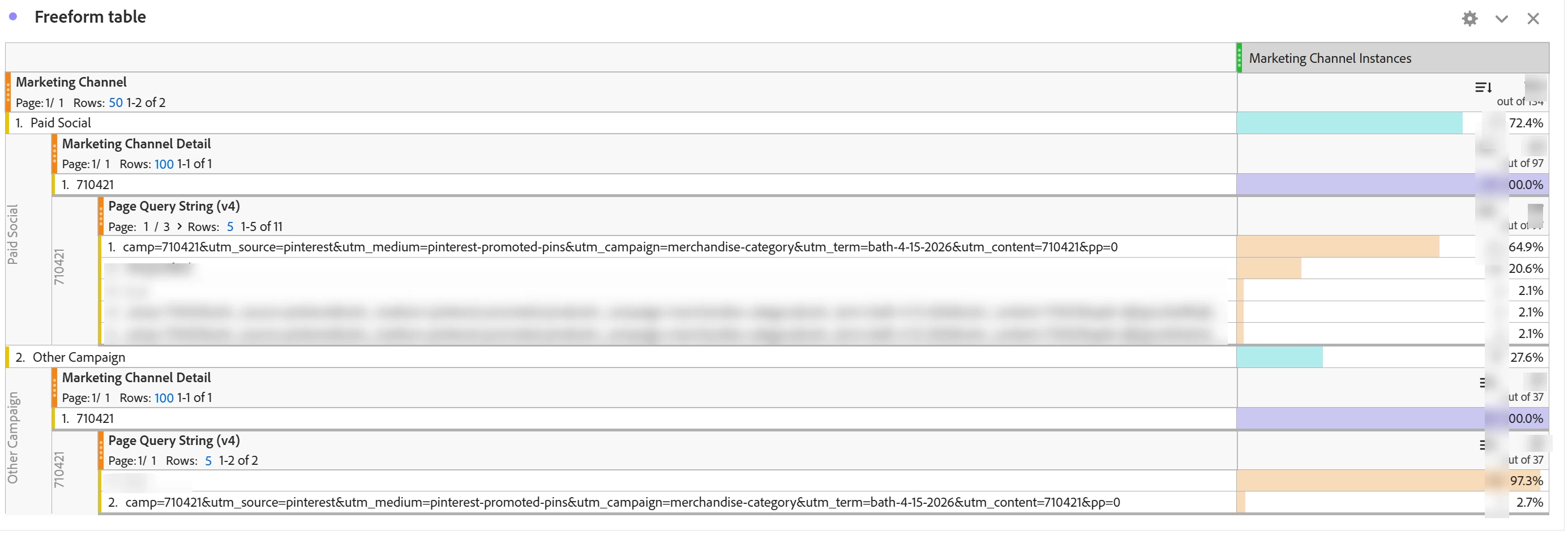
I’m a relatively new user and am trying to understand Marketing Channel Classification. For example, I have a table where I am pulling in Marketing Channels broken down by Marketing Channel Detail and Page Query String for Marketing Channel Instances.
Looking for help understanding why campaign 710421 with the same Page Query String is being classified under Paid Social and Other Campaign.
Our marketing channel is set to expire in 90 days, Paid Social and Other Campaign are set to Override the Last Touch Channel.
Does the table below point to an issue in our Marketing Channel Processing rules?
Appreciate any advice in understanding the table below.
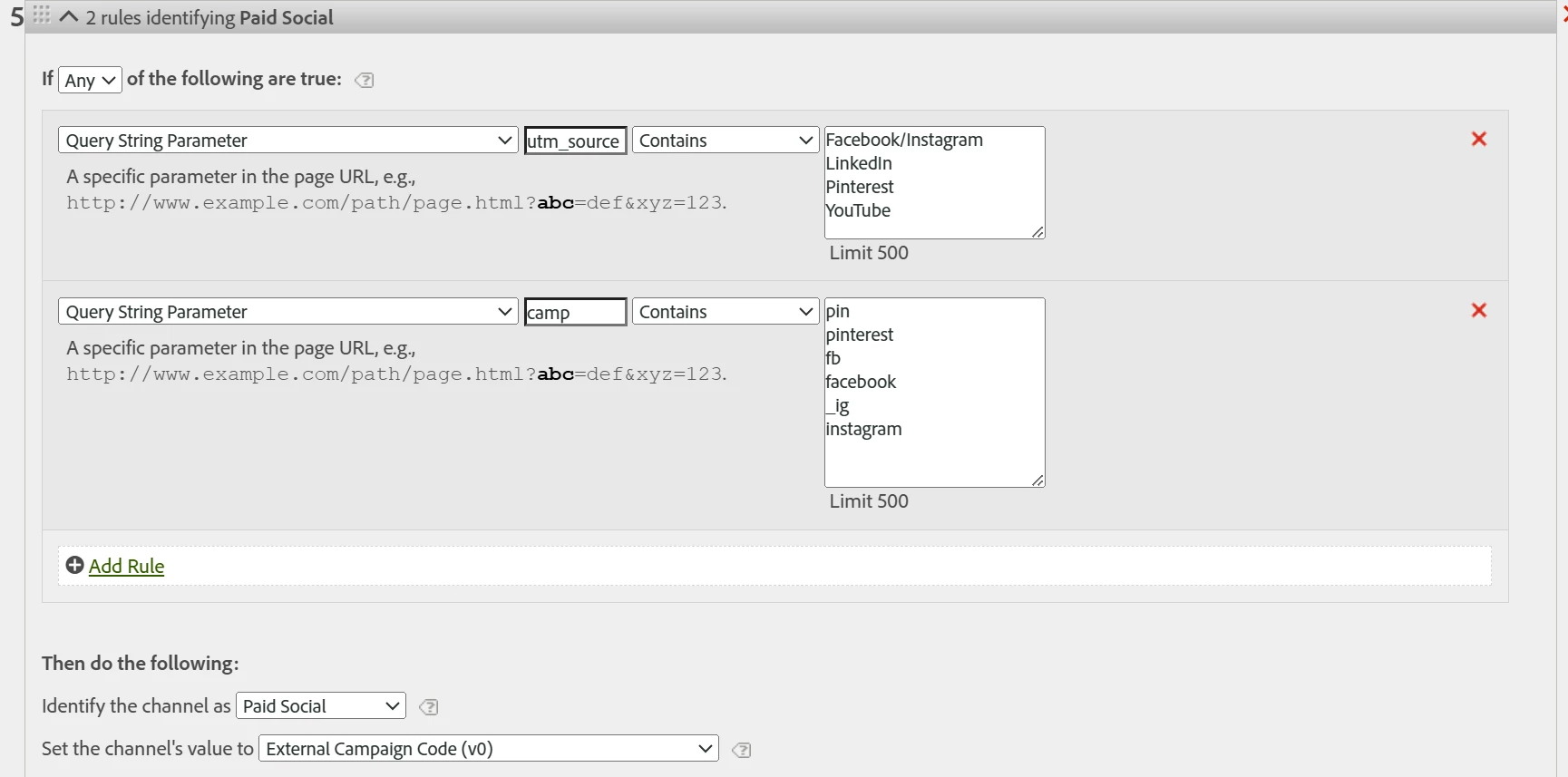
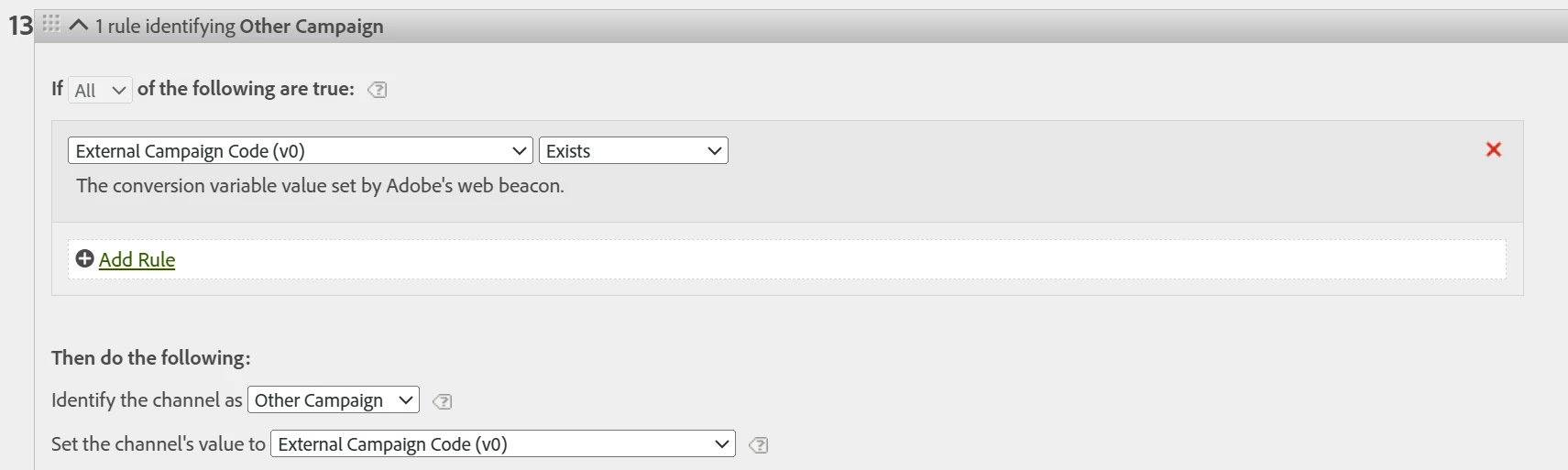
Marketing Channel Processing rules for Paid Social and Other Campaign:
@msweeneyRAB so it’s interesting… if you look at your second screenshot with your “full URL” and using the “Marketing Channel Instance” metric… you can see that your “Other Campaign” has no campaign parameters at all! Not even the camp param which is supposed to be driving your Marketing Channel Detail. Yet you still have that camp value as the details…
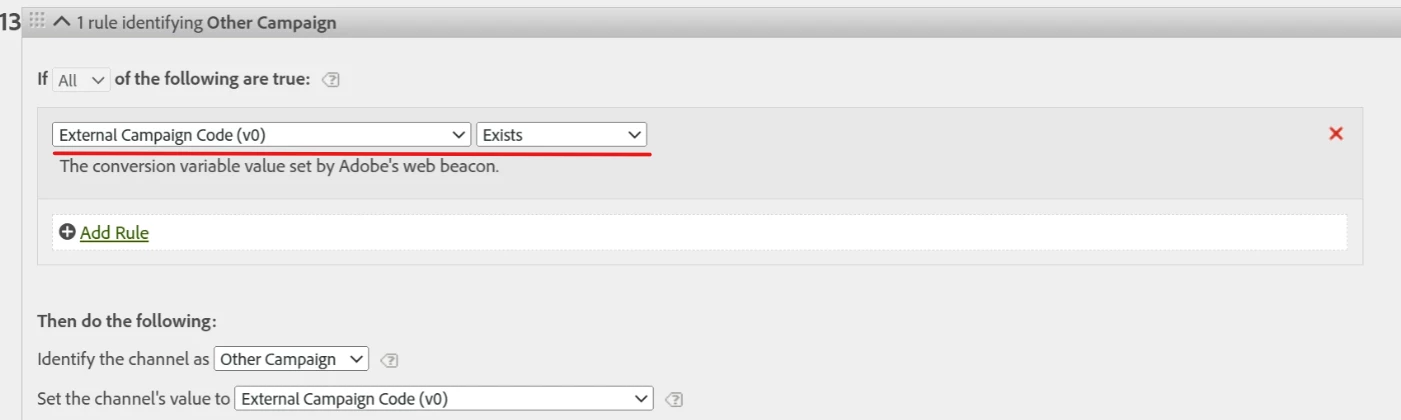
I think part of the problem is checking for a value in a dimension with an extended expiry:
I think you should probably change the criteria here to:
If:
Query String Parameter camp Exists
Then do the following:
Set the channel’s value to eVar0
(Or to Query String Parameter camp)
The “set the value to” can safely be either.. since eVar0 will be set to camp, if camp is on the page, and you are explicitly looking for camp to exist in the rule, there shouldn’t be any issue.
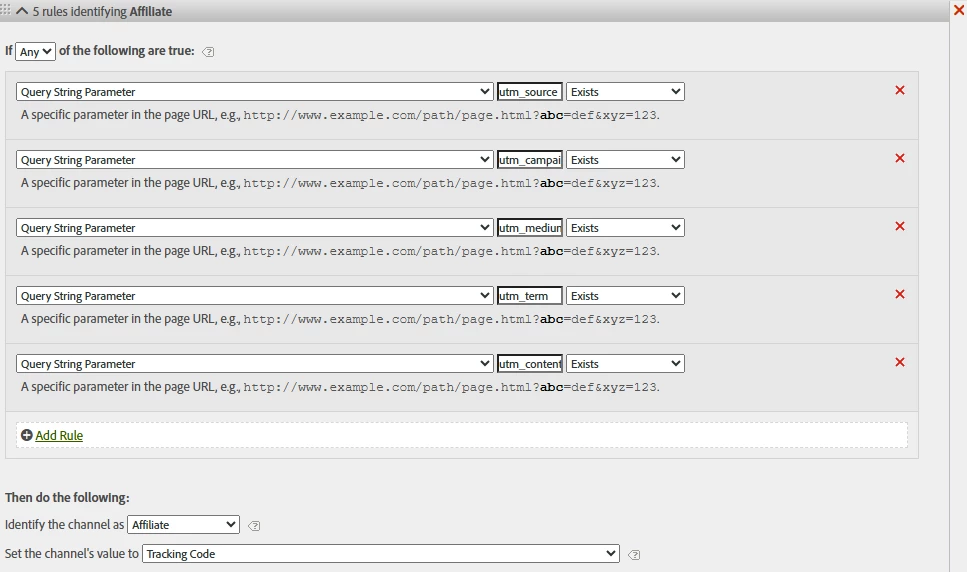
I use a similar rule, I check for any UTM to exist (I have specific value rules above this), but I use my concatenated “Tracking Code” (eVar0) to set the channel’s value:
Because I am explicitly looking for Query String Parameters on the hit, and not looking at the value of a dimension that may be persisted, I don’t have any issues.. I have long suspected that looking at a dimension with something other than a HIT expiry would cause issues (i.e. I could be matching a persisted value), and I think your example proves it!
Now, you were asking about “cross channel” visits… so using the examples.
Visits
Page Views
Marketing Channel Instances
Orders
Marketing Channel
1
3
2
1
Paid Social
1
2
1
0
Page
1
2
1
0
Page A
1
1
1
0
Page B
1
1
0
0
Other Campaign
1
1
1
1
Page
1
1
1
1
Page C
1
1
1
1
Basically, for the 1 Visit, there are 2 channels, 3 Page Views, and 2 Marketing Channel Instances. Let’s also pretend there was an Order made on Page C (not a page view, but an action)… The Order would be associated to current active Channel (i.e. Other Campaigns)… but, if you were to look at a different attribution, say “Participation”, you would see 1 total order, but both channels would count towards your conversion. Now, likely, you wouldn’t be looking at Page Breakdown, but a Product Breakdown:
Order
Order | Participation (Visit)
Products
1
1
Nightstand
1
1
Marketing Channel
1
1
Paid Social
0
1
Other Campaign
1
1
You will see that the regular Order is associated only to “Other Campaign” but that Paid Social has a contribution to the Order within the Visit. The Attribution will only look at Marketing Channels before the order… let’s say after making an Order, the user interacted with a third campaign in the Visit (let’s say “Email”)… Email will not be associated to the order in either the normal or the Participation model, because the email came after the order was made, and therefore had no part in driving the user to make the order (though it might contribute to the next order if you are looking at Participation over 30 Days and they make a second order in that time)
Have you recently updated your rules so that there is a period of mis-attribution?
What is the expiry of your eVar4?
While I don’t think the rules are case sensitive… maybe they are? I assume your eVar4 is forcing lower case, but maybe the rules are seeing “Pinterest” and “pinterest” as different values?? And therefore not matching your rule? It’s a shame that the mapped results of Marketing Rules don’t show up in the Post-Processed data in the debugger..
Can I ask a question though? Your “Paid Social” rules only looks for social sources, but no check that they are paid? How are you sure that other links aren’t being placed in those sites (like share links) that are setting the UTM Source to “pinterest” or “linkedin”, etc? Are you sure that your rules aren’t potentially counting shares and non-paid links as “paid”?
The last change made to the Marketing Channel Processing rules was on April 24th when we added a new set of processing rules around Conversational AI, which we call “AI Discovery”.
Here are the eVar4 settings:
To test if this is a recent issue I expanded the date for the table to Feb 1, 2026 - June 30, 2026 and pulled out another example of duplicate marketing channel categorization.
Campaign 706744 is categorized as both Paid Social & Other Campaign Feb-June.
My understanding is that Marketing Channel Instances are the number of times the marketing channel was set during a request. If that is correct, how is the first Page Query String under Other Campaign for campaign 706744 be n_a?
Do I understand correctly that if our processing rules are working properly and we use the Marketing Channel Instances metric we would not see Marketing Channel Details categorized under multiple Marketing Channels?
Good question regarding our Paid Social rule, it’s possible we should look at all of our processing rules to see what improvements can be made.
We’ve actually had something similar happen at our org recently (although our issue was with the marketing channel detail, not the actual marketing channel itself). So the first thing I’ll note is that your query string evar with a visit expiration could theoretically be persisting from one hit to another. If a hit/page doesn’t have a query string, because your evar expires on the visit, it could persist through to the next page. For us, any page specific evars (QSP, page name, domain, page path, etc.) we set to expire on a hit, that way it doesn’t persist through to the next page. With last touch this would only happen if there isn’t a value on the next page, but still something to try and avoid.
So, for the sake of figuring out what’s going on, first lets check if evar4 actually fired on that ‘other campaign’ hit or if it persisted. Drag in the evar4 instances metric. If it has a value for that row then it actually fired with that QSP, if there is no value, then it persisted.
Do you have access to data feeds? It would be good to look at the pre and post versions of some of the variables to see what actually fired on each it (that was how we solved our issue with the marketing channel detail). If you do, I’d suggest looking at the pre and post versions of evar4 and looking at your marketing channel information to see if you can pinpoint why each channel is being set for each hit.
If you don’t, are you capturing the full URL in workspace in an evar or prop? Hopefully, if you are using an evar it is hit expiry and not visit so it doesn’t have the same issue of persistence as evar4. If there is a campaign value associated with that hit, but no paid social website in the UTM or other QSPs that could be why it’s falling under Other Campaign instead of paid social.
FYI - “All text fields are evaluated as case-insensitive. For example, if you use a rule condition where query string parameter cmp equals ‘abc123’, both the query string parameter and value can use any combination of uppercase and lowercase.” So, no problem with the values.
Also, this is 100% a Marketing Channel Processing Rules behavior issue. Report shows values appears under both channels because both rules are correct for the same hit -
So why doesn’t Paid Social always win?
Because of rule processing + persistence timing
Even though Adobe usually stops at the first match, this behavior can still happen due to:
Scenario A: First hit vs subsequent hit timing
Hit 1: Campaign code not yet set - Paid Social fires Hit 2: Campaign code now populated - Other Campaign fires
This sounds like an AI generated answer, and it has some of the hallmarks of stuff that AI typically gets wrong.
Adobe ALWAYS stops at the first match. That a basic principle of how marketing channels work. If Adobe doesn’t stop at a rule it’s because it isn’t a match.
This is NOT a problem. As you move down the list of marketing channel rules, you do typically want to get more broad. The higher, specific rules capture the important marketing channels, lower ones can be more broad to capture anything not captured above. The channel rules are fine, they are not a problem, and they don’t need to be fixed. It is not stealing from paid social.