Make date range components relative to panel calendar | Community
Skip to main content
Level 2
March 15, 2024
Solved

Make date range components relative to panel calendar

  • March 15, 2024
  • 1 reply
  • 761 views

The "Make date range components relative to panel calendar" has stopped working. When this option is selected, I can no longer access the date comparison menu. Usually, this is a right-click on the metric title. The menu pops up and I select my comparison type. Now I have to deselect the "Make date range components relative to panel calendar" option to add a date comparison. That date comparison is of course not relative to the panel which was the point of the component relative feature.
This post is no longer active and is closed to new replies. Need help? Start a new post to ask your question.
Best answer by Josh Stephens

I just tried testing the Make date range components relative to panel calendar and it worked for me as it has in the past.

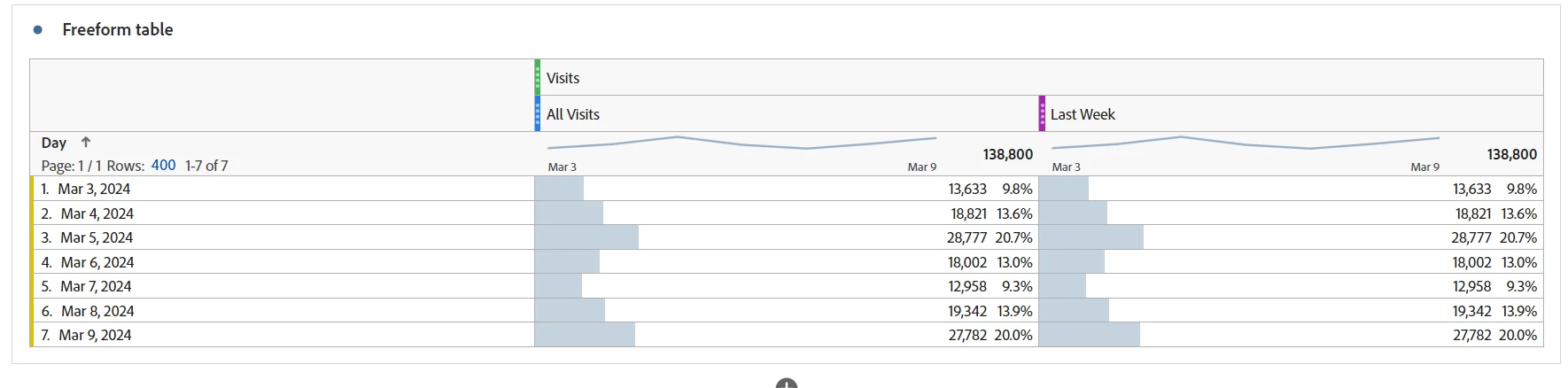
Here's a screenshot of sandbox data:  I initially set the panel date range to Last Week (Mar 3 - Mar 9).  I then used All Visits & Last Week date range on the metric.  As expected, they both reflected the same values.  Then I enabled the Make date range components relative to panel calendar.  With that option in abled the last week date range, reflects the week prior to the start of the panel start date.  

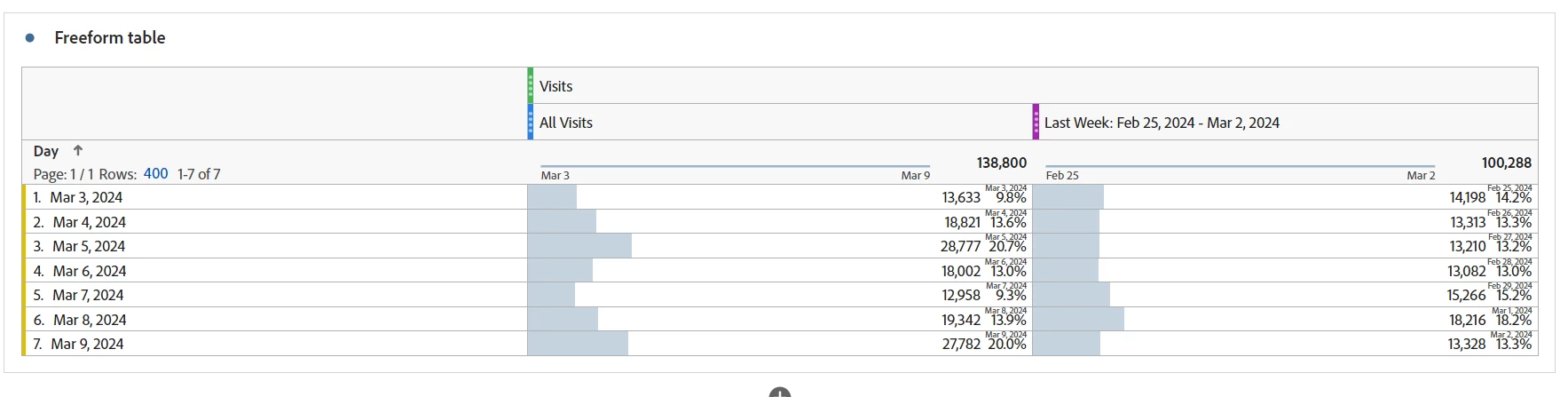
Then I enabled the Make date range components relative to panel calendar.  With that option in abled the last week date range, reflects the week prior to the start of the panel start date.  

Regarding the separate Right Click & Add Comparison Date range feature, without the relative date range option enabled, I was able to get the expected behavior.

Interestingly, once I enabled the feature, I couldn't get Right Click to work at all.  Sounds like that is a bug.

1 reply

Josh Stephens
Community Advisor
Josh StephensCommunity AdvisorAccepted solution
Community Advisor
March 15, 2024

I just tried testing the Make date range components relative to panel calendar and it worked for me as it has in the past.

Here's a screenshot of sandbox data:  I initially set the panel date range to Last Week (Mar 3 - Mar 9).  I then used All Visits & Last Week date range on the metric.  As expected, they both reflected the same values.  Then I enabled the Make date range components relative to panel calendar.  With that option in abled the last week date range, reflects the week prior to the start of the panel start date.  

Then I enabled the Make date range components relative to panel calendar.  With that option in abled the last week date range, reflects the week prior to the start of the panel start date.  

Regarding the separate Right Click & Add Comparison Date range feature, without the relative date range option enabled, I was able to get the expected behavior.

Interestingly, once I enabled the feature, I couldn't get Right Click to work at all.  Sounds like that is a bug.