List vars in Data warehouse reports | Adobe Higher Education
Skip to main content
Level 2
June 26, 2021
Beantwortet

List vars in Data warehouse reports

  • June 26, 2021
  • 1 Antwort
  • 1000 Ansichten

Hi- this might be a fairly basic question for someone familiar with Data warehouse reports, but I'm new to it, any help would be appreciated!


I was trying to fetch data as follows-

The first dimension (say d1) was broken down by another dimension (say d2), further broken down by dimension d3 which is a list var.


I expected the report to look something like this-

d1           d2                 d3

A             X                  a,b


However, the report looked something like this-

d1           d2                d3

A             X                  a

A             X                  b


Is this an expected behaviour or am I missing something?

Thank you!
Dieses Thema wurde für Antworten geschlossen.
Beste Antwort von Hemangini

Hi @prerna ,

This is an expected behavior. Each unique de-limited listvar value show up in a different row.
For example:

s.list1 = “value1|value2|value3”;
When we will look at the report in UI for listVar1 (de-limited by ‘|’) we will see different rows as “value1”, “value2” and "value3".
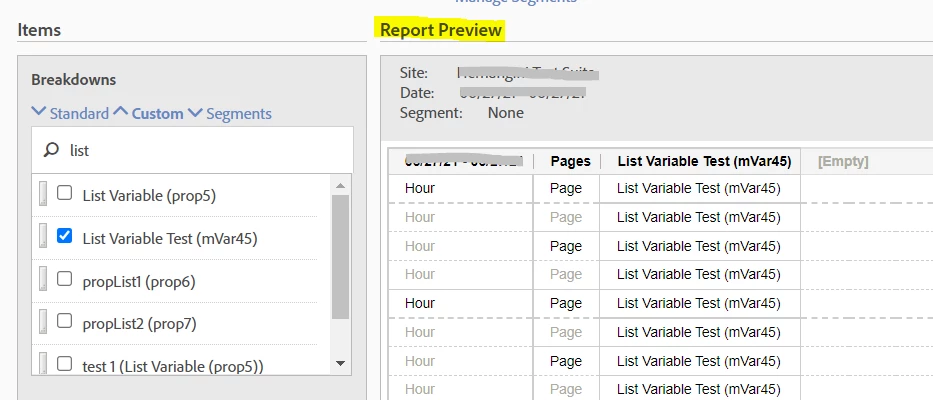
Furthermore, we also have the DW report preview section to know how the report format will look like-


1 Antwort

HemanginiAdobe EmployeeAntwort
Adobe Employee
June 26, 2021

Hi @prerna ,

This is an expected behavior. Each unique de-limited listvar value show up in a different row.
For example:

s.list1 = “value1|value2|value3”;
When we will look at the report in UI for listVar1 (de-limited by ‘|’) we will see different rows as “value1”, “value2” and "value3".
Furthermore, we also have the DW report preview section to know how the report format will look like-