Limitation in Segment Builder – Cannot Add More Than One Condition in a Container Definition | Community
Skip to main content
Level 2
May 14, 2025
Solved

Limitation in Segment Builder – Cannot Add More Than One Condition in a Container Definition

  • May 14, 2025
  • 3 replies
  • 887 views

While creating audience segments within the analytics platform, I encountered a constraint that prevents adding more conditions within a single definition container. This limitation severely restricts the ability to define complex and highly specific audience behaviors, which is critical for our use cases.

When attempting to add more than one condition in a single definition container, the platform did not provide any option to add more condition, but earlier there was an option. Refer screenshot for different times. In 2023, there was a option to add more than one condition in container definition instead of that what I'm getting a nested container option.


Can someone suggest is this something respective to platform updates or I'm missing anything to add.
This post is no longer active and is closed to new replies. Need help? Start a new post to ask your question.
Best answer by Jennifer_Dungan

Hi @prernago2,


I am not sure if maybe this is just an example of forgetting how segment builder works... but the Options area, where you show "Add Container", is only used for adding containers or flipping the logic between Exclude or Include... 


The example you showed from 2023 doesn't require you to use Options... you simply have to drag the same dimension into the Segment Builder (under or above the existing value).


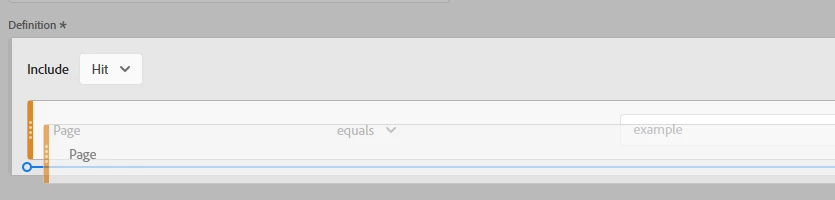
You can even duplicate the existing dimension by holding CTRL on a PC or CMD (I believe) on a Mac, and dragging it until you see a blue line indicating a drop zone:

Dragging in a new dimension will also show the drop zone.

3 replies

juliusonyancha
Level 4
May 14, 2025

Hi @prernago2 unable to recreate the issue. However, If you are using a quick segment, you can only setup a maximum of three rules.


PrernaGo2Author
Level 2
May 16, 2025

Hi @juliusonyancha 

Thanks for your quick response. I wasn’t working on Quick Segment at that time, but I’ll definitely keep this in mind moving forward.

MandyGeorge
Community Advisor and Adobe Champion
May 14, 2025

Hi @prernago2 , I'm also unable to replicate this issue. You could try logging out and back in, clearing you cache/cookies, see if any of that fixes it.

If it doesn't, I would suggest reaching out to client care and telling them what is happening. It sounds like there might just be a bug in the system, because it is absolutely still possible to add multiple conditions in a container in a segment. 

PrernaGo2Author
Level 2
May 16, 2025

Hi @mandygeorge 
Thanks for your help. Yes, that was cache issue, Now this works fine.

Jennifer_Dungan
Community Advisor and Adobe Champion
Jennifer_DunganCommunity Advisor and Adobe ChampionAccepted solution
Community Advisor and Adobe Champion
May 15, 2025

Hi @prernago2,


I am not sure if maybe this is just an example of forgetting how segment builder works... but the Options area, where you show "Add Container", is only used for adding containers or flipping the logic between Exclude or Include... 


The example you showed from 2023 doesn't require you to use Options... you simply have to drag the same dimension into the Segment Builder (under or above the existing value).


You can even duplicate the existing dimension by holding CTRL on a PC or CMD (I believe) on a Mac, and dragging it until you see a blue line indicating a drop zone:

Dragging in a new dimension will also show the drop zone.

PrernaGo2Author
Level 2
May 16, 2025

Hi @jennifer_dungan
Thanks for helping out. Might some cache issue. 
Drag and drop works perfectly now.