Level 4
July 30, 2019
Solved

Is there a role /permission to restrict a user from creating a project?

Hi Adobe Analytics Experts,

Is there a role /permission to restrict a user from creating a project? I only want them to see the projects I have shared with them?

Regards - Manish

This post is no longer active and is closed to new replies. Need help? Start a new post to ask your question.
kumararajak
kumararajakAccepted solution
Level 5
August 1, 2019

Hi Manish,

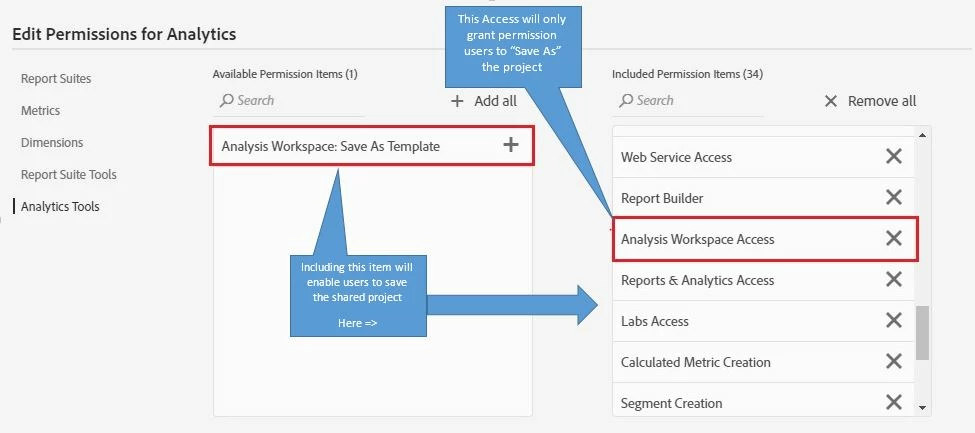
if you are an Admin you need to remove the access to the users as per the below screenshot. Remove the "Analysis Workspace:Save As Template" from included Permission item.
In Adobe Analytics Workspace, you cannot give them read/write only access.

If the user has the Permission that includes 'Analysis Workspace Access' and 'Analysis Workspace:Save As Template', they can Save and edit your Workspace project.

If the user has the Permission that only includes 'Analysis Workspace Access' and not 'Analysis Workspace:Save As Template', they can only 'Save As' or 'Copy' the Project in their Dashboard to edit.

Hope this Helps

Regards,

Kumararaja K

2 replies

Balaji_V
Level 4
July 30, 2019

Hi Manish,

To my understanding sharing the Project can be restricted not creating the project

Might this below links helps you

How to Give View-Only Permission to Workspaces

Ability to Share Workspace Project as READ ONLY

Thanks,

Balaji

Translate
kumararajak
kumararajakAccepted solution
Level 5
August 1, 2019

Hi Manish,

if you are an Admin you need to remove the access to the users as per the below screenshot. Remove the "Analysis Workspace:Save As Template" from included Permission item.

In Adobe Analytics Workspace, you cannot give them read/write only access.

If the user has the Permission that includes 'Analysis Workspace Access' and 'Analysis Workspace:Save As Template', they can Save and edit your Workspace project.

If the user has the Permission that only includes 'Analysis Workspace Access' and not 'Analysis Workspace:Save As Template', they can only 'Save As' or 'Copy' the Project in their Dashboard to edit.

Hope this Helps

Regards,

Kumararaja K

Translate