I need to switch from counting to summing the transaction value | Community
Skip to main content
Level 2
April 8, 2024
Solved

I need to switch from counting to summing the transaction value

  • April 8, 2024
  • 1 reply
  • 463 views

I have this configuration for my event, but having it this way, it counts each time the event is executed


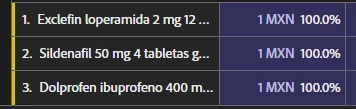
And when viewing the report in Analytics, it shows the counter increasing by 1 each time instead of the purchase values, thus compromising the data. Please help


This post is no longer active and is closed to new replies. Need help? Start a new post to ask your question.
Best answer by Jennifer_Dungan

Your Processing Rule is telling Revenue (event24) to increment by 1 (not by your actual revenue value)



Try setting the event with the actual "value(Context Data)" instead of "custom value" with a specific increment value (i.e. 1).


So something like this:

 

However, if this still doesn't work (possible that your Content Variable "value" is being sent as text and not properly parsing as a numerical value, you may need to have your developers set and send the event with the value directly from the App, rather than using processing rules.


They would have to send the data as &&event24=5.99  (or whatever your Revenue value actually is)


If you are still using the old ACP SDK, this will go straight to your event data (without needed processing rules), if you are using the AEP SDK, with the new (as of the last few weeks) XDM Stream custom data model (a.tags), it should likewise go to your analytics in the same way... direct into Adobe Analytics.


If you are using the standard XDM stream mapping, this would need to map the XDM into your analytics (which I am less familiar with - we are just going to be starting XDM and will be leveraging the a.tags solution).


Good luck

1 reply

Jennifer_Dungan
Community Advisor and Adobe Champion
Jennifer_DunganCommunity Advisor and Adobe ChampionAccepted solution
Community Advisor and Adobe Champion
April 8, 2024

Your Processing Rule is telling Revenue (event24) to increment by 1 (not by your actual revenue value)


Try setting the event with the actual "value(Context Data)" instead of "custom value" with a specific increment value (i.e. 1).


So something like this:


However, if this still doesn't work (possible that your Content Variable "value" is being sent as text and not properly parsing as a numerical value, you may need to have your developers set and send the event with the value directly from the App, rather than using processing rules.


They would have to send the data as &&event24=5.99  (or whatever your Revenue value actually is)


If you are still using the old ACP SDK, this will go straight to your event data (without needed processing rules), if you are using the AEP SDK, with the new (as of the last few weeks) XDM Stream custom data model (a.tags), it should likewise go to your analytics in the same way... direct into Adobe Analytics.


If you are using the standard XDM stream mapping, this would need to map the XDM into your analytics (which I am less familiar with - we are just going to be starting XDM and will be leveraging the a.tags solution).


Good luck