How to use Regular Expression to build Classification Rule Builder in Adobe Analytics | Community
Skip to main content
February 13, 2018
Solved

How to use Regular Expression to build Classification Rule Builder in Adobe Analytics

  • February 13, 2018
  • 4 replies
  • 2797 views

Hi All,

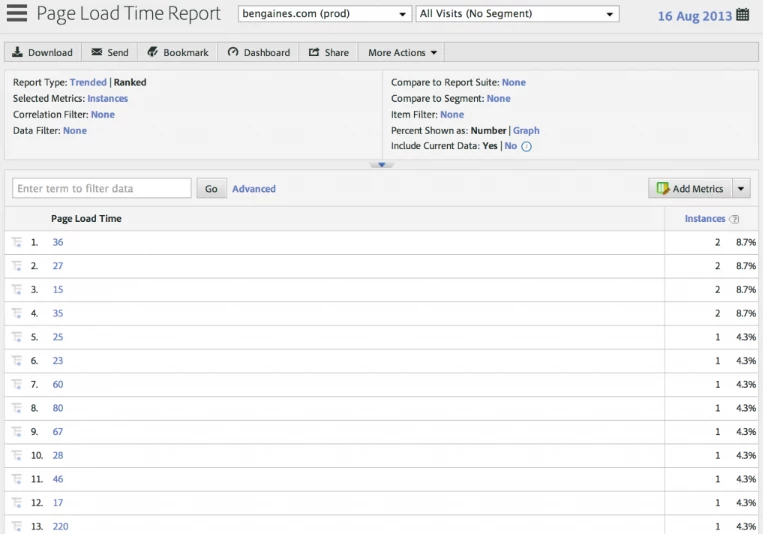
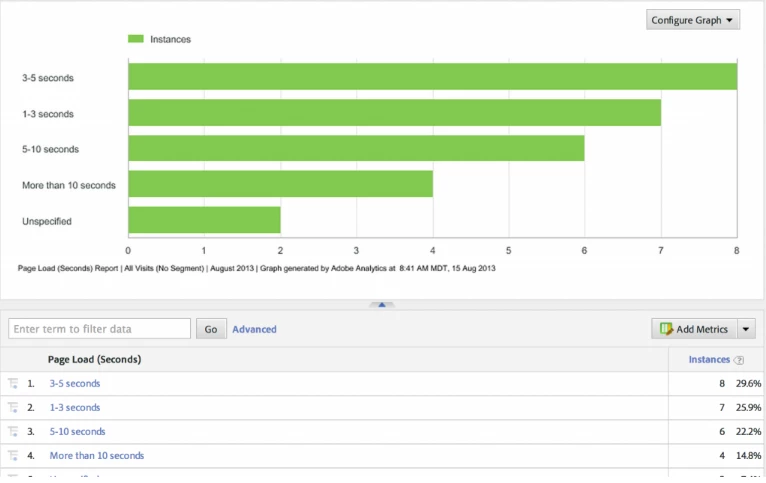
Just want to understand, how it is possible to make a proper logic using Regular Expression (Classification Rule Builder) in Adobe Analytics to make structured data like the screenshot below from first screenshot to second screenshot.

Before - Its look like
After -
Could you please help me to provide the regular expression (logics)!

Thanks,

Vijay

This post is no longer active and is closed to new replies. Need help? Start a new post to ask your question.
Best answer by PratheepArunRaj

Dear Vijay,

Don't have time to work on the above bucket since it need more effort.

Below the buckets with few modifications and i hope even the below is good to go for you.

Also, i believe that captured numbers are in Milliseconds. If not, logic will also change.

More than 50 Sec : \d

Less than 10 Sec : ^([0-9]|[0-9][0-9]|[0-9][0-9][0-9]|[0-9][0-9][0-9][0-9])$

10 to 19 Sec : ^([1][0-9][0-9][0-9][0-9])$

20 to 29 Sec : ^([2][0-9][0-9][0-9][0-9])$

30 to 39 Sec : ^([3][0-9][0-9][0-9][0-9])$

40 to 49 Sec : : ^([4][0-9][0-9][0-9][0-9])$

The rules must be placed in the same order.

Thank You!

Arun

4 replies

PratheepArunRaj
Community Advisor and Adobe Champion
February 14, 2018

Dear Vijay,

I have grouped it based on Milliseconds itself. But you can edit the below to create your own!

> 600 ms : \d

Less Than 30 ms : ^([0-9]|[1][0-9]|[2][0-9]|30)$

>30 And <=60 ms : ^([3][1-9]|[4][0-9]|[5][0-9]|60)$

>60 And <=120 ms : ^([6][1-9]|[7][0-9]|[8][0-9]|[9][0-9]|[1][0-1][0-9]|120)$

>120 And <=300 ms : ^([1][2][1-9]|[1][3-9][0-9]|[2][0-9][0-9]|300)$

>300 And <=600 ms : ^([3][0][1-9]|[3][1-9][0-9]|[4-5][0-9][0-9]|600)$

Thank You

Arun

February 16, 2018

Thank you so much for your help Pratheep!

I am not fully technical guy to create regular expression like this.

It would be great if you can help me to provide the below scenario as well (If possible), I tried on my own but it doesn't work .

  • Less than 10 Sec
  • 10 to 20 Sec
  • 21 to 30 Sec
  • 31 to 40 Sec
  • 41 to 50 Sec
  • More than 50 Sec

Thanks again for the wonderful insights that you have provided earlier.

Regards,

Vijay

PratheepArunRaj
Community Advisor and Adobe Champion
PratheepArunRajCommunity Advisor and Adobe ChampionAccepted solution
Community Advisor and Adobe Champion
February 16, 2018

Dear Vijay,

Don't have time to work on the above bucket since it need more effort.

Below the buckets with few modifications and i hope even the below is good to go for you.

Also, i believe that captured numbers are in Milliseconds. If not, logic will also change.

More than 50 Sec : \d

Less than 10 Sec : ^([0-9]|[0-9][0-9]|[0-9][0-9][0-9]|[0-9][0-9][0-9][0-9])$

10 to 19 Sec : ^([1][0-9][0-9][0-9][0-9])$

20 to 29 Sec : ^([2][0-9][0-9][0-9][0-9])$

30 to 39 Sec : ^([3][0-9][0-9][0-9][0-9])$

40 to 49 Sec : : ^([4][0-9][0-9][0-9][0-9])$

The rules must be placed in the same order.

Thank You!

Arun

February 19, 2018

Thank you so much Pratheep for your help!

I appreciate it!

Regards,
Vijay