How to split String with Classification Rules (Regex) | Community
Skip to main content
Luca_Lattarini
Level 9
February 9, 2022
Solved

How to split String with Classification Rules (Regex)

  • February 9, 2022
  • 2 replies
  • 2349 views

Hello guys,

Anyone can help to split 1 string as b1cdc3168772ce4a79ba2db0cfeba174#recdc3168772ce4a79ba2db0cfeba123#.... into a multiple sub customerId?


Thanks

This post is no longer active and is closed to new replies. Need help? Start a new post to ask your question.
Best answer by jgrubbs

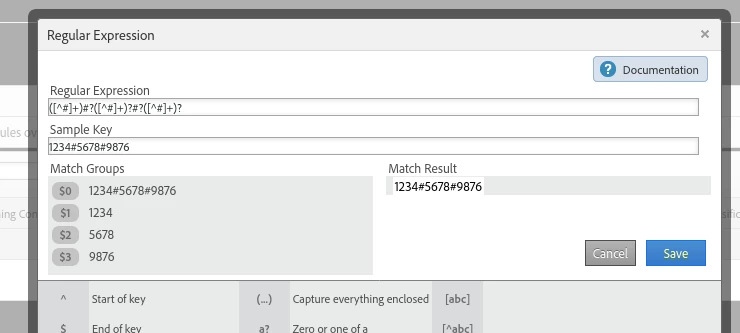
Assuming the "#" character is your delimiter, an example regex for THREE id values would be

([^#]+)#?([^#]+)?#?([^#]+)?


And if you have 3 classifications, called something like "FirstID", "SecondID", and "ThirdID", you'd set the values for them in the rule builder as $1, $2, and $3 respectively


2 replies

jeff_bloomer
Community Advisor and Adobe Champion
February 9, 2022

@luca_lattarini Classification Rules using Regex typically work by identifying certain patterns.  What specific pattern(s) are you wanting to recognize in order to then "normalize" split things out and/or return different data in your Report Suite?
For instance, you can actually have your Regex split on the hashtags or a specific sets of numbers.  It all depends on your criteria.

jgrubbs
jgrubbsAccepted solution
Level 3
February 10, 2022

Assuming the "#" character is your delimiter, an example regex for THREE id values would be

([^#]+)#?([^#]+)?#?([^#]+)?


And if you have 3 classifications, called something like "FirstID", "SecondID", and "ThirdID", you'd set the values for them in the rule builder as $1, $2, and $3 respectively


jeff_bloomer
Community Advisor and Adobe Champion
February 10, 2022

So, the first thing I always like do is use a tool like Rubular to play around with these things to prove them out, and I'm not sure if you're going to be able to get your example to work out there.  However, if this DOES work within Adobe, then more power to you.  😁  Adobe Analytics likes to do its own things sometimes.