How to make the header metric number work? | Community
Skip to main content
Level 2
January 29, 2018
Solved

How to make the header metric number work?

  • January 29, 2018
  • 1 reply
  • 1275 views

Hi,

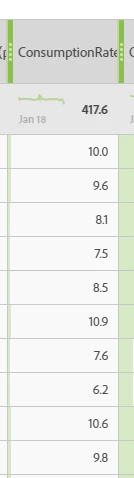
I'm in Adobe analytics workspace, and I have a project pulling in the metrics for visits, etc.  The header number for metrics (like visits)works for number aggregation on line items, however it didn't seem to work for percentage aggregation.  Like for consumption rate, the header number is just a pure sum of all consumption rate, which should not be the case, instead it should take the formula of consumption rate, on the total numbers to come up a percentage.  Do you know how could I get that fixed?  Please see below the snapshot.  There are 47 lines so I didn't get to capture all of them.

Thank you so much for your help!

Lily
This post is no longer active and is closed to new replies. Need help? Start a new post to ask your question.
Best answer by PratheepArunRaj

Dear Lily,

It should be working correctly, not sure why it didn't.

Since it is Rate, can you change the number format from 'Decimal' to 'Percentage' in calculated metrics and check?

Thank You!

Arun

1 reply

PratheepArunRaj
Community Advisor and Adobe Champion
PratheepArunRajCommunity Advisor and Adobe ChampionAccepted solution
Community Advisor and Adobe Champion
January 30, 2018

Dear Lily,

It should be working correctly, not sure why it didn't.

Since it is Rate, can you change the number format from 'Decimal' to 'Percentage' in calculated metrics and check?

Thank You!

Arun

Thank You, Pratheep Arun Raj B (Arun) | Xerago | Terryn Winter Analytics
