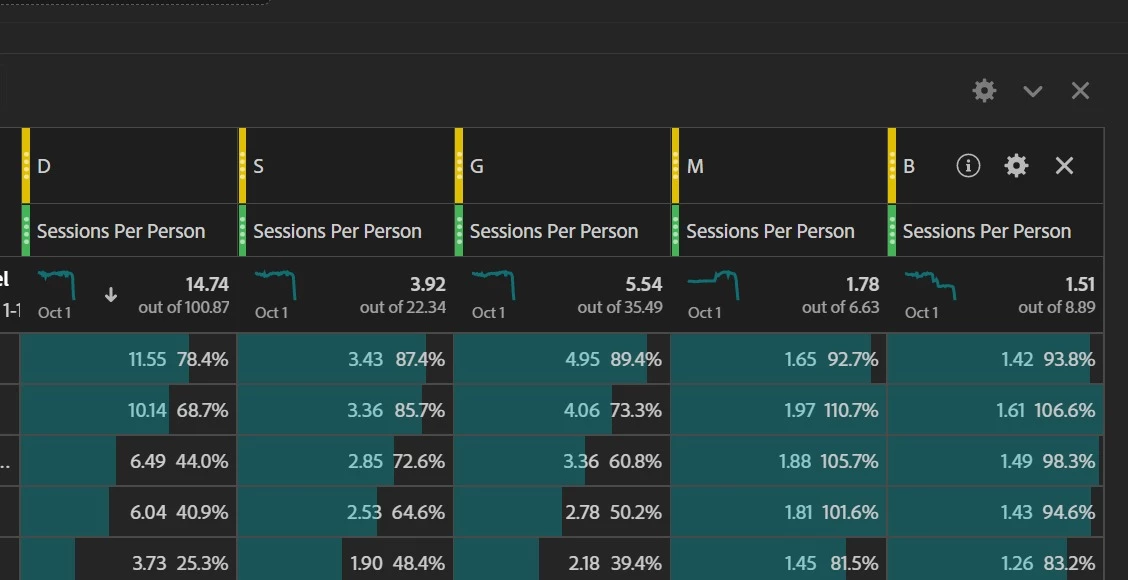
In each cell, the percentage is that cell's value out of the total value.
E.g. 11.55 = 78.4% of 14.74, 10.14 = 68.7% of 14.74, etc
Depending on the metric used, you can't always expect the rows' percentages to add up to 100%. In your case, it's just as you won't expect 11.55 + 10.14 + ... = 14.74 because of how your selected metric is calculated.
I believe, based on your column headings of "Sessions per User"... there is data for each user in multiple rows... which will throw the percentage off...
In cases like these, I often hide the % and just let the background visualization show a relative weight.....
In each cell, the percentage is that cell's value out of the total value.
E.g. 11.55 = 78.4% of 14.74, 10.14 = 68.7% of 14.74, etc
Depending on the metric used, you can't always expect the rows' percentages to add up to 100%. In your case, it's just as you won't expect 11.55 + 10.14 + ... = 14.74 because of how your selected metric is calculated.