You could set your eVar expiry to be a specific event (you can only choose one event, not two)... so you could fire an event at the start and end of the flow.
In "Expire After" on your eVar configuration, it will start with all the standard expiries (Visit, Hit, Never, Minute, Hour, etc...) and then after all of those, all of your custom events will be listed..
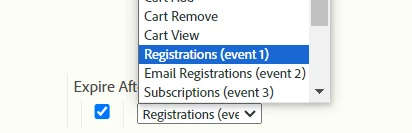
(so instead of my example showing "Expire After Registrations (event 1)", you would have to set up an event that would trigger on the start and end of your flow....
Keep in mind, that your eVar will maintain its value until it hits it's expiry, or until its overwritten... are you sure you need to expire the value at the start / end of this flow? You might be over-complicating your implementation unnecessarily? As in, do you really need to expire the value at these points? Maybe you do, maybe you don't... I am not sure what you are trying to achieve...
You seem to be new to Adobe (based on the questions I've seen), so if you help by explaining what your end goal is, myself and others may have other suggestions for implementation that could make your life easier.