how to create segment for values stores in eVar | Adobe Higher Education
Skip to main content
Level 3
April 14, 2022
해결됨

how to create segment for values stores in eVar

  • April 14, 2022
  • 1 답변
  • 1195 조회

I have another question concerning the tracking of the dimension “Transaction Value” in Adobe Analytics. The dimension items. like “3000” or “10000”, depending on what credit volume a customer requests in his product application for the private credit. These values are captured as discrete values, which means I currently can’t (or just don’t know how to) build segments like this:


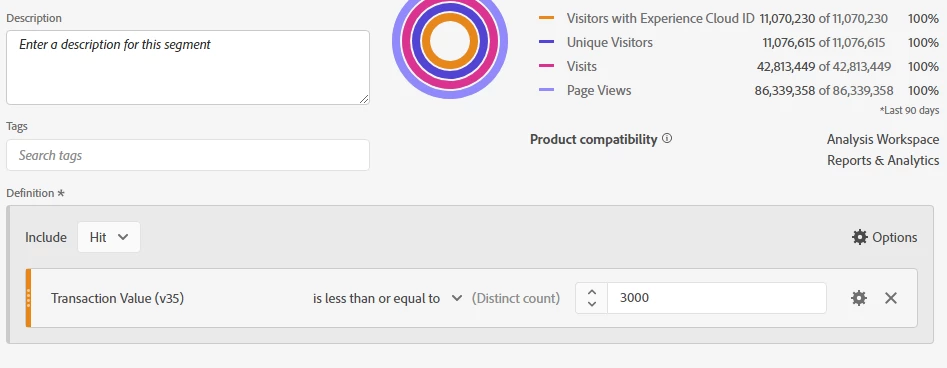
Hits

Transaction Value is less than or equal to 3000
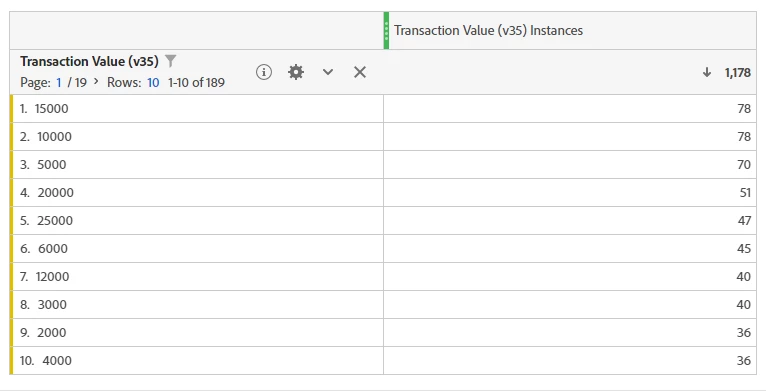
 

The operand returns the distinct count of the transaction value instances but not the actual count of values that match this criteria. Is this because the value is captured in the dimension(1. screenshot of eVar) and not in an event? It seems like we can’t calculate further values with it because of eVar type is "text string". If we change it to "counter" and then create segment , then we can see the correct results ? or need to pass the values in a event?

please suggest me 

1. screenshot of eVar

segment created as follows
 

이 주제는 답변이 닫혔습니다.
최고의 답변: yuhuisg

Your desired segment condition "Transaction Value is less than or equal to 3000" doesn't work because eVar values are always stored as strings. So while you're reading a number 3000, AA only recognises it as the string "3000" and so it cannot perform any math on it.

eVar counters won't work because, as the name suggests, they are used to count, kinda like a hit counter. So you can't specify your own value to the eVar.

So yes, your best option is to use numeric events to track Transaction Values.

One other option is to classify your eVar's values into buckets. Fortunately, Classification Rule Builder supports regular expressions, so that should make the buckets fairly easy to specify.

1 답변

yuhuisg
Community Advisor
yuhuisgCommunity Advisor답변
Community Advisor
April 15, 2022

Your desired segment condition "Transaction Value is less than or equal to 3000" doesn't work because eVar values are always stored as strings. So while you're reading a number 3000, AA only recognises it as the string "3000" and so it cannot perform any math on it.

eVar counters won't work because, as the name suggests, they are used to count, kinda like a hit counter. So you can't specify your own value to the eVar.

So yes, your best option is to use numeric events to track Transaction Values.

One other option is to classify your eVar's values into buckets. Fortunately, Classification Rule Builder supports regular expressions, so that should make the buckets fairly easy to specify.
