how to create segment for bounce rate exclude specific page types? | Community
Skip to main content
Level 7
October 21, 2020
Solved

how to create segment for bounce rate exclude specific page types?

  • October 21, 2020
  • 5 replies
  • 2417 views

Dear Experts, 


Could you please share your idea about titled question? The purpose is to evaluate Search landing experience.


For example, there are following page types:

Home page, FAQ, Product, Checkout, Video


if we want to get bounce rate for all other page types but not "FAQ", how to create the segment?

(coz we consider FAQ is self-sufficient content page, user may read and left, so we want to exclude all FAQ pages from Bounce%)

Here are 2 ideas come up to my mind:

1. Create All Visit segment, Create another Hit segment limits the "page type (prop2) is FAQ", then use following fomular:

Bounce[in ALL Visit] - (minus) Bounce[in FAQ] / Entries[in ALL Visit] - (minus) Entries[in FAQ]
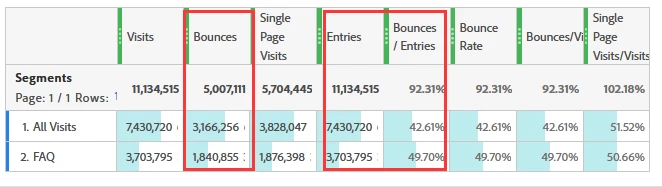


2. Create Visit level segment Exclude "Entry Page Type = FAQ".
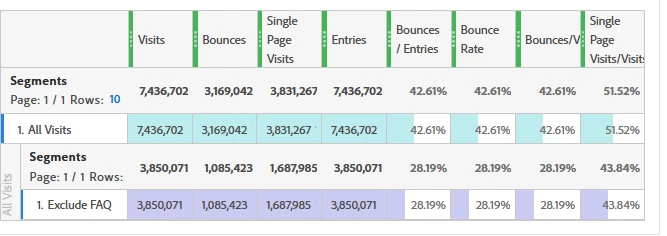
 

But I see significant difference between these 2 method, in method 1, the bounce% is about 32% while it is around 28% in method.


Update: please see my comments and replies, I validated and seems method 1 and 2 neither correct...

Now my only idea is to export ALL page types with Bounce and Entries, then manually calculate , sum up the bounces / sum up the entries by filtering page types does not contain FAQ. 

But that will be a disaster when we want a daily trend chart.....


May I have your professional idea or suggest a better way to calculate the bounce% Exclude specific page type?

(We cannot create segment "Include" specific page types as in the real case, there are about 100 page types.)


Thank you in advance.
This post is no longer active and is closed to new replies. Need help? Start a new post to ask your question.
Best answer by H_L

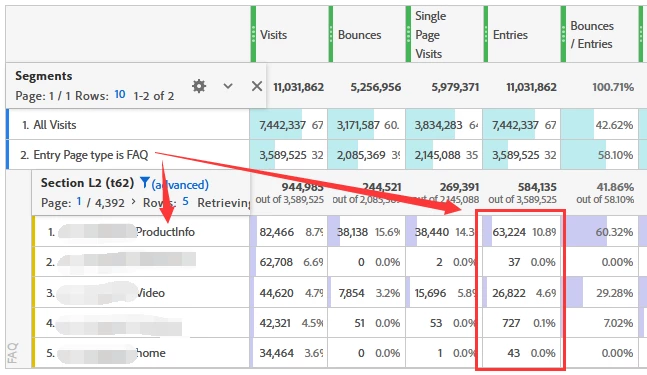
@aaronj39712229, I just tried to drill down the segment in method 2, I use a reverse way to validate: create segment "entry page type = FAQ", but I still can see other page types get "entries". So i think "Exclude Entry Page Type is FAQ" is not accurate as well.


5 replies

H_LAuthor
Level 7
October 21, 2020

I just think the method 1 is not accurate, coz if I set [page type = FAQ], in the segment, will also include other pages entered and then visited "FAQ" pages in the visiting journey... as a result, the "Entries" in the segment is more than actual

Level 3
October 21, 2020
Yes your second idea is the better way to achieve this as you only want to exclude Visits whose Entry page was the FAQ page type
H_LAuthorAccepted solution
Level 7
October 21, 2020

@aaronj39712229, I just tried to drill down the segment in method 2, I use a reverse way to validate: create segment "entry page type = FAQ", but I still can see other page types get "entries". So i think "Exclude Entry Page Type is FAQ" is not accurate as well.


Level 3
October 21, 2020
Ok that looks a bit strange, the other approach could be to exclude visits where the Entry Page (not page type) is a specific set of values
H_LAuthor
Level 7
October 21, 2020

@aaronj39712229, sorry I can only reply you by this "answer" since the design of new layout of this community, "comments" will not allow a paste of image.


I tried to Exclude "Entry Page" (not entry page type) for all FAQ pages, then breakdown by Page Name, I can still see "FAQ" pages listed with Entries.

For example, if I see Page Name contains FAQ listed and without Entries will be reasonable, but the result is we see "entries" for that page as well.

More weird, when I breakdown the Page Name by Entry Page, I cannot find any "FAQ Page" in Entry Page under the FAQ page.


So, I am not sure if the segment is correct or not and how to read the data.

Do you have any idea?

Thank you.


H


jantzen_b
Adobe Employee
Adobe Employee
February 3, 2021
Do any of the answers below answer your initial question? If so, can you select one of them as the correct answer? If none of the answers already provided answer your question, can you provide additional information to better help the community solve your question?