How to configure % of Page viewed in Launch | Adobe Higher Education
Skip to main content
ynxinl55879595
Level 2
July 15, 2019
Resuelto

How to configure % of Page viewed in Launch

  • July 15, 2019
  • 13 respuestas
  • 21712 visualizaciones

Hi all

If need to see % of Page viewed in Analytics, How should I set up my Data elements and  Rules in Launch? thanks

Este tema ha sido cerrado para respuestas.
Mejor respuesta de kumararajak

Hi Yn,

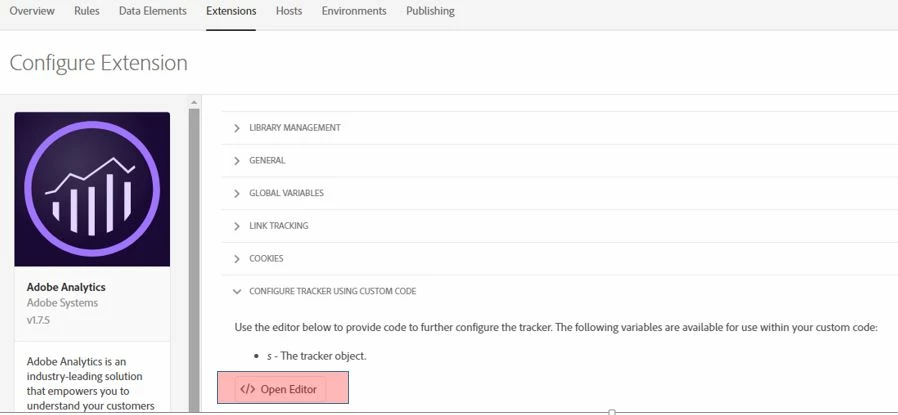
Goto Launch => Web Prperty => Extension => CONFIGURE TRACKER USING CUSTOM CODE => Open Editor, and use the below Plug in code
/*

* Plugin: getPreviousValue_v1.0 - return previous value of designated

*   variable (requires split utility)

*/

s.getPreviousValue=new Function("v","c","el",""

+"var s=this,t=new Date,i,j,r='';t.setTime(t.getTime()+1800000);if(el"

+"){if(s.events){i=s.split(el,',');j=s.split(s.events,',');for(x in i"

+"){for(y in j){if(i[x]==j[y]){if(s.c_r(c)) r=s.c_r(c);v?s.c_w(c,v,t)"

+":s.c_w(c,'no value',t);return r}}}}}else{if(s.c_r(c)) r=s.c_r(c);v?"

+"s.c_w(c,v,t):s.c_w(c,'no value',t);return r}");

/*

* Utility Function: split v1.5 - split a string (JS 1.0 compatible)

*/

s.split=new Function("l","d",""

+"var i,x=0,a=new Array;while(l){i=l.indexOf(d);i=i>-1?i:l.length;a[x"

+"++]=l.substring(0,i);l=l.substring(i+d.length);}return a");

/* Adobe Consulting Plugin: getPercentPageViewed v3.01 w/handlePPVevents helper function (Requires AppMeasurement and p_fo plugin) */

s.getPercentPageViewed=function(pid,ch){var s=this,a=s.c_r("s_ppv");a=-1<a.indexOf(",")?a.split(","):[];a[0]=s.unescape(a[0]);

pid=pid?pid:s.pageName?s.pageName:document.location.href;s.ppvChange=ch?ch:!0;if("undefined"===typeof s.linkType||"o"!==

s.linkType)s.ppvID&&s.ppvID===pid||(s.ppvID=pid,s.c_w("s_ppv",""),s.handlePPVevents()),s.p_fo("s_gppvLoad")&&window

.addEventListener&&(window.addEventListener("load",s.handlePPVevents,!1),window.addEventListener("click",s.handlePPVevents, !1),window.addEventListener("scroll",s.handlePPVevents,!1),window.addEventListener("resize",s.handlePPVevents,!1)),s._ppvPreviousPage

=a[0]?a[0]:"",s._ppvHighestPercentViewed=a[1]?a[1]:"",s._ppvInitialPercentViewed=a[2]?a[2]:"",s._ppvHighestPixelsSeen=a[3]?a[3]:""};

/* Adobe Consulting Plugin: handlePPVevents helper function (for getPercentPageViewed v3.01 Plugin) */

s.handlePPVevents=function(){if("undefined"!==typeof s_c_il){for(var c=0,d=s_c_il.length;c<d;c++)if(s_c_il[c]&&

s_c_il[c].getPercentPageViewed){var a=s_c_il[c];break}if(a&&a.ppvID){var f=Math.max(Math.max(document.body.scrollHeight,

document.documentElement.scrollHeight),Math.max(document.body.offsetHeight,document.documentElement.offsetHeight),Math.max(document.

body.clientHeight,document.documentElement.clientHeight));c=(window.pageYOffset||window.document.documentElement.scrollTop||window.document.body.scrollTop)+(window.innerHeight||document.documentElement.clientHeight||document.body.clientHeight);d=Math.min(Math.round

(c/f*100),100);var e="";!a.c_r("s_tp")||a.unescape(a.c_r("s_ppv").split(",")[0])!==a.ppvID||1==a.ppvChange&&

a.c_r("s_tp")&&f!= a.c_r("s_tp")?(a.c_w("s_tp",f),a.c_w("s_ppv","")):e=a.c_r("s_ppv");var b=e&&-1<e.indexOf(",")?e.split(",",4):[];f=0<b.length?b[0]:

escape(a.ppvID);var g=1<b.length?parseInt(b[1]):d,h=2<b.length?parseInt(b[2]):d;b=3<b.length?parseInt(b[3]):c;0<d&&(e=f+","

+(d>g?d:g)+","+h+","+(c>b?c:b));a.c_w("s_ppv",e)}}};

/* Adobe Consulting Plugin: p_fo (pageFirstOnly) v2.0 (Requires AppMeasurement) */

s.p_fo=function(on){var s=this;s.__fo||(s.__fo={});if(s.__fo[on])return!1;s.__fo[on]={};return!0};

/******************************************** END CODE TO DEPLOY ********************************************/

Check more details on getPercentPageViewed

Hope this helps.

Regards,

Kumararaja K

13 respuestas

ynxinl55879595
Level 2
August 6, 2019

Dear kumararajak

Thanks for your information.

After disabled Data elements and rules in launch and moved the variables settings to Launch => Web Property => Extension => CONFIGURE TRACKER USING CUSTOM CODE => Open Editor,

Now is working properly!

The plugin referred seems not working very well so I changed to the one in getPercentPageViewed

Thanks so much for your support again.

BR,

Ynxin

September 24, 2019

Its not working in my case. kindly upload output screenshot.

September 26, 2019

It worked for a while but it stopped working.  I checked the s_ppv cookie is not getting generated.  My Adobe Analytics extension in launch is current v1.7.8 with AppMeasurement 2.17.0 . I have pasted the below coding in the custom code within the Adobe Analytics extension.

s.usePlugins=true

s.doPlugins=function(s) {

    /* Add calls to plugins here */

  if(s.pageName) s.getPercentPageViewed();

if(s._ppvPreviousPage)

{

s.prop7 = s._ppvPreviousPage;

s.prop10 = s._ppvHighestPercentViewed;

s.prop12 = s._ppvInitialPercentViewed;   

}

/******************************************* BEGIN CODE TO DEPLOY *******************************************/

/* Adobe Consulting Plugin: getPercentPageViewed v3.01 w/handlePPVevents helper function (Requires AppMeasurement and p_fo plugin) */

s.getPercentPageViewed=function(pid,ch){var s=this,a=s.c_r("s_ppv");a=-1<a.indexOf(",")?a.split(","):[];a[0]=s.unescape(a[0]);

pid=pid?pid:s.pageName?s.pageName:document.location.href;s.ppvChange=ch?ch:!0;if("undefined"===typeof s.linkType||"o"!==

s.linkType)s.ppvID&&s.ppvID===pid||(s.ppvID=pid,s.c_w("s_ppv",""),s.handlePPVevents()),s.p_fo("s_gppvLoad")&&window

.addEventListener&&(window.addEventListener("load",s.handlePPVevents,!1),window.addEventListener("click",s.handlePPVevents, !1),window.addEventListener("scroll",s.handlePPVevents,!1),window.addEventListener("resize",s.handlePPVevents,!1)),s._ppvPreviousPage

=a[0]?a[0]:"",s._ppvHighestPercentViewed=a[1]?a[1]:"",s._ppvInitialPercentViewed=a[2]?a[2]:"",s._ppvHighestPixelsSeen=a[3]?a[3]:""};

/* Adobe Consulting Plugin: handlePPVevents helper function (for getPercentPageViewed v3.01 Plugin) */

s.handlePPVevents=function(){if("undefined"!==typeof s_c_il){for(var c=0,d=s_c_il.length;c<d;c++)if(s_c_il[c]&&s_c_il[c].getPercentPageViewed){var a=s_c_il[c];break}if(a&&a.ppvID){var f=Math.max(Math.max(document.body.scrollHeight,document.documentElement.scrollHeight),Math.max(document.body.offsetHeight,document.documentElement.offsetHeight),Math.max(document.

body.clientHeight,document.documentElement.clientHeight));c=(window.pageYOffset||window.document.documentElement.scrollTop||window.document.body.scrollTop)+(window.innerHeight||document.documentElement.clientHeight||document.body.clientHeight);d=Math.min(Math.round

(c/f*100),100);var e="";!a.c_r("s_tp")||a.unescape(a.c_r("s_ppv").split(",")[0])!==a.ppvID||1==a.ppvChange&&

a.c_r("s_tp")&&f!= a.c_r("s_tp")?(a.c_w("s_tp",f),a.c_w("s_ppv","")):e=a.c_r("s_ppv");var b=e&&-1<e.indexOf(",")?e.split(",",4):[];f=0<b.length?b[0]:escape(a.ppvID);var g=1<b.length?parseInt(b[1]):d,h=2<b.length?parseInt(b[2]):d;b=3<b.length?parseInt(b[3]):c;0<d&&(e=f+","+(d>g?d:g)+","+h+","+(c>b?c:b));a.c_w("s_ppv",e)}}};

/* Adobe Consulting Plugin: p_fo (pageFirstOnly) v2.0 (Requires AppMeasurement) */

s.p_fo=function(on){var s=this;s.__fo||(s.__fo={});if(s.__fo[on])return!1;s.__fo[on]={};return!0};

/******************************************** END CODE TO DEPLOY ********************************************/