How to change rows displayed for all dimension rows | Community
Skip to main content
Level 4
June 17, 2019
Solved

How to change rows displayed for all dimension rows

  • June 17, 2019
  • 1 reply
  • 2656 views

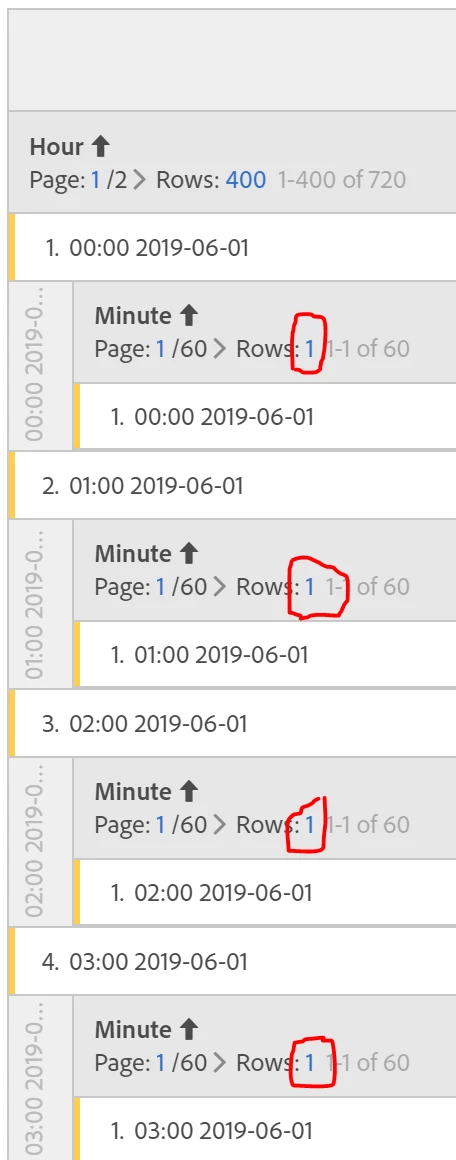
In a workspace project, I have a freeform table with many rows of the first dimension and one metric. I would like to breakdown all of the first dimension rows by a second dimension. I would like to then change the number of second dimension rows that display for each first dimension. How can I do this?

See screenshot - I'd like to change all the circled row numbers at once, either by changing the default for the table, or configuring them all at once.

This post is no longer active and is closed to new replies. Need help? Start a new post to ask your question.
Best answer by Urs_Boller

currently, it is not possible to change all breakdowns together. I believe that Adobe is working on something similar, but haven't heard of a specific function nor a release date. if there isn't an idea about this, best raise one here in the forum

what you can try: change settings for the first breakdown, CTRL+drag&drop breakdown to the other items. maybe it keeps the selected breakdown numbers... never tried it, but worth to check

1 reply

Urs_Boller
Community Advisor
Urs_BollerCommunity AdvisorAccepted solution
Community Advisor
June 17, 2019

currently, it is not possible to change all breakdowns together. I believe that Adobe is working on something similar, but haven't heard of a specific function nor a release date. if there isn't an idea about this, best raise one here in the forum

what you can try: change settings for the first breakdown, CTRL+drag&drop breakdown to the other items. maybe it keeps the selected breakdown numbers... never tried it, but worth to check