How can my Average Time on Site be that different between a table and a Key Metric Summary? | Community
Skip to main content
Level 1
March 5, 2026
Question

How can my Average Time on Site be that different between a table and a Key Metric Summary?

  • March 5, 2026
  • 4 replies
  • 53 views


Good morning,

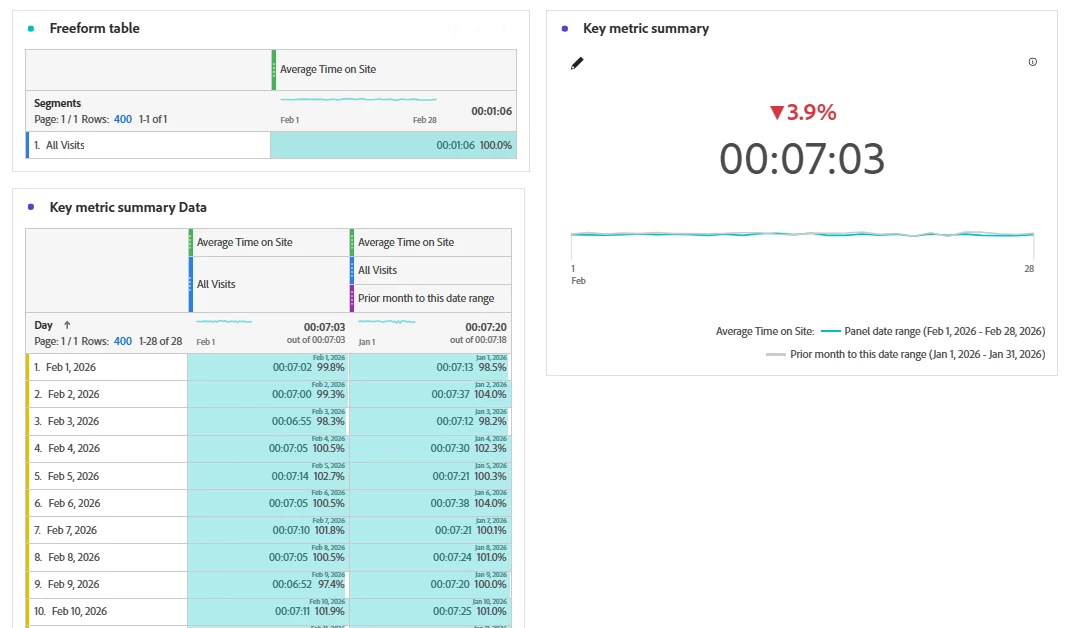
Recently I’ve been trying to make a deep dive on the Time on Site users spend on my web and I noticed that I have a very big difference between the Time on Site we see on the Freeform table for All visits, and the time we see in the the Key Metric Summary, even though we have the same filters applied.

I can tell it’s because of the days average but I would need you as experts to help me understand:

  • Why such a big difference
  • The meaning of each KPI

Thank you in advance!

4 replies

Level 2
March 5, 2026

According to https://experienceleague.adobe.com/en/docs/analytics/components/metrics/average-time-on-site it shows the amount of time that passed between hits for a given dimension item. So in case of the day dimension, the dimension item stays the same for all the hits that day. The question is: What exactly is the dimension for a segment like “All Visits”?

Jennifer_Dungan
Community Advisor and Adobe Champion
March 5, 2026

These are the joys of working with “calculated” values… especially ones (as ​@Ronny3 mentioned) that use a dimension as part of the calculation….


I suspect that some users are making multiple visits in a day, so when you are breaking it down by day, it’s taking all the times from all visits per user and finding the average spent on the day… but when you are looking just at “All Visits” it’s finding the average of each visit.

Level 1
March 6, 2026

Hi ÁlvaroGa5,

This is a classic and very common point of confusion with averages in analytics. The other replies are on the right track—it comes down to what is called the "average of averages."

Here is the mathematical explanation for the difference you are seeing:

  1. In the Freeform Table (broken down by Day): The table first calculates an average time on site for each individual day. Then, it takes those daily averages and averages them together to show you the final number in the table. This is an average of averages.

  2. In the Key Metric Summary (for "All Visits"): This takes the total time on site from every single visit in the entire date range and divides it by the total number of visits. This is the true, overall average.

Why they are different: The average of averages (in the table) can be skewed if you have days with very few visits. For example, a day with only 2 visits that both lasted a long time will pull the table's average up more than it should, compared to the overall metric which correctly weights each visit equally.

In calculus terms, it is the difference between looking at the average rate of change over a large interval (the Key Metric Summary) versus looking at the average of many smaller intervals' rates (the table).

To get the table to match the Key Metric Summary, you would need to calculate a "Weighted Average" of the daily times, where each day's average is multiplied by the number of visits that day before averaging. This gives more importance to days with more traffic.

I built a free step-by-step calculus tool (Derivative Calculus) to help people visualize exactly these kinds of mathematical relationships, like how a rate changes across different intervals. Understanding this "average vs. average of averages" is a perfect real-world example of the concept.

Hope this helps clarify what you are seeing in your data!
Jacinda E
Community Manager
Community Manager
March 11, 2026

Hi ​@ÁlvaroGa5 - just wanted to follow up here. Did any of these responses help answer your question? If so, please consider marking a best answer to close out the thread and help anyone else with this question find the answer in the future 🙏