Level 2
Dec 20, 2024 2:01 AM UTC
Solved

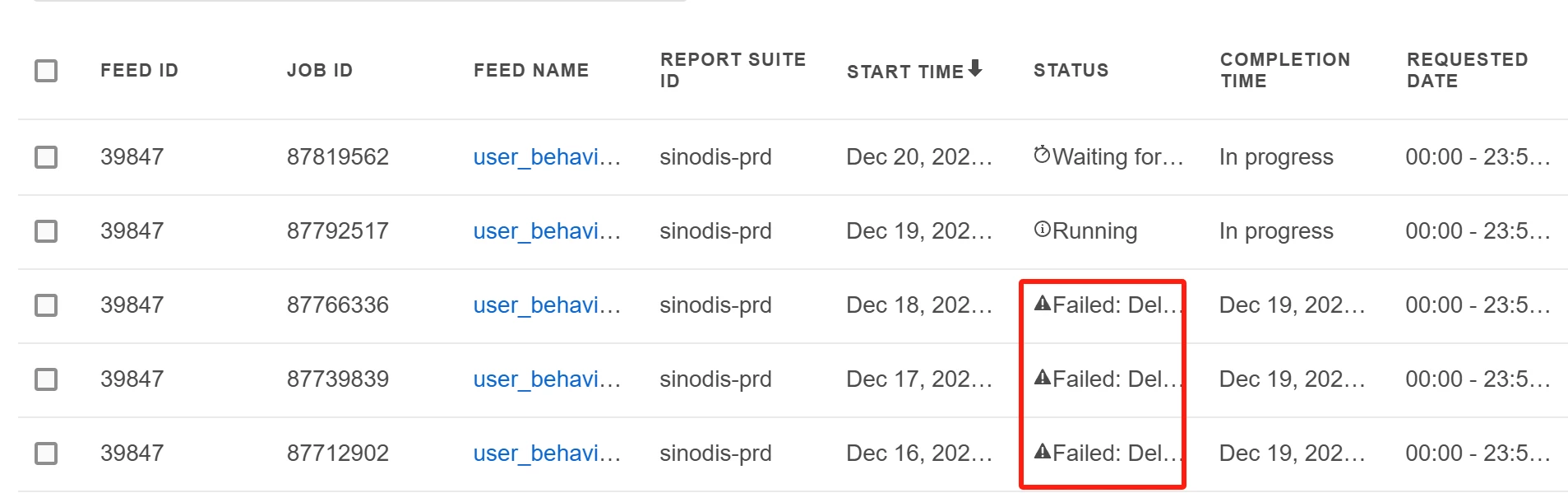
How can I find the specific error details for the Data Feed job?

Hello,

My Data Feed job was running fine before December, but it has been failing constantly since December. However, I cannot see the specific error details. Could you let me know where I can check the error information, or can you help me identify the issue based on the ID or other information shown in the screenshot?



This post is no longer active and is closed to new replies. Need help? Start a new post to ask your question.
Harveer_SinghGi1
Harveer_SinghGi1Accepted solution
Adobe Champion, Community Advisor, UG Leader
Dec 20, 2024 4:52 PM UTC

Normally if a feed running successfully suddenly starts failing it is most probably related to delivery location issues like

  1. Not enough space,
  2. Change in the delivery destination (FTP folder getting deleted or renamed)
  3. FTP account being not active/accessible at all

You can make sure none of the above are causing the failures and try to rerun the failed feeds.

More on data feeds troubleshooting can be found here:

https://experienceleague.adobe.com/en/docs/analytics/export/analytics-data-feed/troubleshooting

4 replies

Jennifer_Dungan
Adobe Champion and Community Advisor
Dec 20, 2024 3:57 AM UTC

As far as I am aware, there are no logs for us to check issues ourselves... from the error message, it looks like some sort of delivery error, but what that issue is.. it's hard to say exactly.


Unfortunately, I think the only way to get more details is to contact Client Care to look into the specific logs (or to work with them to run a feed and have them monitor it for issues).


I wish I could be more help.


Good luck finding the issue!

Translate
MandyGeorge
Adobe Champion, Community Advisor, UG Leader
Dec 20, 2024 2:43 PM UTC

Like @jennifer_dungan mentioned, there's no logs specific to the data feeds, so it isn't really possible to see why they failed. I know from experience that if two files try to drop at the exact same time, it can cause an issue - are there multiple feeds going to the same destination?


The other thing you can check is if any changes were made to the report suite. There are logs for report suite changes that you can get through the admin settings. Check in there and see if any changes were made that could potentially impact the settings.


If that fails, then reach out to client care and hopefully they can assist.

Translate
Harveer_SinghGi1
Adobe Champion, Community Advisor, UG Leader
Harveer_SinghGi1Adobe Champion, Community Advisor, UG LeaderAccepted solution
Adobe Champion, Community Advisor, UG Leader
Dec 20, 2024 4:52 PM UTC

Normally if a feed running successfully suddenly starts failing it is most probably related to delivery location issues like

  1. Not enough space,
  2. Change in the delivery destination (FTP folder getting deleted or renamed)
  3. FTP account being not active/accessible at all

You can make sure none of the above are causing the failures and try to rerun the failed feeds.

More on data feeds troubleshooting can be found here:

https://experienceleague.adobe.com/en/docs/analytics/export/analytics-data-feed/troubleshooting

Translate
Jennifer_Dungan
Adobe Champion and Community Advisor
Dec 20, 2024 5:09 PM UTC

Agreed, try to diagnose any potential issues with the location first. If it's something that can be fixed easily then you can save a lot of time.

Translate