This sounds like standard attribution reporting....
So there are standard ways of tracking this (Tracking Code and Marketing Channels), as well as custom tracking (eVars)... I use all three.
Starting with Marketing Channels... this is going to be the most complex of the rules... this will look at more than just campaign codes, but also look at traffic coming from search engines, and other organic traffic that doesn't have any campaign codes.
Marketing Channels by default have a 30 day attribution.. so the last channel interacted with, within a 30 day time frame, will be attributed to the purchase... you can also look at cross channel attribution using models such as linear or participation, etc. (This should be external campaigns only)
Next, you have pure Tracking Code... this is the s.campaign value. This only tracks your campaign codes, and by default this has a 7 day attribution... Because Marketing Channels and Tracking Code have different behaviours and attribution models, they can conflict in what they are telling you. (This should be external campaigns only)
Lastly, you can also do you own custom tracking using eVars... I like to track my External Campaigns in Visit level eVars, as well as additional eVars for my Internal Campaigns.. I typically set these to Visit level expiry.
So let's look at some examples:
Visit 1 - Organic Search
- Page 1
- Marketing Channel set to "Organic Search"
- Marketing Channel Detail set to "Google"
- Tracking Code not set
- Campaign eVar not set
- Page 2
- Marketing Channel retains value "Organic Search" due to 30 day attribution
- Marketing Channel Detail retains value "Google" due to 30 day attribution
- etc
Visit 2 - Marketing Email (2 Days Later)
- Page 1
- Marketing Channel set to "Marketing Email"
- Marketing Channel Detail set to "campaignX"
- Tracking Code set to "campaignX"
- Campaign eVar set to "campaignX"
- Page 2
- Marketing Channel retains value "Marketing Email" due to 30 day attribution
- Marketing Channel Detail retains value "campaignX" due to 30 day attribution
- Tracking Code retains value "campaignX" due to 7 day attribution
- Campaign eVar retains value "campaignX" due to visit attribution
Visit 3 - Direct Traffic (1 Day Later)
- Page 1
- Marketing Channel retains value "Marketing Email" due to 30 day attribution
- Marketing Channel Detail retains value "campaignX" due to 30 day attribution
- Tracking Code retains value "campaignX" due to 7 day attribution
- Campaign eVar not set (outside of Visit expiry)
Visit 4 - Direct Traffic (14 Days Later)
- Page 1
- Marketing Channel retains value "Marketing Email" due to 30 day attribution
- Marketing Channel Detail retains value "campaignX" due to 30 day attribution
- Tracking Code not set (outside of 7 day expiry)
- Campaign eVar not set (outside of Visit expiry)
Now, if you were to make a purchase at the end of Visit 1... you will have a Marketing Channel value, but nothing for Tracking Code or Custom eVar
If you were to make a purchase at the end of Visit 2, all three of the values should be aligned... since they are all based on URL campaigns and all three are within the expiry
If you were to make a purchase at the end of Visit 3, Marking Channel and Tracking Code would be aligned (both are within their respective expiries), but your Custom Tracking at the Visit level would show that there was no campaign on this specific visit.
And finally, if you were to make a purchase at the end of Visit 4... only Marketing Channel, with its 30 day attribution would show any value.
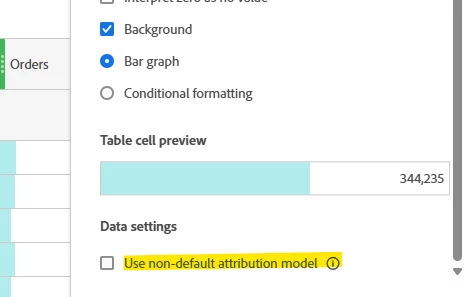
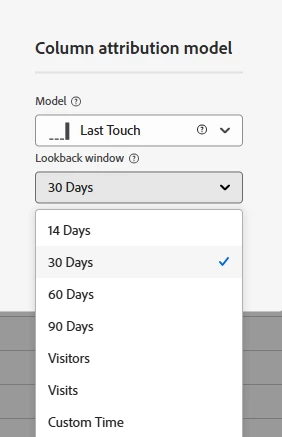
However, you could apply custom attribution models to Tracking Code or Custom eVar to see farther back than their set "attributions", if you needed that:
More information:
https://experienceleague.adobe.com/en/docs/analytics/components/marketing-channels/c-getting-started-mchannel
https://experienceleague.adobe.com/en/docs/analytics/components/dimensions/tracking-code