Google Ads Conversion Pixels not working | Community
Skip to main content
Level 4
May 25, 2023
Solved

Google Ads Conversion Pixels not working

  • May 25, 2023
  • 2 replies
  • 1125 views

Dear All, 

We would like to implement Google Conversion Pixels on our website:
Google Ads, that we prepared here, but it is not working . Could you please help
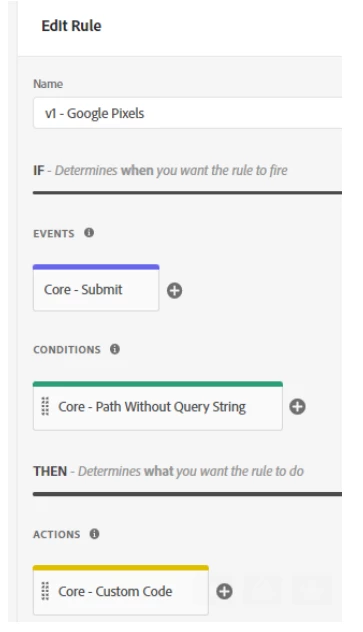
It should fire, when someone clicks on the Submit button (successfully sent form)
Before implementing Usercentrics it worked, with the rule above, but currently it does not work anymore.


<!-- Event snippet for Surgery Contact Form Submit conversion page
In your html page, add the snippet and call gtag_report_conversion when someone clicks on the chosen link or button. -->
<script>
function gtag_report_conversion(url) {
  var callback = function () {
    if (typeof(url) != 'undefined') {
      window.location = url;
    }
  };
  gtag('event', 'conversion', {
      'send_to': 'AW-273165026/ljXNCJnZ3-cBEKKmkGKP',
      'event_callback': callback
  });
  return false;
}
</script> 

This post is no longer active and is closed to new replies. Need help? Start a new post to ask your question.
Best answer by kamlesh-maddheshiya

Hi @priyankagupta20 ,

It seems there is something in the website that is blocking our code which you don't have control of(that code used to block third-party scripts). To confirm the same, you have to disable this for now.

Please paste the same code under the Action “Adobe Analytics – Set Variables à Custom code”,
it would works.
If not possible then I would recommend below 2 steps.
   1. For page load rules, try changing the event for the rule to page top or page bottom.
   2. For submit or clicks, try using the Adobe Analytics extension's Set Variables and add the desired custom code there.

2 replies

Jennifer_Dungan
Community Advisor and Adobe Champion
May 25, 2023

I don't think you need some of that code....


The callback portion of this is really for when trying to call the conversion directly within the code from the button click.. but you have the Adobe trigger for that...


try just using this in your custom code:

gtag('event', 'conversion', { 'send_to': 'AW-273165026/ljXNCJnZ3-cBEKKmkGKP' });


This is all I use, and it's working fine for me.

Level 4
June 23, 2023

Thank you so much @jennifer_dungan .
I tried it but its not working.

Jennifer_Dungan
Community Advisor and Adobe Champion
June 23, 2023

Would you be willing to share a link to your site and where the pixels should be triggered so that we can see if there are any errors that would help us see the problem? Even sharing a link in Private Message if you don't want the link available publicly.

kamlesh-maddheshiya
Community Advisor
kamlesh-maddheshiyaCommunity AdvisorAccepted solution
Community Advisor
June 23, 2023

Hi @priyankagupta20 ,

It seems there is something in the website that is blocking our code which you don't have control of(that code used to block third-party scripts). To confirm the same, you have to disable this for now.

Please paste the same code under the Action “Adobe Analytics – Set Variables à Custom code”,
it would works.
If not possible then I would recommend below 2 steps.
   1. For page load rules, try changing the event for the rule to page top or page bottom.
   2. For submit or clicks, try using the Adobe Analytics extension's Set Variables and add the desired custom code there.