Getting significant Amount of None Traffic | Community
Skip to main content
Level 1
January 23, 2026
Solved

Getting significant Amount of None Traffic

  • January 23, 2026
  • 2 replies
  • 100 views

Hello togehter,

We see an unusually high volume of traffic with the source set to “None” in an Adobe form. For me It is currently unclear why this traffic is not attributed correctly.


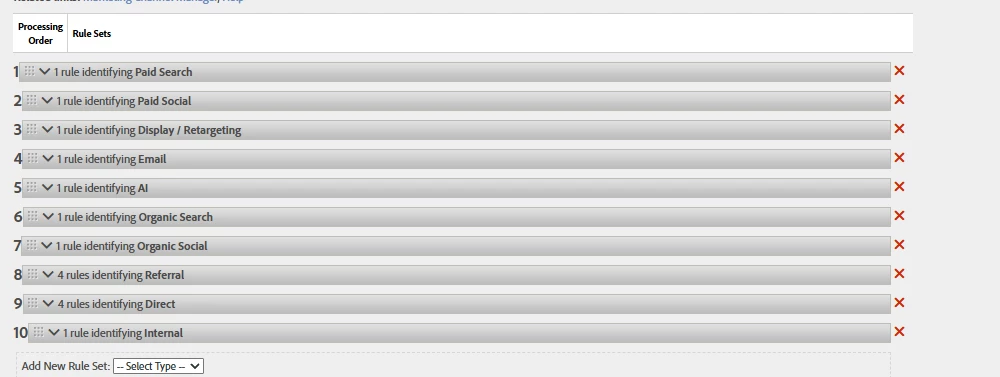
  • Based on the Marketing Processing Rules, do you see any issues that could cause “None” traffic?

    Thanks and kind regards robin

Best answer by Jennifer_Dungan

Hi ​@RobinBl1,


When was the last time you updated your Marketing Channel rules? And what is the attribution period for them (standard 30 days, or something custom)? Basically, have you updated the rules within the attribution time frame that could allow previously “uncaught” buckets to not yet have a value.


While showing us your “basic list of rules” is great, I cannot see what any of those rules are doing… it’s possible that there are problems in the rules (either typos that make the rules not work, or maybe the rules are too specific, causing many examples to not get caught and there is nothing else in the list that they match, so they fall all the way through).


These Rules are pretty simple, you can match “all” or match “any”… there is no “X AND (Y or Z)” type logic.


I often have multiple rules for the same bucket to properly catch different scenarios. So that I can do one rule for “X AND Y” and another rule for “X and Z” (set to the same channel).


In your first image, you only have 6 of your 10 available channels present… that might just be because not all your channels lead to conversion…. but again, without access to your data, I can’t did into what might be collected in your “none”.


My first recommendation is to review ALL your marketing channel rules.


Also, use the Marketing Channel Instance metric to check all the entry points, and dig deeper into the None category, look for Referrer or other indications of where that traffic came from, so that you can did deeper into the logic of your Processing Rules and figure out what isn’t working properly.


Good Luck!

2 replies

Jennifer_Dungan
Community Advisor and Adobe Champion
Jennifer_DunganCommunity Advisor and Adobe ChampionAccepted solution
Community Advisor and Adobe Champion
January 23, 2026

Hi ​@RobinBl1,


When was the last time you updated your Marketing Channel rules? And what is the attribution period for them (standard 30 days, or something custom)? Basically, have you updated the rules within the attribution time frame that could allow previously “uncaught” buckets to not yet have a value.


While showing us your “basic list of rules” is great, I cannot see what any of those rules are doing… it’s possible that there are problems in the rules (either typos that make the rules not work, or maybe the rules are too specific, causing many examples to not get caught and there is nothing else in the list that they match, so they fall all the way through).


These Rules are pretty simple, you can match “all” or match “any”… there is no “X AND (Y or Z)” type logic.


I often have multiple rules for the same bucket to properly catch different scenarios. So that I can do one rule for “X AND Y” and another rule for “X and Z” (set to the same channel).


In your first image, you only have 6 of your 10 available channels present… that might just be because not all your channels lead to conversion…. but again, without access to your data, I can’t did into what might be collected in your “none”.


My first recommendation is to review ALL your marketing channel rules.


Also, use the Marketing Channel Instance metric to check all the entry points, and dig deeper into the None category, look for Referrer or other indications of where that traffic came from, so that you can did deeper into the logic of your Processing Rules and figure out what isn’t working properly.


Good Luck!
manpreetkaur27
Adobe Support
Adobe Support
June 9, 2026

Jennifer is right. The issue is most likely related to the Marketing Channel Processing Rules configuration.

She pointed out a few key things:

  • The rules may not have been updated recently, or changes may still be within the attribution window, which can affect how traffic is categorized.

  • Some rules could be too specific or contain typos, causing traffic to fall into the “None” bucket.

  • Since Adobe’s rule logic only supports simple “match all” or “match any” conditions, multiple rules are often needed to properly capture different scenarios.

  • Only 6 out of 10 channels appear in your report, which suggests some traffic may not be getting classified correctly.

If you'd like, you can also raise a support ticket so the setup can be debugged more thoroughly.