Getting None in my Direct Marketing Channel Detail | Community
Skip to main content
Level 2
March 16, 2026
Question

Getting None in my Direct Marketing Channel Detail

  • March 16, 2026
  • 1 reply
  • 14 views

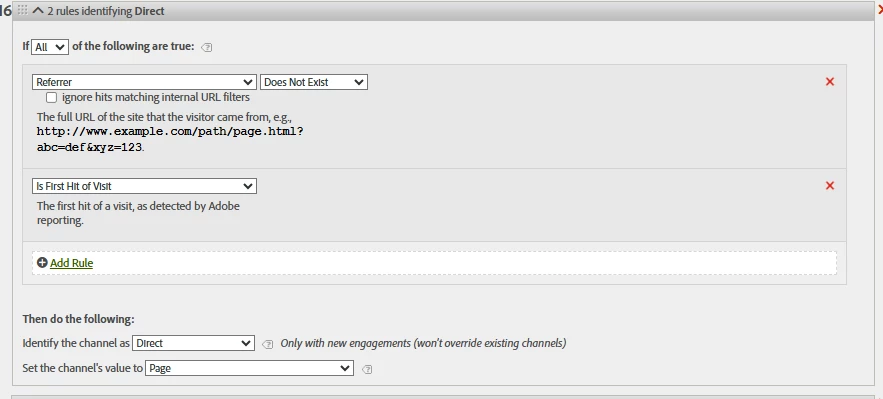
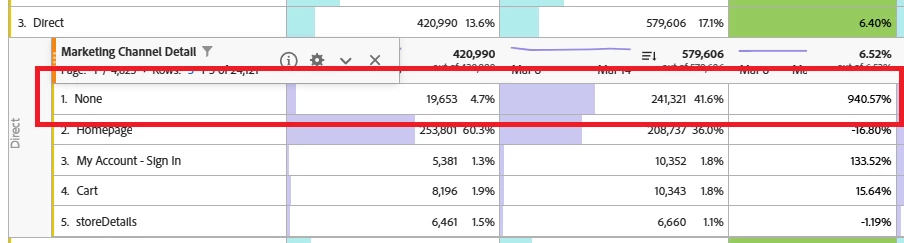
In our marketing channel set up we saw a spike in traffic coming into our Direct Channel. In the marketing channel detail it is all going into None, where the rule is set to show what page it is on. We have no changed anything on our end and am wondering why this is happening. We have had this rule running for years and now we are facing this issue. 


1 reply

Jennifer_Dungan
Community Advisor and Adobe Champion
March 16, 2026

“None” is a catchall bucket that can be set when none of your rules match.

Without seeing ALL your rules and how specific they are, we won’t be able to identify what traffic is falling through the cracks.


This can be caused by you having very specific rules, and new types of campaign data (either intentional from your teams, or something coming from an external source), that you aren’t capturing. Or it could be triggered by some change in Adobe… 


On that note, why are you specifically looking only for “Referrer” traffic on the “first hit of the visit”?? This will lose a lot of potential referrer traffic mid-visit..


In general, “first hit of the visit” is only used for Direct or Internal, nothing else, because the potential to lose traceability is too great.


Example:

Visit 1:

  • (Direct Entry)
  • Page A
    • Marketing Channel set to “Direct”
  • Page B
    • Marketing Channel retains value “Direct”
  • Page C
    • Marketing Channel retains value “Direct”
  • (User opens a new tab, and clicks on a link to your site from “SiteB.com”)
  • Page D
    • In most setups, the Marketing Channel will now be set to “Referrer”
    • In your setup, this is ignored
  • Page E
    • In most setups, the Marketing Channel retains value “Referrer”
    • In your setup, Marketing Channel retains value “Direct”
  • Conversion - Order
    • In most setups, the Marketing Channel retains value “Referrer” (so “Referrer” will be associated to this conversion, and by Participation Attribution, you will see both Direct and Referrer)
    • In your setup, Marketing Channel retains value “Direct” (your conversion will only see “Direct” - all information about the Referrer channel is lost)


Visit 2:

  • (User does a Google Search)
  • Page F
    • Marketing Channel set to “Search Engine”


In your rules, you won’t have any channel information about your Referrer… 

Level 2
March 16, 2026

Hi Jennifer,

Thanks for your response. 

My concern is that we started to see a spike in none traffic in our Direct Channel without an explanation and without our rules changing. 

Our direct rule is set up to indicate if on the first hit of the visit there is no referrer than consider the traffic to be direct. We have a following rule that manages referring domain traffic so it doesn’t slip through in the waterfall and we are able to see referrer traffic 

We see a clear shift in traffic and need to understand why it is happening. Please see the screenshot below. 


Jennifer_Dungan
Community Advisor and Adobe Champion
March 16, 2026

Did your website happen to add something that might trigger tracking before the page view (like an overlay, or a banner tracking, etc)?


For instance:

  • (user loads page a)
  • overlay appears and is tracked
    • there is no “Page” value since this is an action
  • page view for the page is tracked


Sadly, the Marketing Channel rules are “first hit” not “first page view”… so if the first page loaded happens to load the tracking calls out of sequence, then you might not have a “Page” value.


One thing that I do, is I have a “Page Name” eVar that is set on all pages and events, and I set my detail to “Page Name” just in case anything sequence breaks…. 


That might be the cause of the issue (i.e. not having a “Page” value on the first hit)?