GA4 cookies expiry session based issue | Community
Skip to main content
Level 4
November 20, 2024
Solved

GA4 cookies expiry session based issue

  • November 20, 2024
  • 1 reply
  • 632 views

Hi Team,


I'm using the Global Site Tag (gtag.js) by Acronym extension in Adobe Launch and have configured it with prod measurement ID.

However, I'm encountering an issue where the GA4 cookies are showing session-based expiry. Notably, I haven't configured any specific settings related to cookie expiration within the extension.


Could anyone please help me understand why the cookies are being set up with session-based expiry?


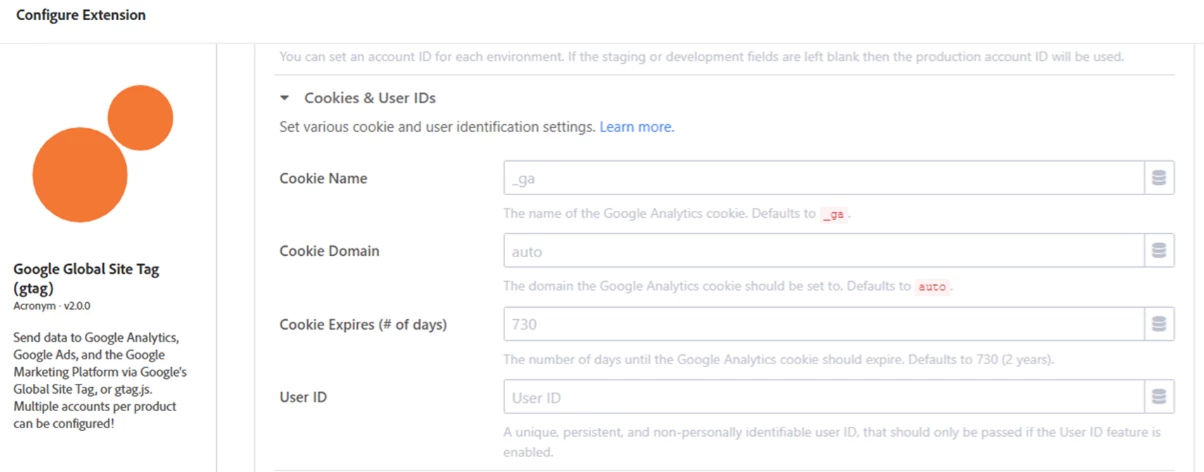
Extension Cookies & User IDs Screen:
 

Site _ga Cookies screen:

 

This post is no longer active and is closed to new replies. Need help? Start a new post to ask your question.
Best answer by Jennifer_Dungan

Ok, I am not suspicious that there is something broken in this extension... 


From the "auto" populated "730 days", I manually typed in "730"


And checked my site in incognito... It's not "session" any more... but it's also not 2 years... the expiry is set to today and about 12 mins from the current time...

2024-11-20T16:14:21.000Z


I think that the "730" is actually the number of seconds, as opposed to days


So, I did a test, using "31540000", which should be 1 year (365 days) if I am correct....


The reran my test in a new incognito window, and the results:

2025-11-20T17:18:17.000Z

That's looking a lot better....


So to get 2 years, I would say manually use "63070000"

1 reply

Jennifer_Dungan
Community Advisor and Adobe Champion
November 20, 2024

Interesting... I am seeing the same thing on my implementations using this extension... but sites using GTM have a longer life... 


Let me see if I can find anything about this and get back to you

Jennifer_Dungan
Community Advisor and Adobe Champion
Jennifer_DunganCommunity Advisor and Adobe ChampionAccepted solution
Community Advisor and Adobe Champion
November 20, 2024

Ok, I am not suspicious that there is something broken in this extension... 


From the "auto" populated "730 days", I manually typed in "730"


And checked my site in incognito... It's not "session" any more... but it's also not 2 years... the expiry is set to today and about 12 mins from the current time...

2024-11-20T16:14:21.000Z


I think that the "730" is actually the number of seconds, as opposed to days


So, I did a test, using "31540000", which should be 1 year (365 days) if I am correct....


The reran my test in a new incognito window, and the results:

2025-11-20T17:18:17.000Z

That's looking a lot better....


So to get 2 years, I would say manually use "63070000"