Freeform table - highlighting rows or specific numbers | Community
Skip to main content
October 10, 2021
Solved

Freeform table - highlighting rows or specific numbers

  • October 10, 2021
  • 1 reply
  • 1405 views

Hi there,

I created a freeform table with several segments in rows.


I want to show where 1 segment ranks among others (ex. highlight row 3/segment c of 10 rows displayed). Is it possible to highlight just the row that displays the segment in question (ex row 3/segment c) and keep this highlighting persistent so that viewers can easily se the key segment when they come to the report suite?

  • If available, does the configuration differ if the row is a metric or a dimension?
  • If available, can this highlighting be locked to the segment so that if we reorder by a different column the highlighting moves with the segment?


Is it possible to highlight and keep persistent specific cells in a free form table to highlight performance?


Thank you!

Jen
This post is no longer active and is closed to new replies. Need help? Start a new post to ask your question.
Best answer by Garretth

Hi, 


I think your specific use case does not have an existing feature, but would be worth submitting as an idea on these forums. 


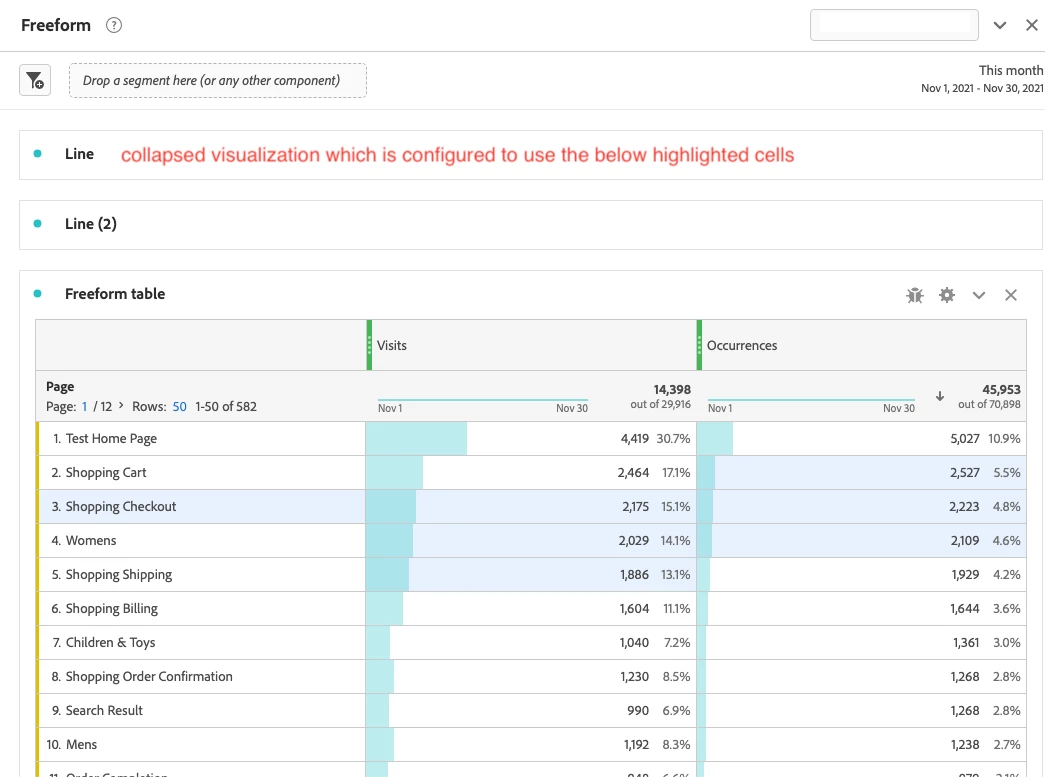
The best solutions for the type of problem using what is available now that I can think of would be to select the cells you want highlighted and create a visualization, you could then collapse the visualization and move it out of the way, but this will result in highlighted cells that will persist after you've saved the project. For example: 


Intra-linking is another option for bringing attention to particular items in a workspace project: 
https://experienceleague.adobe.com/docs/analytics-learn/tutorials/analysis-workspace/visualizations/intra-linking-in-analysis-workspace.html?lang=en


1 reply

GarretthAdobe EmployeeAccepted solution
Adobe Employee
November 3, 2021

Hi, 


I think your specific use case does not have an existing feature, but would be worth submitting as an idea on these forums. 


The best solutions for the type of problem using what is available now that I can think of would be to select the cells you want highlighted and create a visualization, you could then collapse the visualization and move it out of the way, but this will result in highlighted cells that will persist after you've saved the project. For example: 


Intra-linking is another option for bringing attention to particular items in a workspace project: 
https://experienceleague.adobe.com/docs/analytics-learn/tutorials/analysis-workspace/visualizations/intra-linking-in-analysis-workspace.html?lang=en