Free Form table Metric Comparison | Community
Skip to main content
New Member
July 4, 2025
Solved

Free Form table Metric Comparison

  • July 4, 2025
  • 2 replies
  • 576 views

Hi.

I've created a free-form table with metrics in the rows and different time ranges in the columns. I would like to add a third column showing the % change between the two time ranges.

Is this even possible? I´ve tried to scribble it on the screenshot.


Many thanks for your effort in advance.

BR

Best answer by Isha Gupta

Hi @martinpo3 ,


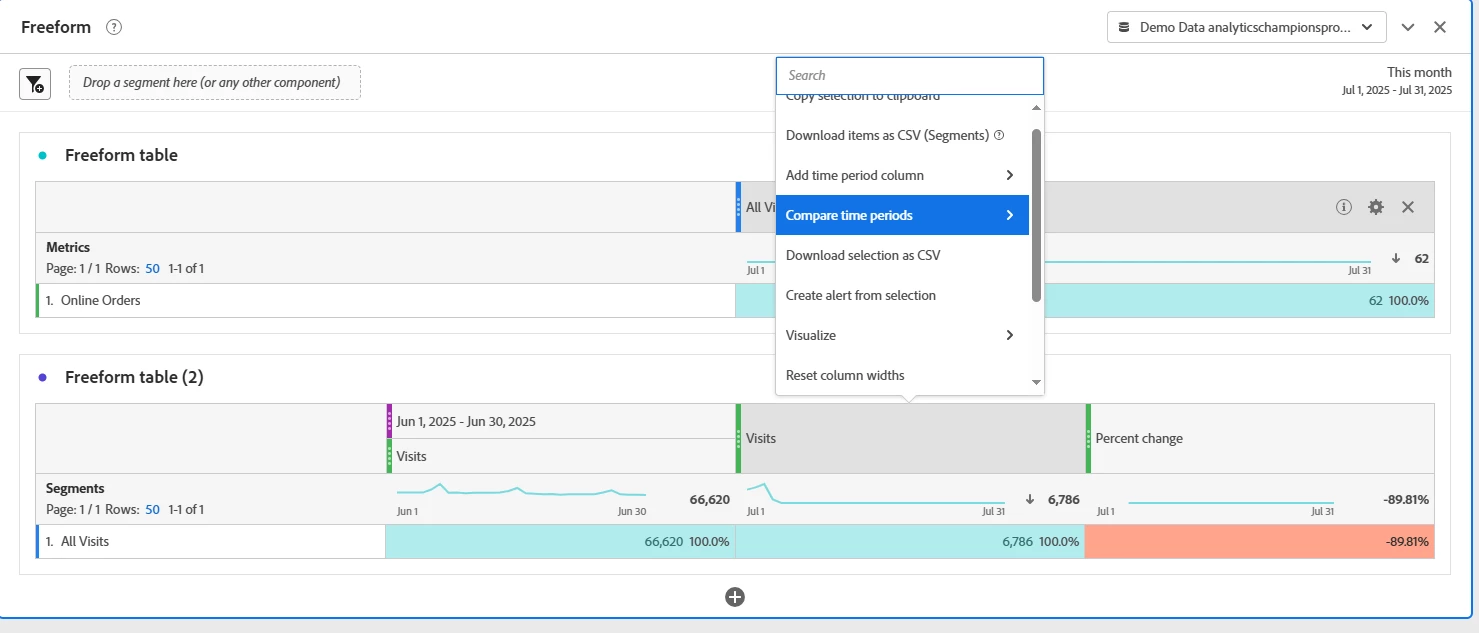
You can right click on the metric and use "Compare Time Periods" which will give you close to what you are looking for. One caveat, if you are using metrics the way you are creating table, it won't give you an option to Compare only Add. Also, it wouldn't work for calculated metrics.

More info on this - https://experienceleague.adobe.com/en/docs/analytics/analyze/analysis-workspace/components/calendar-date-ranges/time-comparison


2 replies

Isha Gupta
Community Advisor and Adobe Champion
Isha GuptaCommunity Advisor and Adobe ChampionAccepted solution
Community Advisor and Adobe Champion
July 4, 2025

Hi @martinpo3 ,


You can right click on the metric and use "Compare Time Periods" which will give you close to what you are looking for. One caveat, if you are using metrics the way you are creating table, it won't give you an option to Compare only Add. Also, it wouldn't work for calculated metrics.

More info on this - https://experienceleague.adobe.com/en/docs/analytics/analyze/analysis-workspace/components/calendar-date-ranges/time-comparison


MandyGeorge
Community Advisor and Adobe Champion
July 4, 2025

It is possible to do a percent change comparison between two time periods, but not with the way that you have it laid out. 

A percent change is a metric, and you can't put a metric against a metric. What you need to do is have a dimension or a segment along the left (not a time based dimension, because the percent change won't work with that, you need something like pages, products, etc. or you can even just use an 'all visits' segment). Then along the top, put your metric and your default date range. 

Then right click, select "compare time periods", you can select a custom time period and make it whatever you need it to be. It will then create two new columns, the comparison time period column, and a percent change column.