Flow diagram on Adobe not showing total number of pages correctly (don't add up) | Community
Skip to main content
November 15, 2024
Solved

Flow diagram on Adobe not showing total number of pages correctly (don't add up)

  • November 15, 2024
  • 1 reply
  • 771 views

Has anyone encounter this before and would know what it

 

This post is no longer active and is closed to new replies. Need help? Start a new post to ask your question.
Best answer by MandyGeorge

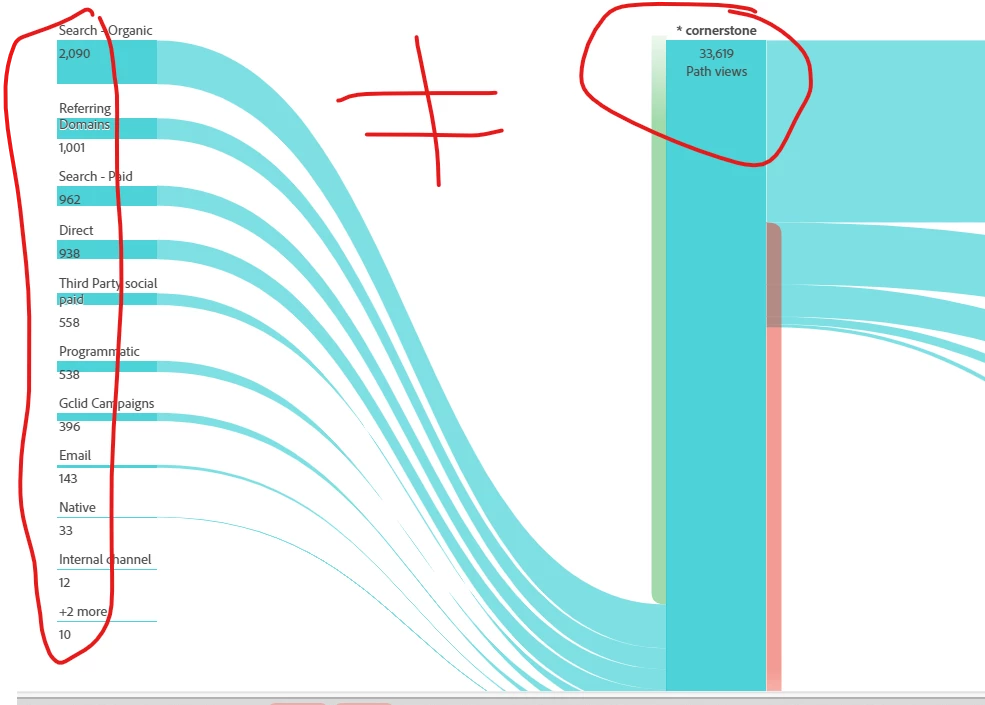
When you have the flow diagram like that, the column to the left shows where they came from. But the part you have circled are the ones that are not entries (meaning they saw another value before the current one). If you look just to the left of the main column, you'll notice a long, thin, green line. That is the entries. If you hover over it, it will show you how many people entered on your value. That plus the ones that saw a previous value should add up to your total.

1 reply

MandyGeorge
Community Advisor and Adobe Champion
MandyGeorgeCommunity Advisor and Adobe ChampionAccepted solution
Community Advisor and Adobe Champion
November 15, 2024

When you have the flow diagram like that, the column to the left shows where they came from. But the part you have circled are the ones that are not entries (meaning they saw another value before the current one). If you look just to the left of the main column, you'll notice a long, thin, green line. That is the entries. If you hover over it, it will show you how many people entered on your value. That plus the ones that saw a previous value should add up to your total.

KarinaKo1Author
November 15, 2024

Ahhhh this now makes sense. Not very intuitive for completeness purposes but at least now I can add all numbers up! Thank you so much for the quick reply! 🙂

Karina

MandyGeorge
Community Advisor and Adobe Champion
November 15, 2024

Yes, I agree it would be nice if it had a header and/or number visible (before hovering over it). 

Also, on the right of that middle column, the thin orange bar is the exits (so people that didn't do any more actions after that one), in case you need to do the other side.