Fallout Visualization - using segment as a touchpoint vs applying to fallout overall gives different result | Community
Skip to main content
July 22, 2024
Solved

Fallout Visualization - using segment as a touchpoint vs applying to fallout overall gives different result

  • July 22, 2024
  • 1 reply
  • 1270 views

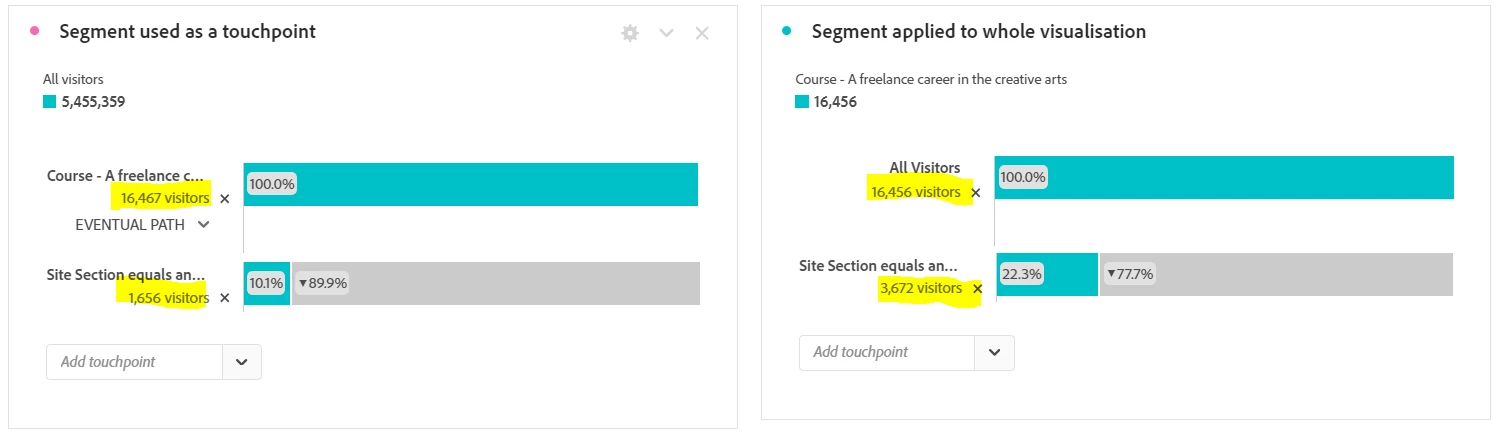
I am struggling to understand why using a segment as the first touchpoint in a fallout visualisation gives me a different result to applying the segment to the funnel as a whole? In the image below the first number in both funnels is very similar, and even though the next step is the same, the fallout values are very different. The difference is in the left image I've applied the 'Course -' segment to the touchpoint whereas on the right I applied it to the whole funnel. I noticed that on the left the 'eventual path' option appeared, which isn't an option on the right, but can't think that this should make a difference? The funnel on the right must also be using eventual path.


This post is no longer active and is closed to new replies. Need help? Start a new post to ask your question.
Best answer by Jennifer_Dungan

Thanks 🙂


Are you running this fallout on "this month" data (or really anything that includes today)? That could account for the top level variance of about 11 people (if you have data actively coming in, the time at which each visualization was calculated, there could be differences).


However, I think that the reason your "Site Section equals...." step is so far off is because there is a difference in the pathing...


On the "segment as step" version, the user must hit the segment first, then they hit the section (and that section doesn't necessarily meet the hit criteria of your segment...)


Example: HIT segment page title contains "abc"


Page A > Page ABC > Section Page ABC

OR

Page A > Page ABC > Section Page C


would both match, the segment as a step catches the second page, and the Segment doesn't necessarily have to contain ABC; but it must hit two specific pages in sequence... ABC then a section page


On the other hand, in the segment applied to the whole visualization, all steps inside the sequence have to have a page title that contains "ABC" (which you would think would make the numbers lower), but there is really only a single step here... there is no need to hit 2 pages, one is enough to meet the criteria.


Page A > Page ABC > Section Page ABC

OR

Page A > Section Page ABC


This doesn't require hitting Page ABC prior to section ABC.... you can even see that your second fallout is missing "EVENTUAL PATH". So it's would be lower due to the higher restrictions of the Page Title on the section, but higher since all direct traffic to those pages will be included.

1 reply

Jennifer_Dungan
Community Advisor and Adobe Champion
July 22, 2024

Can you show us how your Segment is built? I suspect that the scope or way the segment is defined is causing some differences in how the fallout is calculated.

July 22, 2024

Thanks Jennifer

Below is the Segment 'Course - a freelance career in the creative arts'

Then the final step of the funnel is 2 site sections


Jennifer_Dungan
Community Advisor and Adobe Champion
Jennifer_DunganCommunity Advisor and Adobe ChampionAccepted solution
Community Advisor and Adobe Champion
July 22, 2024

Thanks 🙂


Are you running this fallout on "this month" data (or really anything that includes today)? That could account for the top level variance of about 11 people (if you have data actively coming in, the time at which each visualization was calculated, there could be differences).


However, I think that the reason your "Site Section equals...." step is so far off is because there is a difference in the pathing...


On the "segment as step" version, the user must hit the segment first, then they hit the section (and that section doesn't necessarily meet the hit criteria of your segment...)


Example: HIT segment page title contains "abc"


Page A > Page ABC > Section Page ABC

OR

Page A > Page ABC > Section Page C


would both match, the segment as a step catches the second page, and the Segment doesn't necessarily have to contain ABC; but it must hit two specific pages in sequence... ABC then a section page


On the other hand, in the segment applied to the whole visualization, all steps inside the sequence have to have a page title that contains "ABC" (which you would think would make the numbers lower), but there is really only a single step here... there is no need to hit 2 pages, one is enough to meet the criteria.


Page A > Page ABC > Section Page ABC

OR

Page A > Section Page ABC


This doesn't require hitting Page ABC prior to section ABC.... you can even see that your second fallout is missing "EVENTUAL PATH". So it's would be lower due to the higher restrictions of the Page Title on the section, but higher since all direct traffic to those pages will be included.