Extracting ALL data in Analytics Workspace (not just first 10 rows from the first page) | Community
Skip to main content
Level 3
July 20, 2017
Solved

Extracting ALL data in Analytics Workspace (not just first 10 rows from the first page)

  • July 20, 2017
  • 3 replies
  • 6514 views

Hi there,

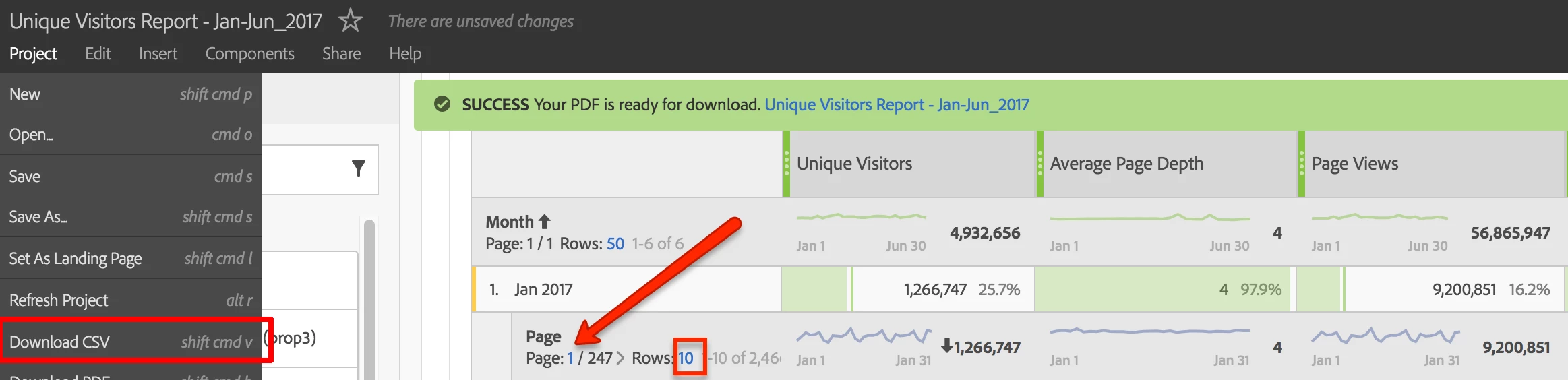
Is it possible to download all the Data (CSV/PDF) format in Workspace? I am only seeing the first 10 rows on the first page of each report. Please see screenshot below.
Thank you!
ParitMittalJantzen.Belliston

This post is no longer active and is closed to new replies. Need help? Start a new post to ask your question.
Best answer by RameshAnalytics

Hi,

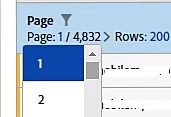
In workspace, Max of 200 rows can be downloaded as (CSV/PDF) in the workspace. You can change filter options from Page 1 to 2, 3, 4 etc. and

each page have max 200 rows can be download at a time.

Hope this helps

3 replies

RameshAnalyticsAccepted solution
Level 4
July 20, 2017

Hi,

In workspace, Max of 200 rows can be downloaded as (CSV/PDF) in the workspace. You can change filter options from Page 1 to 2, 3, 4 etc. and

each page have max 200 rows can be download at a time.

Hope this helps

NiraEpAuthor
Level 3
July 20, 2017

Thanks, this helps (a little bit ). I wish there was an option to download all the data at once. Is that possible using API or something?

Level 4
July 20, 2017

Through 'Data Warehouse' you can download unlimited data at once.

For more detailed comparisons here: Analytics Product Comparison and Requirements