Extract Report Limited to 500 rows only | Adobe Higher Education
Skip to main content
April 21, 2022
解決済み

Extract Report Limited to 500 rows only

  • April 21, 2022
  • 2 の返信
  • 1229 ビュー

Hello Team,

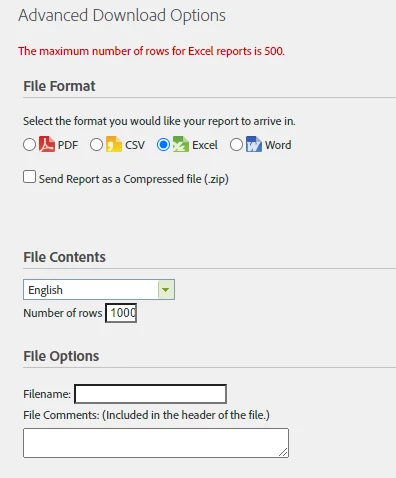
it seems there's a new updated to the reporting where you cant extract more than 500 rows which isn't useful as we extract report with not less than thousands rows.

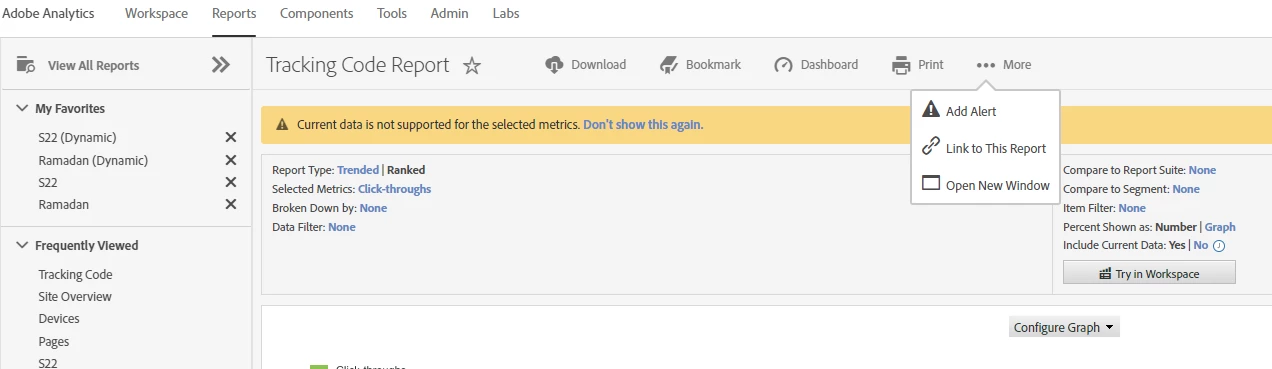
also the export feature that used to be under "more is no longer there" 


we're relying on the advanced download options to extract.. screenshots below. 


appreciate advising on the below.  


このトピックへの返信は締め切られました。
ベストアンサー Pablo_Childe

I didn't notice this interface change until you called it out.


theres a trick to it now...


Select PDF option see there you can change row count(its default 50). Once its desired count then click to file format option you need the new count will stay. then export email as needed.


GLTU

2 の返信

Pablo_Childe
Community Advisor
Community Advisor
April 21, 2022

I didn't notice this interface change until you called it out.


theres a trick to it now...


Select PDF option see there you can change row count(its default 50). Once its desired count then click to file format option you need the new count will stay. then export email as needed.


GLTU

Jennifer_Dungan
Community Advisor and Adobe Champion
April 21, 2022

Ha.. I love little tricks like this to get around stuff... nice find!

Adobe Employee
April 25, 2022

1. Go to Download tab & Click Advanced Download options.

2. Select CSV format and add row limit you want. I tested it for downloading 10K records and it seems to be working fine for me.


Dane-J
April 28, 2022

This is correct!