
Export Workspace Projects to PowerPoint using Adobe Analytics Labs | Community
Skip to main content
jenmarti
Adobe Employee
Adobe Employee
May 24, 2023

Export Workspace Projects to PowerPoint using Adobe Analytics Labs

  • May 24, 2023
  • 6 replies
  • 2397 views

While Analysis Workspace is excellent for sharing data stories across Adobe Analytics users, users often need help if there is a need to share the report with outside individuals. Using the Workspace Project PowerPoint Exporter, you can go beyond exporting a project as a .pdf or .csv. You can automatically export visualizations and tables into a PowerPoint deck using the tool. As screenshots of the report and .pdf/.csv versions are a common way to share insights with a broader team, there are limitations around editing and clarifying key data points. This limitation may be a significant challenge if you want to emphasize or update critical findings from the analysis. However, using the PowerPoint Exporter tool, Freeform tables, including those with breakdowns, are transformed into native PowerPoint tables, making them easily editable and customizable.

How to Use:

  1. Open the existing project or create a new one in the PowerPoint Exporter.
  2. Ensure the project is fully loaded and navigate to Project > Download PowerPoint. 
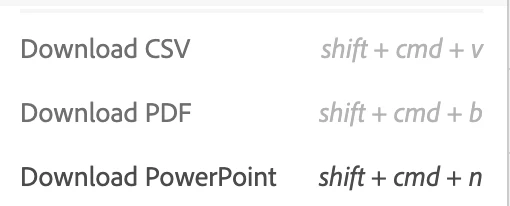
     3. Save the presentation to a location of your choice. 

Upon opening the PowerPoint deck, you will see that it contains all your project's panels, data tables, and visualizations. However, please note that specific visualizations, such as Flow, Fallout, and Combo, as well as specific chart settings, such as dual-axis, are not supported in PowerPoint Exporter. 


This post is no longer active and is closed to new replies. Need help? Start a new post to ask your question.

6 replies

Sergei_Kalinichenko
Level 2
June 2, 2023

Hi @jenmarti 

Exactly bumped into the issue with no opportunity to open existing project. One of team mates asked to provide him access to download PowerPoint docs, but unfortunately neither he nor me, we couldn't find how to open existing projects. Just rolling circle and no option in file menu available.


Krishna_Musku
Community Advisor
Community Advisor
June 2, 2023

Yes, these labs are nice to give a try on some new features. But this feature is limited to only few visualizations.

Josh Stephens
Community Advisor
Community Advisor
June 3, 2023

Thanks for highlighting this lab.  As you call out, I love how it allows you to easily edit particular portions of the graphs to help tell the correct data story.

Vinay_Chauhan
Community Advisor and Adobe Champion
January 13, 2024

Thanks for sharing this.
But somehow this option is not available in for me.

Are there any steps to enable it?

Josh Stephens
Community Advisor
Community Advisor
January 16, 2024

I have access to labs with a couple of clients, and I don't see any Analytics labs as an option currently.  It's possible Adobe has removed this lab feature.

(With Labs, they're in development so can disappear or have unexpected results.)

Do you have access to Labs?  If not, your Admin can enable it for you.

Krishna_Musku
Community Advisor
Community Advisor
February 29, 2024

@vinay_chauhan These labs are prototypes, Adobe will remove after sometime or when the POC is done. Right now, there are no prototypes available in Labs.

This is how it looks if you have access to labs.